TikTok Shop Shopify Integration: 3 Ways to Connect, Fees and Setup

What connects and what doesn't. The three ways to connect TikTok Shop and Shopify, eligibility and fees, setup steps, how TikTok ads fit in, and the problems we actually ran into.
When you connect TikTok Shop to Shopify, the official TikTok app is the obvious first choice. But there are other ways, and which one you pick decides how much you can change product details for TikTok Shop and whether orders stay in Shopify.
We’ve used the official TikTok app and a third-party sync app on client stores, and we’ve seen setups where TikTok Shop connects directly to a warehouse management system. Below, we walk through the three routes and separate what the help documentation says from what we learned using them.
The short version: what connects and what doesn’t
TikTok Shop and Shopify connect for products, inventory and orders, but not for refunds or on-site tracking. Here’s how it works with the official TikTok app:
| Connects | Doesn’t connect, or happens elsewhere | |
|---|---|---|
| Products | Products you choose in Shopify sync to TikTok Shop | Keeping different titles or descriptions on TikTok Shop only (our experience) |
| Inventory | Orders are created after checking Shopify inventory | Orders aren’t created when Shopify has no inventory |
| Orders | Created in your Shopify admin and fulfilled from Shopify | Refunds, returns and cancellations happen in TikTok Seller Center |
| Ads | TikTok pixel setup and catalog creation | Some ads (such as Conversion Ads) have to be created in TikTok Ads Manager |
| Tracking | TikTok Shop orders stay in Shopify order data | TikTok Shop purchases don’t show up in your site’s GA4 or Meta pixel |
A third-party sync app changes the “Products” row: you choose which fields sync. A direct WMS connection changes the “Orders” row: orders no longer reach Shopify.
Three ways to connect TikTok Shop and Shopify
There are three ways to connect, and which you pick decides where TikTok Shop orders end up.
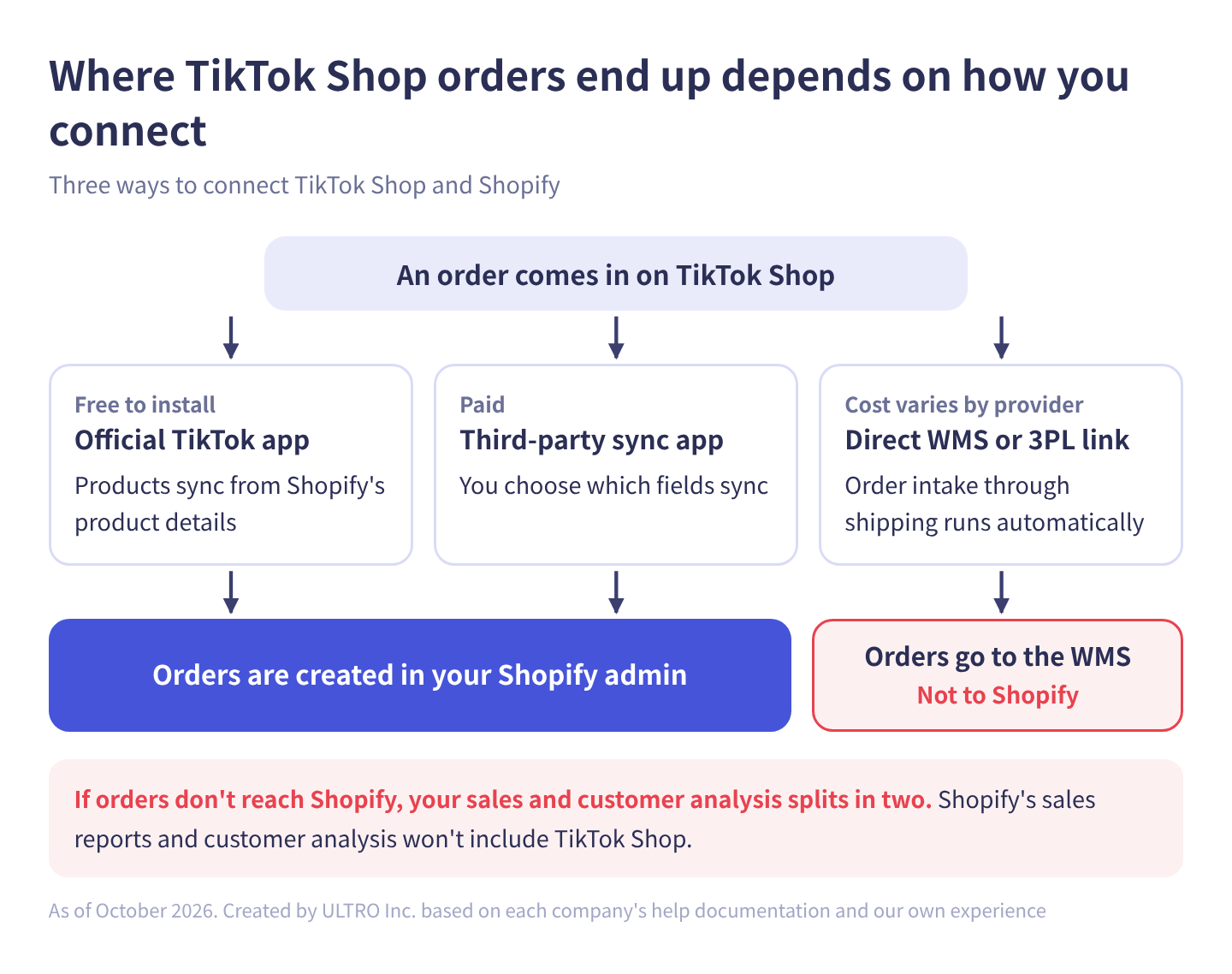
Side by side:
| Official TikTok app | Third-party sync app | Direct WMS or 3PL connection | |
|---|---|---|---|
| Provided by | TikTok | Independent app developers | Your WMS or 3PL provider |
| Cost | Free to install | Monthly fee (examples below) | Depends on your contract |
| Product details | Shopify → TikTok Shop | Choose per field whether to sync (varies by app) | Depends on the provider |
| Inventory sync | Yes | Yes | Yes |
| Where orders go | Shopify | Shopify | The WMS (not Shopify) |
| TikTok pixel and catalog | Set up inside the app | Usually not included; set up ads separately | Not included |
| Best for | Trying TikTok Shop first | Tailoring product details for TikTok Shop | Prioritizing shipping automation, with sales analysis handled separately |
Whichever route you choose, TikTok Shop’s referral fee applies. And because TikTok Shop purchases finish inside the TikTok app, they don’t show up in your Shopify store’s GA4 or other on-site tags. More on that below.
The official TikTok app
The official TikTok app is free to install and handles products, inventory, orders and ad setup in one place. TikTok provides the TikTok sales channel on the Shopify App Store. Installing it adds TikTok to your sales channels, and you connect your TikTok Shop account from there.
What it does
Per Shopify’s help center and the app listing:
- Syncs Shopify products to TikTok Shop. You choose which products are available to the channel
- When an order comes in on TikTok Shop, checks inventory and creates the order in your Shopify admin. No inventory, no order
- Shows the TikTok order ID, payment amount, estimated tax and customer details on the order details page
- Lets you fulfill orders from the Orders page in Shopify
- Shows product status on the Overview page, including disapproved products and the reason for each
- Sets up the TikTok pixel and a product catalog for TikTok ads
The app is free to install. If you run TikTok ads, ad spend is billed directly by your TikTok ad account, not by Shopify. Payouts for TikTok Shop orders also come from TikTok, to the bank account you connect in Seller Center, after a settlement period.
What gave us trouble
From here on, this is our experience using the official app.
Edits we made for TikTok Shop were sometimes overwritten with Shopify’s details. You often want different titles or descriptions on TikTok Shop than on your own site, or extra attributes that fit TikTok Shop’s categories. With the official app, details we added or changed on the TikTok Shop side were sometimes overwritten by Shopify’s product details.
There was no option to turn the sync off. We couldn’t find a setting to stop syncing per product or per field, so we couldn’t keep different content on TikTok Shop only. As of October 2026, Shopify’s help center doesn’t say how edits made on TikTok Shop are handled or how to stop syncing individual fields either. What it covers is choosing which products are available to the channel. The app may have changed since, so check the settings if you’re using it now.
If you’re happy to show the same product details on TikTok Shop as on your site, none of this matters. It becomes a problem when you want to tailor product details for TikTok Shop.
Third-party sync apps
A third-party sync app is the paid option for when you want to tailor product details for TikTok Shop, because you can choose which fields sync. We used one built for Japanese merchants; in the US, the Shopify App Store has several, for example:
| App | Pricing (October 2026) | What the listing says about sync |
|---|---|---|
| Ownbase: Sync to TikTok Shop | $15/month (up to 500 products) or $30/month (up to 5,000), 30-day free trial | Choose which attributes sync: images, description, status, variations, inventory, prices. TikTok Shop orders create Shopify orders |
| CedCommerce TikTok Shop | Free plan, then $19, $49 and $89/month by order volume | Product, inventory, order, tracking and refund/cancellation sync. The listing doesn’t describe per-field toggles |
These are examples from the listings, not recommendations; we haven’t used either. Check the current listing and run a test product before relying on any of them.
What to check before you choose one
The app we used let us turn sync on or off separately for product details (title, images, description, variants), price, inventory and publishing status. Turning off product detail sync stopped TikTok Shop content from being overwritten, but with conditions, and similar apps are likely to have their own. Ask about these before you commit:
- What happens to new products. In the app we used, newly added products were still listed on TikTok Shop even with sync off; after that, only inventory synced. Products created as drafts in Shopify didn’t sync until set to active.
- Changing SKUs while sync is off. Adding or removing SKUs while sync was off broke the inventory and order connection. The fix was to turn sync on, make the change, confirm success in the sync log, then turn it off again.
- Accidental overwrites. If sync was on when an order came in, the product whose inventory changed was synced too, which could overwrite TikTok Shop content.
- Which orders get imported. One setting imported all orders, including for products created manually on TikTok Shop (without inventory sync). The other imported only orders for linked products.
- Deleting variants. The app’s help center listed a known bug where deleting a variant in Shopify didn’t remove it from TikTok Shop. When you reduce variants, delete them on TikTok Shop by hand too.
What we learned using one
It costs money, but support was responsive and we got quick answers when we were stuck on settings. Choosing which fields sync solved the overwrite problem we had with the official app. If TikTok Shop is going to be one of your main sales channels, we think a sync app is worth paying for.
Connecting a WMS or 3PL directly to TikTok Shop
Connecting your warehouse system directly to TikTok Shop automates everything through shipping, but orders don’t reach Shopify. Many warehouse management systems and fulfillment providers now offer direct TikTok Shop connections that import orders, sync inventory, send shipping instructions and print labels.
We’ve seen this setup (with a Japanese WMS) rather than configured it in detail, so here’s what we observed:
The TikTok Shop connection didn’t cost extra in that setup. Pricing varies by provider, so check yours.
Orders never reach Shopify. Orders go from TikTok Shop straight into the WMS, so your Shopify admin has no TikTok Shop orders. That’s fine for shipping, but it affects analysis:
- TikTok Shop sales are missing from Shopify’s sales reports
- TikTok Shop buyers don’t become Shopify customers, so they’re left out of repeat rates and RFM analysis
- To see combined sales for your site and TikTok Shop, you have to pull Seller Center numbers separately and add them up
If your WMS is also connected to Shopify, inventory flows from the WMS to both, so overselling is less of a risk. If you prioritize shipping automation and are willing to track TikTok Shop sales separately in Seller Center, it’s a reasonable choice.
Requirements to sell on TikTok Shop from Shopify
To sell on TikTok Shop from Shopify, you need to meet Shopify’s requirements and pass TikTok Shop’s review. Shopify’s help center lists four requirements:
- Your store is located in an eligible country: the United States, the United Kingdom, Spain, Ireland, France, Italy, Germany, Mexico, Japan or Brazil
- Your Locations settings have a verifiable address
- You have an online store and a TikTok for Business account (you can create one during setup)
- Your online store displays a return policy page
Products also need to comply with TikTok Shop’s prohibited products policy for the region you sell in.
While creating your TikTok Shop account, you’ll upload business documents; follow the prompts on the sign-up screen for which ones. TikTok’s help center says you must reside in the country you choose for your shop.
TikTok Shop seller fees in the US
As of October 2026, TikTok’s US Seller University page says the referral fee is 6% for qualified orders, effective April 1, 2024, with rates of 5% to 6% depending on category (jewelry and pre-owned items are among those at 5%). Several seller guides report that the standard rate rose to 8% for most non-food categories from August 4, 2026, but TikTok’s public category table still showed mostly 6% when we checked. Check the rate on your Seller Center settlement statements before you set prices.
How the fee works, per the Seller University page:
| Item | Rule |
|---|---|
| Fee base | Customer payment + platform-funded discounts − tax |
| Payment processing | Covered: the referral fee “encompasses all TikTok Shop fees, with the exception of shipping and tax fees” |
| Refunds, returns, cancellations | The referral fee is returned, minus a refund administration fee of 20% of the referral fee |
| Refund administration fee cap | $5 per SKU per refund (since May 15, 2025) |
| No refund administration fee | “Buy now refund later” creator sample refunds and eligible pre-shipment auto-cancellations |
For example, refunding a $10 SKU at 6% costs $0.12 ($10 × 6% × 20%). For a $500 SKU, the fee would be $6, capped at $5.
The referral fee isn’t everything. Creator affiliate commissions, shipping and fulfillment, and ad spend come on top. TikTok also runs promotional rates for new sellers; check what applies to your account in Seller Center.
Setup at a glance
With the official app, you add the TikTok sales channel in your Shopify admin, connect a TikTok Shop account and get through review. Here are the steps from Shopify’s help center, grouped:
- Prepare. Get your location address, warehouse address and phone number, and return policy page in place first.
- Add the channel. In Settings > Sales channels, click Shopify App Store, search for “TikTok,” and click Add channel.
- Connect TikTok Shop. On the Set up TikTok Shop page, click Connect in the TikTok Shop section. Click Log in if you have a TikTok for Business account, or enter your phone number, email and password and click Register as merchant.
- Submit shop information and documents. In the Connect to Shopify? dialog, review the TikTok Shop Merchant Terms of Service and click Connect. In the Shop information section, click Verify, complete the Upload Documents dialog, click Next, then click Finish setup.
- Choose products. Make the products you want to sell on TikTok Shop available to the channel.
- Check review results. On the channel’s Overview page, Product status shows any errors. Click the number next to Disapproved to see each product’s disapproval reasons and fix them.
If you’ll also run ads, connect your TikTok for Business account, Business Center and ad account in the same app, and set up the pixel. The next section covers this.
How TikTok ads fit in
TikTok ads are tracked differently depending on whether they send people to your site or sell on TikTok Shop. Which you focus on decides what you set up.
Ads that send people to your site are tracked with the TikTok pixel. According to TikTok’s help center, when you connect your ad account in the TikTok app on Shopify, you choose a data sharing level (Standard, Enhanced or Maximum) and either click Create Pixel or select an existing pixel. Once you connect Business Center, TikTok builds a marketing catalog based on the primary market in your Shopify store settings. You can check each product’s approval under Product Status in the app’s Settings > Product Catalog. Some ads, such as Conversion Ads, can’t be created in the app; you create them in TikTok Ads Manager.
Ads that sell on TikTok Shop are GMV Max campaigns. GMV Max is an automated campaign type in TikTok Ads Manager that optimizes for overall ROI across your TikTok Shop. Product GMV Max automatically picks the products, creatives and placements most likely to drive purchases; LIVE GMV Max drives traffic to a LIVE room to maximize gross revenue for a LIVE event. You set an ROI target, and the campaign adjusts spend to stay within it. Results are reported inside TikTok, so look at them separately from your site pixel.
Our view: if you sell on both your site and TikTok Shop, decide up front which results you’ll use to judge your ads. If you only look at your site pixel, TikTok Shop sales won’t count toward your ads, and they may look like they aren’t working.
TikTok Shop sales never show up in site tracking
However you connect, TikTok Shop purchases aren’t recorded as purchases in your site’s GA4 or Meta pixel. Payment happens inside the TikTok app, and the buyer never goes through your Shopify store.
Even when the official app or a sync app creates the order in Shopify, that only affects your Shopify admin. GA4 purchase events are sent when checkout completes on your site, so TikTok Shop orders aren’t included. When you compare Shopify orders with GA4 purchases, exclude TikTok Shop orders first. For the other reasons GA4 misses purchases, see GA4 Not Tracking All Shopify Purchases?
If you want TikTok Shop orders in GA4 too, they have to be sent from a server. We built a Shopify app, GapFill, that recovers missing GA4 purchase events server-side. It’s our own product, so keep that in mind. It works alongside your existing tags, the missing purchases report is free, and orders placed inside social apps can be sent with a source and medium based on the sales channel.
Our Shopify appGapFill: Recover missing GA4 purchase events server-sideWorks alongside your existing tags. Free missing purchases report.See GapFill →Common problems
The usual problems are products that won’t sync, orders that aren’t created, and actions that have to be done somewhere else. Here’s what the help documentation says, and what we ran into.
From the help documentation:
- Products won’t sync. Shopify shows “Your products couldn’t be synced to TikTok due to a location address issue.” Check that your location name is 35 characters or fewer, that the location address matches Google Maps, and that the warehouse address and phone number are valid. If products stay disapproved after fixes, Shopify says to contact TikTok Shop support.
- Orders aren’t created in Shopify. With the official app, orders aren’t created when Shopify has no inventory. Keep Shopify inventory in line with what you actually have.
- You can’t refund or cancel in Shopify. With the official app, these happen in TikTok Seller Center. If you planned to manage all orders in Shopify, this is where the process splits.
- Orders went missing when switching apps. The migration guide for the sync app we used recommended putting the shop into vacation mode in Seller Center first. It warned that orders still pending when you remove the old app won’t reach Shopify, that removing the old app stops tracking number sync, and that orders placed between removing the old app and finishing product linking in the new one aren’t sent to Shopify or allocated against inventory. Avoid switching during busy periods.
From our experience:
- Product edits made on TikTok Shop revert. With the official app, Shopify’s product details overwrote them. Either change the product details in Shopify or protect TikTok Shop content with a sync app.
- Shopify has the orders, but GA4 revenue doesn’t match. That’s because TikTok Shop orders are in Shopify. As the previous section explains, GA4 doesn’t include TikTok Shop purchases.
- Choosing based on inventory sync alone. Every route syncs inventory, but whether orders land in Shopify changes your sales and customer analysis.
Which should you choose?
It comes down to two questions: do you want different product details on TikTok Shop, and do you want to see sales in Shopify?
1. Do you want different product details on TikTok Shop? If the same titles and descriptions as your site are fine, the official app is enough. If you want different titles or descriptions, or extra attributes for TikTok Shop’s categories, look at a sync app that lets you choose which fields sync.
2. Do you want sales and customers in one place in Shopify? If so, choose the official app or a sync app, both of which create orders in Shopify. A direct WMS connection makes shipping easier, but you’ll have to combine the numbers yourself.
You can also start with the official app to test listings, then move to a sync app once TikTok Shop sales grow and you want to tailor product details. If you do, check the switching notes in the previous section first.
After you connect, videos and LIVE drive sales
Connecting sets up the storefront; what moves TikTok Shop sales is the videos your products appear in and LIVE selling. This part is our view, not an official spec.
When we start TikTok Shop with a client, we decide together how to grow not just videos on the brand’s own account, but also customer posts (UGC) and creator affiliate content. In our experience, what turns LIVE viewers into buyers is answering comments and questions to clear up doubts, giving people a reason to buy now with limited-quantity or limited-time offers, and featuring products the host genuinely likes.
Sources
- TikTok (Shopify Help Center)
- Setting up TikTok Shop (Shopify Help Center)
- Manage product availability (Shopify Help Center)
- Managing TikTok Shop orders (Shopify Help Center)
- Getting paid for TikTok Shop orders (Shopify Help Center)
- TikTok (Shopify App Store)
- Shopify set up guide (TikTok Business Help Center)
- Requirements to register as a seller on TikTok Shop (TikTok Business Help Center)
- About GMV Max campaigns in TikTok Ads Manager (TikTok Business Help Center)
- Referral fee and refund administration fee (TikTok Shop Seller University, US)
- TikTok Shop referral fee rises to 8% (beBOLD Digital)
- Ownbase: Sync to TikTok Shop (Shopify App Store)
- CedCommerce TikTok Shop (Shopify App Store)
- Help pages and app listings checked in October 2026
FAQ
How do I connect TikTok Shop to Shopify?
The standard route is to install the official TikTok sales channel from the Shopify App Store and connect TikTok Shop. You can also use a third-party sync app, or connect TikTok Shop directly to your warehouse management system (WMS) or 3PL. Which you choose determines how freely you can edit product details for TikTok Shop and whether orders end up in Shopify.
Which countries can use TikTok Shop with Shopify?
Shopify's help center lists stores located in the United States, the United Kingdom, Spain, Ireland, France, Italy, Germany, Mexico, Japan and Brazil. You also need a verifiable address in your Locations settings, an online store, a TikTok for Business account, and a return policy page on your online store.
Is the official TikTok app free?
It's free to install. When you sell on TikTok Shop, TikTok charges its referral fee. If you run TikTok ads, ad spend is billed directly by your TikTok ad account, not by Shopify.
Why do my TikTok Shop product edits keep reverting to the Shopify version?
The official TikTok app syncs Shopify's product details to TikTok Shop. When we used it, changes we'd made on TikTok Shop were sometimes overwritten with Shopify's details, and we couldn't find a setting to stop the sync. If you want different titles or descriptions on TikTok Shop, consider a third-party sync app that lets you choose which fields sync.
Do TikTok Shop orders show up in Shopify?
With the official TikTok app and most third-party sync apps, TikTok Shop orders are created in your Shopify admin. With the official app, an order isn't created if Shopify has no inventory for it. If you connect TikTok Shop directly to a WMS or 3PL, orders go there and not to Shopify.
Can I refund or cancel TikTok Shop orders in Shopify?
Not with the official TikTok app. Shopify's help center says refunds, returns and cancellations must be completed in TikTok Seller Center. Fulfillment is handled from the Orders page in Shopify.
How much does TikTok Shop charge sellers in the US?
TikTok's US Seller University page lists a 6% referral fee on qualified orders since April 1, 2024, with 5% for some categories. Several seller guides report an increase to 8% for most non-food categories from August 2026, which TikTok's public category table didn't yet reflect when we checked. The fee is calculated on customer payment plus platform discounts, minus tax. Check your actual rate in Seller Center.
Do TikTok Shop sales show up in GA4?
No. TikTok Shop purchases are paid for inside the TikTok app and never go through your Shopify store's checkout. Even when the order appears in your Shopify admin, it isn't included in GA4 purchase events. Look at TikTok Shop sales in Seller Center or in Shopify order data.
- There are three ways to connect: the official TikTok app, a third-party sync app, or a direct WMS or 3PL connection.
- The official app is free to install. Besides products, inventory and orders, it sets up the TikTok pixel and catalog. Product details sync from Shopify.
- When we used the official app, edits made for TikTok Shop were overwritten with Shopify's details, and there was no setting to stop the sync.
- Third-party sync apps are paid and let you turn sync on or off per field, such as description, price and inventory. Orders still go to Shopify.
- A direct WMS or 3PL connection automates shipping, but orders don't reach Shopify, so sales and customer analysis splits in two.
- Refunds and cancellations happen in Seller Center whichever route you choose. TikTok Shop purchases don't appear in GA4.
- US referral fee: 6% on qualified orders per TikTok's Seller University (5% for some categories), with reports of 8% from August 2026. Refunded orders get the referral fee back, minus a refund administration fee.
Written byRyushi Nagata
CEO, ULTRO Inc. (Tokyo)Shopify Partner. Ryushi handles Shopify store builds, maintenance, advertising and CRM end to end, and has managed more than ¥4 billion in ad spend over his career. He holds Google Ads certifications (Search, Display, Video, Shopping, Apps, Performance Max, Measurement) and the Google Analytics certification.
How many purchases is GA4 missing in your store?
GapFill matches your Shopify orders against GA4 purchases, shows what GA4 missed, and recovers those purchase events server-side. It works alongside your existing tags, and the missing purchases report is free.