Cookie Consent for Online Stores: When You Need a Banner

Opt-in consent in the EU and UK, opt-out rules like the CCPA in the US, how a consent banner changes your GA4 numbers, basic vs advanced consent mode, and the settings on Shopify.
The “We use cookies” banner is everywhere, so it’s easy to assume every store needs one. Search for an answer and you’ll find cookie consent vendors saying yes, and other articles saying US stores can skip it.
What gets talked about less is the cost. A consent banner removes data from your analytics and ad platforms. Add one “just to be safe” when no law requires it, and your GA4 sessions can drop noticeably overnight.
Below: how to decide whether your store needs a banner, what the EU, UK and US rules actually ask for, how a banner changes your tracking, and how to set up consent mode and Shopify’s privacy settings. Laws and product details are as of October 2026. We’re not lawyers, so check your own obligations with legal counsel.
The short answer: it depends on where your customers are
Start with the decision.
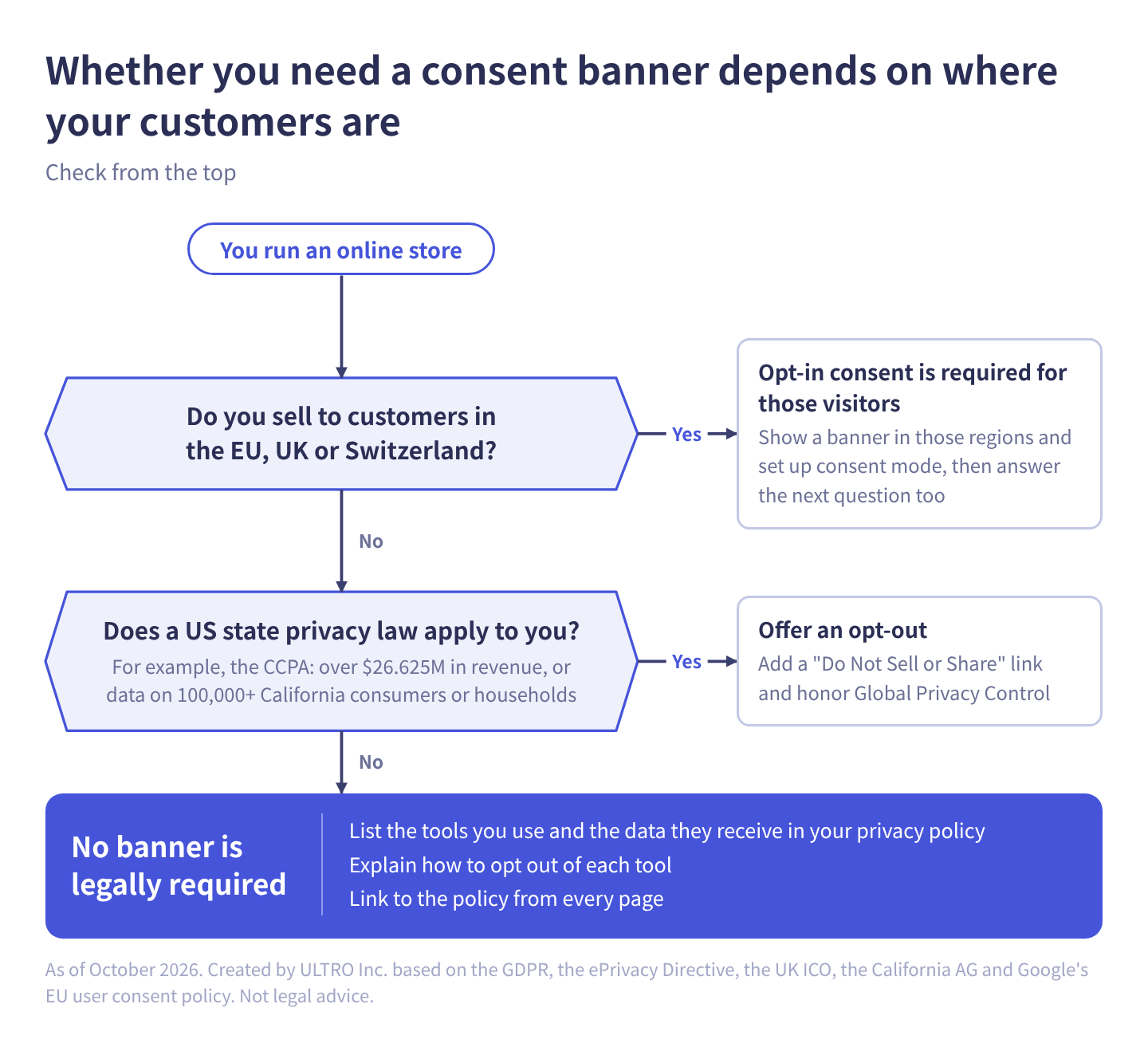
As a table:
| Where your customers are | Consent banner | What to do |
|---|---|---|
| EU, UK or Switzerland | Required for those visitors (opt-in) | Show a banner in those regions and set up consent mode |
| US, and a state privacy law applies to you | Not a pre-consent banner, but an opt-out | Add a “Do Not Sell or Share” link, honor Global Privacy Control, and disclose your tracking in your privacy policy |
| US, and no state privacy law applies | Not legally required | List the tools you use and the data they receive in your privacy policy |
The rule follows the visitor, not your company. A US store with real sales to Germany or the UK is in the first row for those visitors.
EU, UK and Switzerland: opt-in consent before cookies
What the law asks for
In the EU, the ePrivacy Directive requires consent before storing or reading information on a visitor’s device, with an exception for what’s strictly necessary to provide the service the visitor asked for. The GDPR defines what valid consent is: freely given, specific, informed and unambiguous. A cart cookie is strictly necessary. Analytics and advertising cookies are not.
The UK has the same structure under PECR. The ICO’s guidance says consent must be actively and clearly given (carrying on browsing doesn’t count) and that you can’t set non-essential cookies on your homepage before the visitor consents. Shopping basket cookies are one of its examples of strictly necessary cookies.
The UK did add new exceptions in 2026 through the Data (Use and Access) Act, including one for analytics used only to improve your own service, producing aggregate statistics, where any provider uses the data only to help you, not for its own purposes. You still have to tell visitors and give them a simple way to object. Anything used for advertising or profiling still needs consent, so ad pixels don’t qualify. Whether a given analytics setup qualifies is a question for your lawyer.
What Google asks for
Google’s EU user consent policy covers users in the EEA, the UK and Switzerland. If you use Google’s ad and measurement products, you must get consent for cookies where legally required and for the use of personal data for ad personalization, keep records of consent, and tell users how to withdraw it. Since March 2024, Google has required consent signals for EEA users to keep using measurement, ad personalization and remarketing features.
So if you sell into these regions, you need three things:
- A consent banner for visitors in those regions
- Consent mode, sending the four consent types to Google
- A default state of “denied” in those regions only
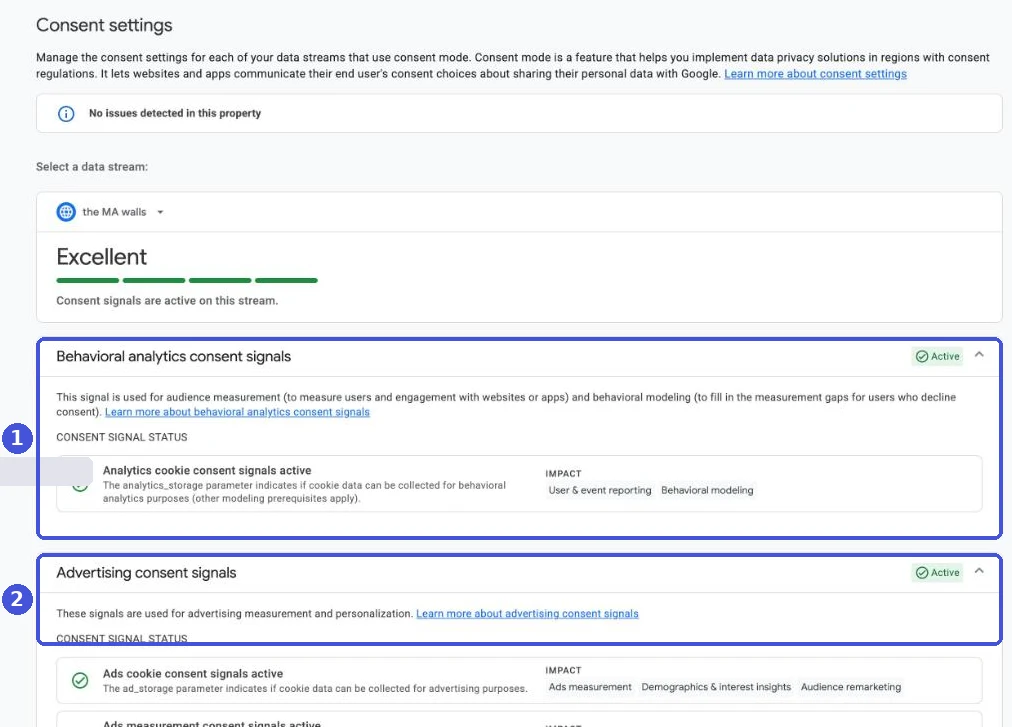
You can check whether consent signals are arriving in GA4 under Admin > Data collection and modification > Consent settings. It shows the status of “Behavioral analytics consent signals” and “Advertising consent signals” for each data stream.
United States: opt-out, not opt-in
There’s no federal law in the US that requires a cookie consent banner. Instead, about 20 states have comprehensive privacy laws, starting with California. Shopify’s help center lists Virginia, Colorado, Oregon, Connecticut, Texas and Utah among them. Most follow an opt-out model: you can collect data by default, but you must tell people and let them say no to certain uses.
The CCPA
According to the California Attorney General, the CCPA applies to for-profit businesses that do business in California and meet at least one of these:
- Annual gross revenue above $25 million, adjusted for inflation to $26.625 million from January 1, 2025
- Buying, selling or sharing the personal information of 100,000 or more California residents or households
- Deriving 50% or more of annual revenue from selling California residents’ personal information
For an online store, the important word is “sharing,” which the CCPA defines as sharing for cross-context behavioral advertising: targeting ads based on a person’s activity across sites. Ad pixels that feed retargeting are the usual reason a store sells or shares data without ever handing over a customer list. In California’s first CCPA settlement, in 2022, Sephora paid $1.2 million over third-party tracking on its site that counted as a sale and for not honoring Global Privacy Control.
If you’re covered and you sell or share personal information:
- Add a “Do Not Sell or Share My Personal Information” link (or the alternative “Your Privacy Choices” link). It has to be clear and conspicuous, and visitors can’t be required to create an account to use it.
- Honor Global Privacy Control (GPC). GPC is a browser setting that sends an opt-out signal. California treats it as a valid request to stop selling or sharing.
- Disclose it in your privacy policy, including the link.
None of this requires blocking cookies before a visitor acts. That’s the main difference from the EU.
If no state law applies
Many small stores don’t meet any state’s thresholds. Even then, the work below is worth doing, and a banner you’re not required to show is an analytics decision more than a legal one.
What every store should do
Do these wherever you sell:
- List the tools you use in your privacy policy: GA4, ad pixels, heatmaps, and anything else that sends data to a third party, with what they receive and why
- Explain how to opt out: link to each tool’s opt-out page
- Link to the policy from every page: the footer is the usual place
- Update the list when you add tags or apps: some Shopify apps start sending data as soon as they’re installed
- Test that opting out actually works: decline on your banner, reload the page, and check in your browser’s developer tools that ad and analytics requests stop
If you later expand into the EU or cross a state threshold, you’re starting from a policy that’s already accurate.
How a consent banner changes your numbers
What consent mode is
Consent mode is how your site tells Google tags (GA4 and Google Ads) what a visitor chose on your banner. It doesn’t show a banner. It switches tag behavior based on the banner’s result.
It uses four consent types:
| Consent type | What it covers |
|---|---|
analytics_storage | Storing cookies or similar data for analytics |
ad_storage | Storing cookies or similar data for advertising |
ad_user_data | Sending user data to Google for advertising |
ad_personalization | Personalized advertising, such as remarketing |
The last two were added in consent mode v2. Older guides only show the first two.
Basic and advanced consent mode lose data differently
There are two ways to implement consent mode.
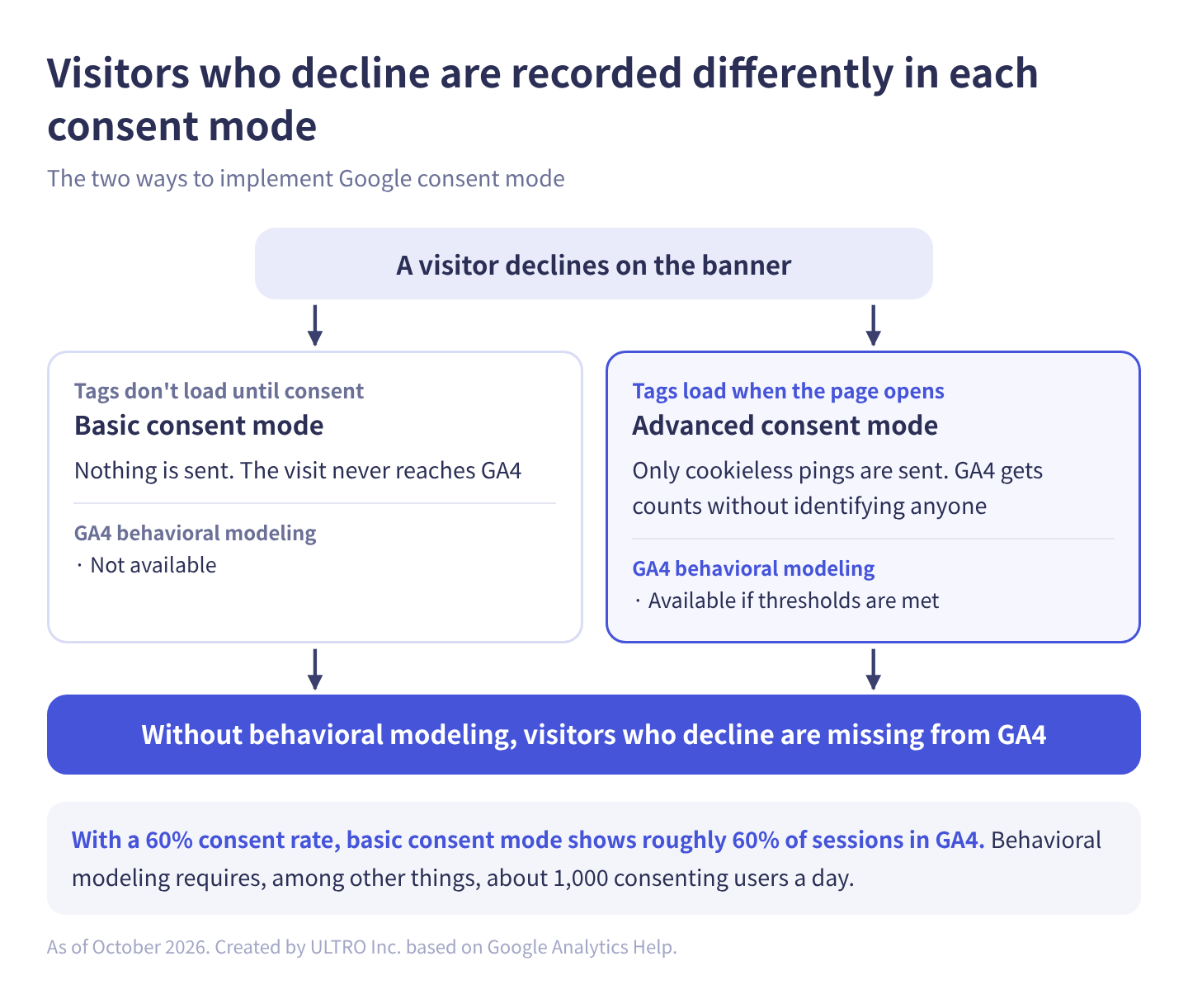
As a table:
| Basic consent mode | Advanced consent mode | |
|---|---|---|
| Tag loading | Blocked until consent is granted | Loaded before the consent dialog appears |
| Sent while consent is denied | Nothing | Cookieless pings only |
| Visits from people who decline | Never reach GA4 | Counted without identifying anyone |
| GA4 behavioral modeling | Not available | Available if thresholds are met |
With basic consent mode, someone who declines is treated as if they never came. At a 60% consent rate, GA4 shows roughly 60% of your sessions from that region. Google Ads still does some general conversion modeling even with basic consent mode.
With advanced consent mode, minimal cookieless signals are sent for people who decline, and GA4 uses the behavior of people who consented to estimate the behavior of those who didn’t. That’s behavioral modeling.
Behavioral modeling needs traffic
Behavioral modeling isn’t available to every site. Google’s help center lists these prerequisites:
- Advanced consent mode, so Google tags load whether or not consent is granted
- At least 1,000 events per day with
analytics_storagedenied, for at least 7 days - At least 1,000 daily users with analytics consent granted, on at least 7 of the last 28 days
Meeting them doesn’t guarantee eligibility. A thousand consenting users and a thousand denied events a day is out of reach for a store that gets a few thousand visits a day from the regions where it shows a banner. If EU and UK sales are a small share of your business, expect modeling not to kick in even with advanced consent mode, and those visitors to simply be missing.
Even when you qualify, modeled data only appears in reports if your reporting identity is set to Blended. Audience lists, user explorer, cohort explorations, retention reports, predictive metrics and BigQuery export don’t use modeled data.
Purchases from people who declined are supposed to be missing; that’s consent working as designed, not a bug to fix. But some purchases from people who consented also never reach GA4, for example because the thank you page never loaded after payment. GA4 Not Tracking All Shopify Purchases? shows how to check for those missed purchases. We built GapFill, a Shopify app that recovers missing GA4 purchase events server-side, for exactly this case. It’s our own product, so read with that in mind. It only sends orders from buyers who consented to analytics, works alongside your existing tags, and the missing purchases report is free.
Our Shopify appGapFill: Recover missing GA4 purchase events server-sideWorks alongside your existing tags. Free missing purchases report.See GapFill →Don’t default everyone to “denied”
Consent mode has a default state, used before the visitor touches the banner. If you set it to denied for all visitors worldwide, you lose data from every region where you don’t show a banner, and from everyone who ignores it.
Google recommends applying a default state to particular regions instead of all visitors. Consent mode lets you set defaults by region.
A common accident: a store starts selling to the EU, installs a consent management platform, and leaves its default at “denied everywhere.” After any consent change, check whether sessions from your home market dropped suddenly.
Cookie consent on Shopify
The cookie banner
Shopify has a built-in cookie banner under Settings > Customer privacy > Cookie banner.
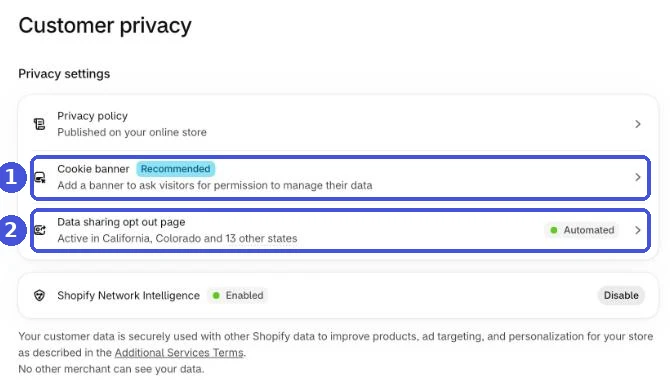
According to Shopify’s help center:
- With automated settings on (the default for new stores), Shopify configures the banner for visitors in the UK and EEA if you have active markets there
- In other regions, the banner is off by default, but you can turn it on
- You can edit the regions, content, appearance and position
- In regions where the banner is active, non-essential data is collected only after the visitor consents
Switzerland isn’t named in the automatic setup, so if you sell there, add it to the banner’s regions manually.
For a US-only store, that means nothing changes by default: no banner, and tracking works as before. Add UK or EEA markets and the banner appears only for those visitors.
The data sharing opt-out page
For US-style opt-outs, the same page has a Data sharing opt-out page. It creates a store page where visitors can opt out of the sale or sharing of their personal data and of processing that may count as targeted advertising. You set the regions and content, then choose where the link goes in your store menu. Shopify’s help center says that when a visitor’s browser sends the Global Privacy Control header, the opt-out is activated in the regions where you use the page. You need a published privacy policy first.
What the banner controls
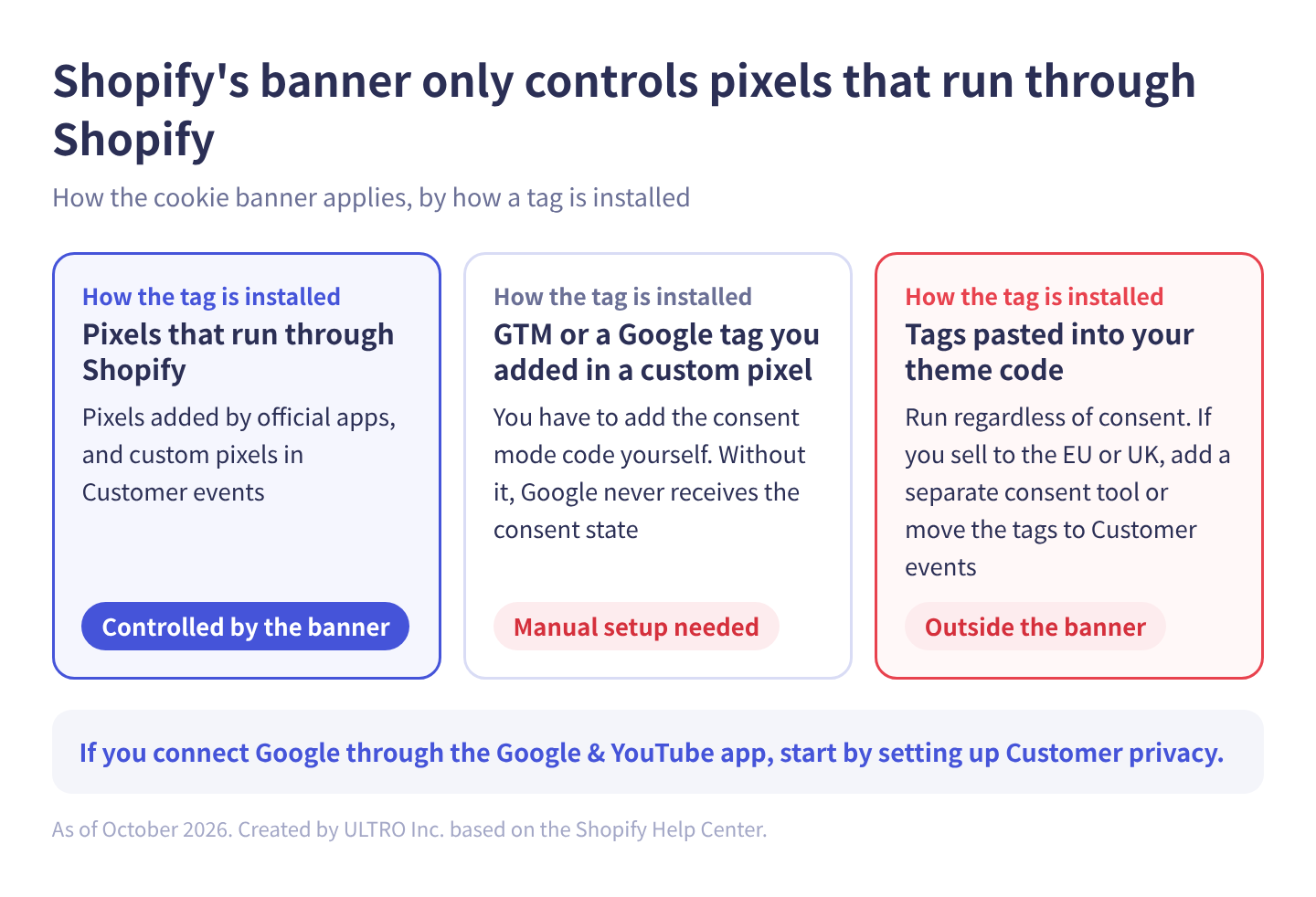
Shopify’s banner controls pixels that run through Shopify: pixels added by official apps and custom pixels in Customer events.
Two cases need attention:
- GTM or a Google tag inside a custom pixel. Shopify’s help center says you have to insert a code snippet yourself to activate consent mode v2 in a custom web pixel. Without it, Google never receives the consent state. Setup is covered in Shopify custom pixels.
- Tags pasted into your theme code. These run outside Shopify’s banner, regardless of consent. Shopify says that if you installed third-party cookies or pixels manually, you may need a third-party cookie banner or custom logic. If you sell to the EU or UK, add a separate consent tool or move the tags to Customer events.
If you connect Google Ads and GA4 through the Google & YouTube app, get your Customer privacy settings right first.
Consent management apps for more control
If the built-in banner isn’t enough, the Shopify App Store has several consent management apps. They vary, but they typically go further than the built-in banner in these ways:
| Feature | What it does |
|---|---|
| Banner design and text | More control over design, position, button layout and per-language text |
| Rules by country or state | Show a banner, default to granted or default to denied, per country or US state |
| Consent categories | Let visitors choose by category, such as analytics, marketing and functional |
| Consent records | Keep a record of who consented to what, and when |
| Consent mode integration | Send consent state to Google from the app’s settings |
They’re worth considering when you sell to many countries or several US states with different rules. The more regions you sell to, the more you need one place to manage what each one sees.
If you sell only in the US, or only in the US plus the UK and EEA, start with the built-in banner and opt-out page. Many apps are paid, so wait until you need something the built-in tools can’t do. When you pick one, choose an app that integrates with Shopify’s Customer privacy settings. Otherwise pixels that run through Shopify won’t receive the consent state.
If you manage tags in Google Tag Manager
On sites outside Shopify, or with GTM installed directly, you combine three things:
- A consent management platform (CMP). It shows the banner, records the visitor’s choice and passes it to consent mode. Google lists CMPs that support consent mode, and featured CMPs have templates in the Tag Manager Community Template Gallery.
- The “Consent Initialization - All Pages” trigger. It fires before other tags so the default consent state is set first.
- Consent settings on each tag. In a tag’s advanced settings, “Built-In Consent Checks” and “Additional Consent Checks” control which consent the tag needs to fire.
In GTM, turn on “Enable consent overview” under Admin > Container Settings > Additional Settings to see which tags have consent settings. On a container with many tags, start there to find gaps. For the basics of containers, tags and triggers, see Google Tag Manager.
Common cookie consent mistakes
Showing a banner to everyone because “it’s required” US state laws ask for an opt-out, not prior consent, and many small stores aren’t covered at all. Stores that show an opt-in banner to every visitor give up data they didn’t have to.
Thinking consent mode replaces the banner Consent mode passes the visitor’s choice to your tags. You still need the banner that asks.
Expecting consent mode to restore your numbers Modeling only fills the gap for sites that meet the traffic thresholds, and even then some features don’t use modeled data.
Tags firing before consent The banner shows, but the tags have no consent settings, so cookies are written before the visitor chooses. For stores selling to the EU or UK, this is the biggest problem. After adding a banner, check in your browser’s developer tools which cookies are set before you click anything.
Ignoring Global Privacy Control If a state law applies to you, a “Do Not Sell or Share” link alone isn’t enough. GPC signals have to be honored too.
Setting it up once and never checking again New tags and apps get added while the privacy policy stays the same. When you add a tool, update the policy.
How much of this you need depends on where you sell and how you advertise. For how cookies themselves are changing in browsers, see third-party cookies. For ways to keep ad conversion tracking working without relying on cookies, see enhanced conversions and Meta’s Conversions API, and for building on data your customers give you directly, first-party data.
Sources
- Directive 2002/58/EC (ePrivacy Directive) (EUR-Lex)
- Cookies and similar technologies (ICO)
- California Consumer Privacy Act (CCPA) (State of California Department of Justice)
- Updated Monetary Thresholds in CCPA (California Privacy Protection Agency)
- EU user consent policy (Google)
- Consent mode on websites and mobile apps (Google Analytics Help)
- About consent mode (Google Ads Help)
- How to provide consent for Customer Match (Google Ads Help)
- [GA4] Behavioral modeling for consent mode (Google Analytics Help)
- [GA4] Verify and update consent settings in Google Analytics (Google Analytics Help)
- Consent mode support in Tag Manager (Tag Manager Help)
- Configuring customer privacy settings (Shopify Help Center)
- Customer privacy settings in your Shopify admin (Shopify Help Center)
- Privacy law compliance (Shopify Help Center)
FAQ
Do I need a cookie consent banner on my online store?
If you have visitors from the EU, the UK or Switzerland, you need opt-in consent for non-essential cookies from them, which in practice means a banner. If you only sell in the US, no federal law requires a banner. State laws such as the CCPA require notice and an opt-out from selling or sharing personal information, not consent before cookies are set. This is not legal advice; check your situation with a lawyer.
Does the CCPA require a cookie banner?
Not as such. The CCPA applies to for-profit businesses that do business in California and meet a threshold, such as annual gross revenue over $26.625 million (the inflation-adjusted figure since January 2025). Covered businesses that sell or share personal information, including sharing for cross-context behavioral advertising, need a clear "Do Not Sell or Share My Personal Information" link (or the alternative "Your Privacy Choices" link) and must treat Global Privacy Control as a valid opt-out request.
What happens to GA4 data when I add a consent banner?
Visitors who decline are missing. With basic consent mode, Google tags don't load until consent is granted, so those visits aren't recorded at all. With advanced consent mode, tags send cookieless pings, and if your property meets the thresholds, GA4 fills the gap with behavioral modeling.
What is Google consent mode?
It's how your site tells Google tags whether a visitor consented. The tags change their behavior based on that state. It doesn't display a banner, so you still need a banner or consent management platform.
What's the difference between basic and advanced consent mode?
Whether tags load before consent. Basic consent mode blocks Google tags until consent is granted and sends nothing. Advanced consent mode loads the tags and, while consent is denied, sends only cookieless pings. Only advanced consent mode supports behavioral modeling in GA4.
Should I set consent mode to denied by default for everyone?
No. Google recommends applying a default state to the regions that need it rather than to all visitors. Defaulting everyone to denied removes data from regions where you don't show a banner, and from people who ignore it.
Where are the cookie banner settings in Shopify?
Settings > Customer privacy > Cookie banner. With automated settings on (the default for new stores), Shopify configures the banner for visitors in the UK and EEA if you have active markets there. In other regions it's off by default, but you can turn it on. The same page has the Data sharing opt-out page for US-style opt-outs.
- Whether you need a banner depends on where your customers are, not where your company is.
- EU, UK and Switzerland: opt-in consent before non-essential cookies, and Google requires consent signals for those users.
- US: no federal cookie consent law. State laws like the CCPA require an opt-out ("Do Not Sell or Share" link and Global Privacy Control), not a pre-consent banner.
- A banner removes visitors who decline from GA4. With basic consent mode they aren't recorded at all.
- Behavioral modeling needs advanced consent mode and roughly 1,000 consenting users a day, so many smaller stores don't qualify.
- Default to denied only in the regions that need it.
- On Shopify, the cookie banner and the data sharing opt-out page are in Settings > Customer privacy, and they only control pixels that run through Shopify.
Written byRyushi Nagata
CEO, ULTRO Inc. (Tokyo)Shopify Partner. Ryushi handles Shopify store builds, maintenance, advertising and CRM end to end, and has managed more than ¥4 billion in ad spend over his career. He holds Google Ads certifications (Search, Display, Video, Shopping, Apps, Performance Max, Measurement) and the Google Analytics certification.
How many purchases is GA4 missing in your store?
GapFill matches your Shopify orders against GA4 purchases, shows what GA4 missed, and recovers those purchase events server-side. It works alongside your existing tags, and the missing purchases report is free.