Third-Party Cookies: What They Are and What Happened in Chrome

How Chrome's third-party cookie phase-out ended in 2025, what Safari restricts today, and the real reasons ecommerce tracking loses purchases, with what to fix first.
“Third-party cookies are going away, and tracking is about to break.” Marketers heard that for years, and then in 2025 the story changed. Google dropped its plan to remove third-party cookies from Chrome and announced it would retire most of the technologies meant to replace them.
Ecommerce tracking data is still incomplete, though. The causes are elsewhere: orders whose thank you page never loads, ad blockers, Safari’s cookie lifetimes.
Below, we cover what third-party cookies are, how the phase-out plan ended, where each browser stands, and what it means for GA4 and ad tracking. Then we get to what actually makes ecommerce tracking lose purchases. It’s written for people who run an online store and make decisions from GA4 and ad platform numbers. Everything follows official Google, Apple, Mozilla and Microsoft sources as of October 2026.
What are third-party cookies? First-party vs third-party cookies
A third-party cookie is a cookie set by a domain other than the site you’re visiting. A cookie set by the site’s own domain is a first-party cookie.
A cookie is a small piece of text a site asks the browser to store: a login state, a cart, an ID that recognizes a returning visitor. Whether it’s first-party or third-party has nothing to do with what’s inside. It depends on which domain (the part of the address like example.com) set it.
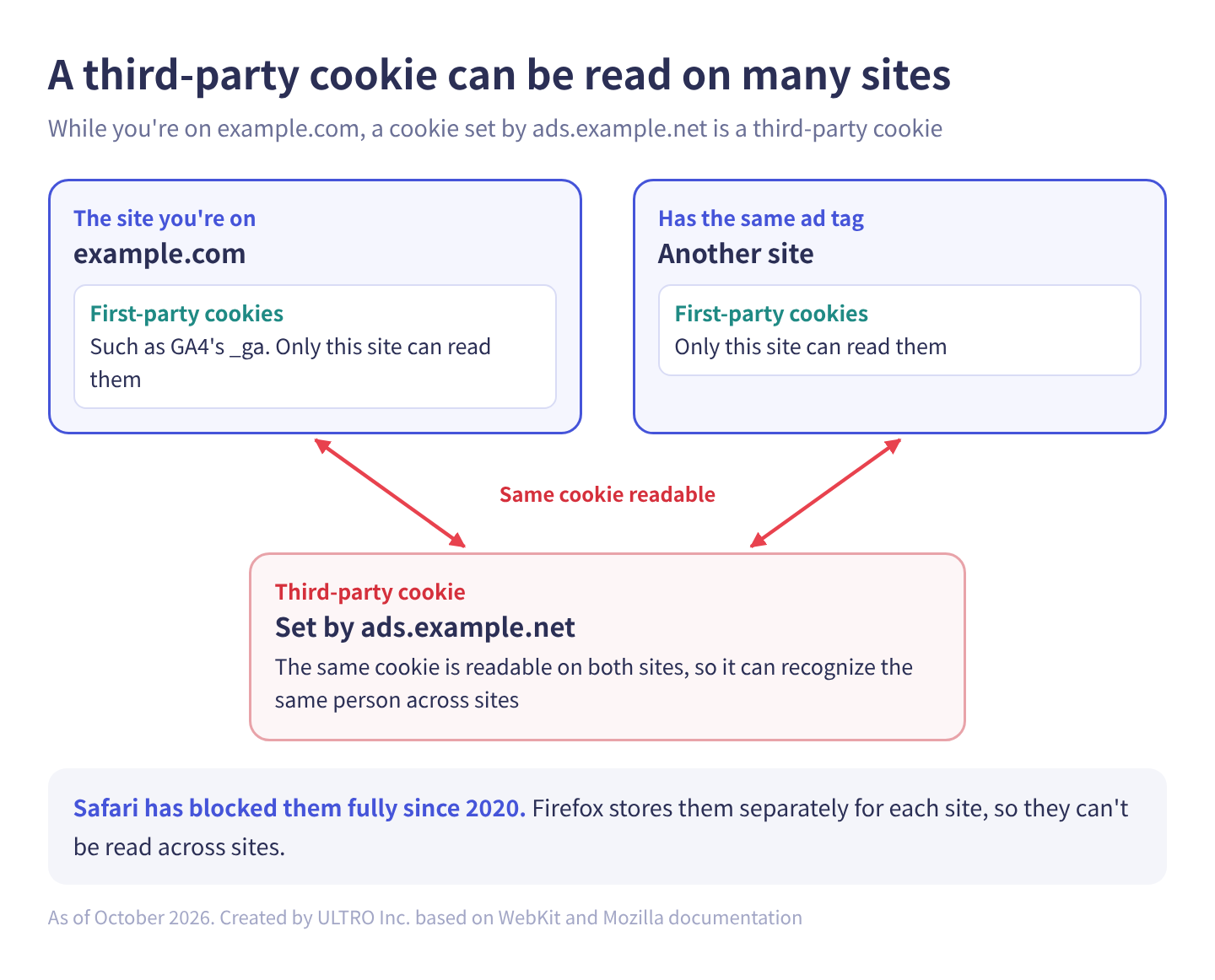
Side by side:
| First-party cookies | Third-party cookies | |
|---|---|---|
| Set by | The same domain as the site (on example.com, set by example.com) | A different domain (on example.com, set by ads.example.net) |
| Typical sources | The site itself, and tags on the site such as GA4 | Ad servers, embedded videos and social buttons, tracking tags on another domain |
| Readable on | That site only | Every site that loads the same tag |
| Main uses | Login, cart, recognizing users in GA4 | Cross-site tracking, retargeting (showing ads to past visitors), view-through measurement (purchases by people who saw an ad but didn’t click) |
| Browser restrictions | Lifetime caps (Safari) and similar | Blocked or partitioned by default in Safari and Firefox. Still on in Chrome |
The GA4 tag loads Google’s script, but it writes its cookies to the domain of the site you’re on, so GA4’s _ga is a first-party cookie. Ad tags work the same way. Google’s help center says the Conversion Linker stores ad click information in first-party cookies on your domain, with names like _gcl_aw. Meta’s docs say the pixel uses first-party cookies, storing _fbp on your domain and the click ID in _fbc. What’s inside those click IDs, and why they disappear, is covered in what gclid is.
Recognizing the same person across sites is exactly why third-party cookies became a regulatory target: they let ad companies connect what one person looked at on many different sites.
Related terms
- Third-party data: data bought from or provided by another company. It’s a separate topic from cookies.
- CHIPS (the Partitioned attribute): a way to store a third-party cookie separately for each top-level site. It’s meant for embedded chat widgets, payments and other uses that aren’t about cross-site tracking. Google says it will keep CHIPS after retiring most of the Privacy Sandbox.
- Cookieless: a catch-all for measurement and advertising that doesn’t rely on cookies. It isn’t the name of any specific technology.
Are third-party cookies going away?
Third-party cookies are staying in Chrome. Google announced the phase-out in 2020, delayed it several times, changed course in July 2024, and in April 2025 said it would keep the current approach.
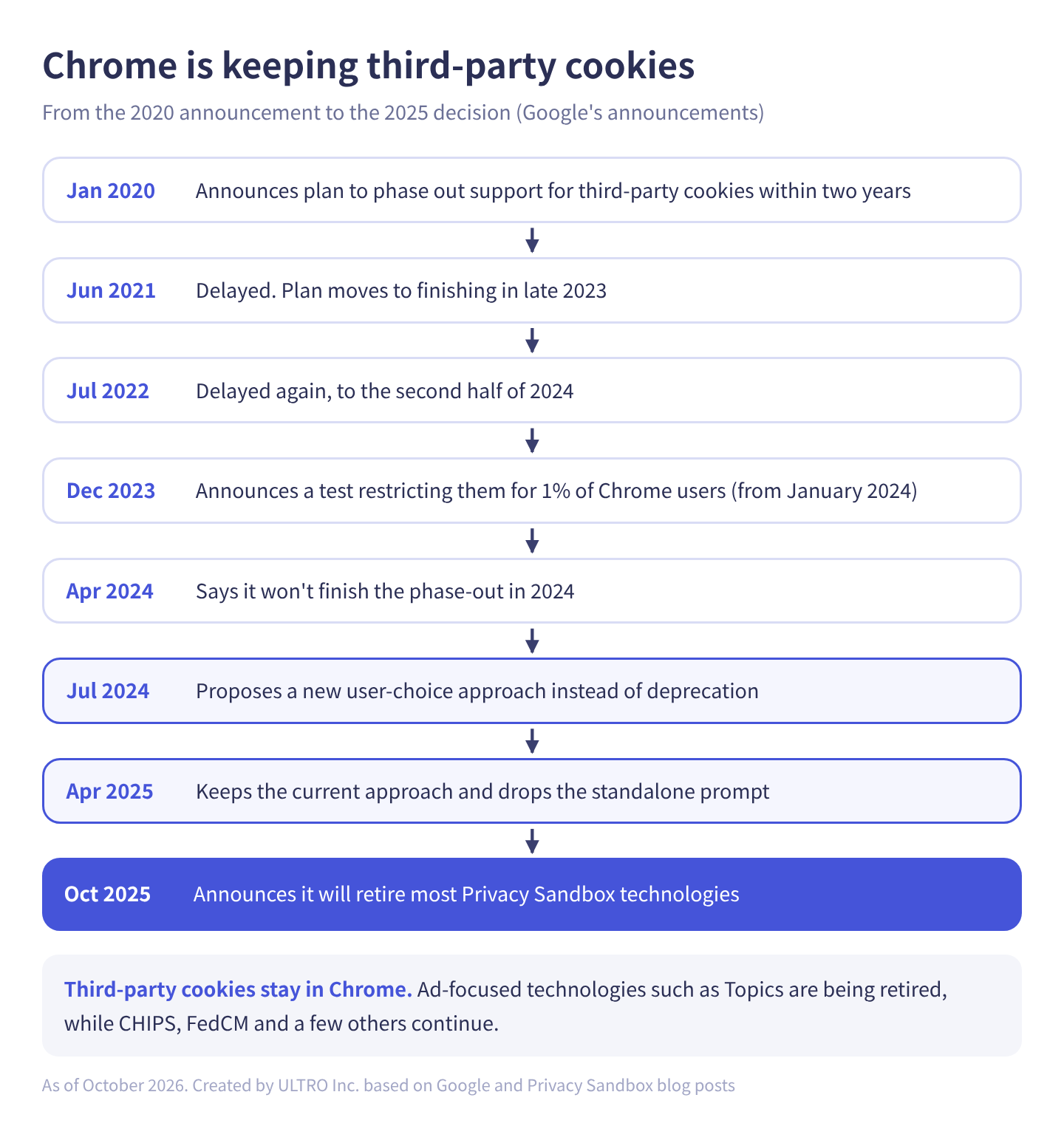
The same timeline, with exact dates:
| Date | Google’s announcement |
|---|---|
| January 14, 2020 | Plans to phase out support for third-party cookies in Chrome within two years |
| June 24, 2021 | Delayed. New plan: phase them out over three months starting mid-2023, finishing in late 2023 |
| July 2022 | Delayed again, to the second half of 2024 |
| December 14, 2023 | Starting January 4, 2024, restricts third-party cookies by default for 1% of Chrome users worldwide as a test, aiming to phase them out for everyone in the second half of 2024 (subject to resolving the UK Competition and Markets Authority’s concerns) |
| April 23, 2024 | Says it won’t complete the phase-out in 2024, and expects to proceed early the next year, subject to agreement with the CMA |
| July 22, 2024 | Proposes a new approach that lets people make an informed choice, instead of deprecating third-party cookies |
| April 22, 2025 | Keeps the current approach to third-party cookie choice (managed in Chrome’s settings) and won’t roll out a new standalone prompt |
| October 17, 2025 | Announces it will retire most Privacy Sandbox technologies, citing low adoption. The same day, the CMA released Google from its commitments |
The CMA had been concerned that Google might remove third-party cookies in a way that favored its own ad business. In releasing the commitments, it pointed to Google’s decision not to remove third-party cookies.
What’s left of the Privacy Sandbox
The Privacy Sandbox was the set of technologies Google built to replace third-party cookies. The October 2025 announcement retired most of the ad-focused ones and kept the ones that make cookies safer.
| Group | Technologies | Status as of October 2026 |
|---|---|---|
| Third-party cookies in Chrome | — | Staying. Users choose in settings. Blocked by default in Incognito |
| Retired (mostly ad-related) | Topics, Protected Audience, Attribution Reporting, Private Aggregation, Shared Storage, Related Website Sets, IP Protection and others | The official status page (updated August 14, 2026) lists Topics and others as “Deprecate and remove” and IP Protection as “Discontinue.” No removal dates or Chrome versions are given |
| Continuing | CHIPS, FedCM, Private State Tokens, Storage Access API, storage partitioning | Kept because other browsers support them or Chrome plans to keep supporting them |
For conversion tracking, the big one is Attribution Reporting, the API for measuring ad conversions without cookies. Google says it will keep working on an interoperable attribution standard with other browsers through the W3C (the body that sets web standards) Private Advertising Technology Working Group.
Was preparing for a cookieless world a waste?
Not entirely. Third-party cookies already don’t work in Safari, and Safari caps first-party cookies too. Safari is the default browser on every iPhone, so on most stores a large share of mobile visits come through it. Cookie-based tracking has been losing data there since long before Chrome’s plans.
In our view, what the 2025 decision removed is the worry that Chrome’s ad infrastructure would change overnight. The order in which an online store should fix its tracking hasn’t changed.
How each browser handles third-party cookies (October 2026)
As of October 2026, the only major browsers that broadly allow third-party cookies by default are Chrome and Edge, which blocks only domains it classifies as trackers. Safari and Firefox have restricted them by default for years.
| Browser | Third-party cookies (default) | Limits on first-party cookies | Since |
|---|---|---|---|
| Chrome | Allowed. Users can block them in settings. Blocked in Incognito | 400 days at most | — |
| Safari (ITP) | Fully blocked | Cookies set with JavaScript last at most 7 days, or 24 hours under some conditions | Full blocking since March 2020 |
| Firefox | Total Cookie Protection stores them separately for each site, so they can’t be read across sites. Known tracking cookies are blocked | — | Tracking protection on by default since September 2019; Total Cookie Protection by default since June 2022 |
| Edge | Allowed except for domains classified as trackers. The default tracking prevention level, Balanced, blocks storage access for known advertising, social and other tracker categories, but not analytics | — | — |
Chrome’s 400 days comes from GA4’s help center, which gives it as the maximum cookie lifetime when a user doesn’t return.
What Safari’s ITP does
Safari’s ITP (Intelligent Tracking Prevention) blocks all third-party cookies and caps first-party cookies set with JavaScript at 7 days (24 hours under some conditions). For ecommerce tracking, the lifetime cap is the part that hurts. Here’s what WebKit (Safari’s engine) has published on its blog:
| Change | Published |
|---|---|
| Persistent cookies set with JavaScript (document.cookie) expire after 7 days at most | February 2019 (ITP 2.1) |
| When a visitor arrives from a domain classified as able to track across sites, and the landing URL has a query string (after ?) or fragment (after #), cookies set with JavaScript on that page expire after 1 day (24 hours) | April 2019 (ITP 2.2) |
| Third-party cookies blocked by default. Script-writable storage (localStorage and similar) is deleted after 7 days of Safari use without interaction on the site | March 2020 |
| Cookies set in responses from third-party servers behind CNAME records (subdomains pointed at another company’s servers) also capped at 7 days | November 2020 |
In October 2022, WebKit also landed a change capping cookies set by servers on a different IP address from the site at 7 days. We confirmed this in WebKit’s bug tracker; there’s no blog post about it. How setting cookies from a server extends their lifetime, and when that works, is covered in our server-side GTM article.
WebKit doesn’t name the domains it classifies as able to track across sites for the 24-hour rule. Our reading is that the typical case is landing from a major ad platform with a click ID (a string such as gclid or fbclid added to the URL when someone clicks an ad). Whether a link with only UTM parameters hits this rule depends on the domain the visitor came from.
What isn’t confirmed about Safari
Articles describe Safari’s tracking protection in very different ways. Here’s what can be confirmed from official sources:
- Link Tracking Protection in iOS 17: in June 2023, Apple announced it would remove tracking parameters from links shared in Messages and Mail and from links opened in Safari Private Browsing. Apple hasn’t published a list of which parameters it removes.
- Fingerprinting protection in iOS 26: in June 2025, Apple announced that advanced fingerprinting protection would be on by default for all browsing. The announcement doesn’t say exactly which scripts get restricted or how.
- Future Safari changes: third parties have published analyses of in-development versions based on the source code, but Apple hasn’t announced anything.
Do third-party cookies affect GA4? _ga is a first-party cookie
GA4 runs on first-party cookies, so the third-party cookie story has little direct effect on it. Google’s help article “[GA4] Cookie usage on websites” says the GA4 JavaScript tags use first-party cookies to distinguish unique users as well as unique sessions from a single user.
| Cookie | Default expiration | Purpose |
|---|---|---|
_ga | 2 years | Distinguishes users |
_ga_<container-id> | 2 years | Persists session state |
The same article also says browsers cap how long first-party cookies last: when a user doesn’t return, the maximum is 400 days in Chrome and 7 days in Safari.
A Safari user who returns after more than 7 days no longer has a _ga cookie, so GA4 counts them as a new user. In our experience, that shows up in a few ways:
- Too many new users: the longer people take to decide, the more often the same person is counted as “new.”
- Lost first-touch source: if someone first came from an ad, then returns from search on day 8 and buys, GA4’s “First user …” dimensions show search.
- Understated repeat metrics: return rates and purchases per user look low for Safari users.
When cookies disappear or the referrer isn’t carried over, you also tend to see more (not set) and direct traffic. Why GA4 shows (not set) explains how to tell the causes apart.
Impact on Google Ads and Meta ads, and what to do
Ad tracking keeps working in Chrome as before, but it has been losing data in Safari for years. The fix is to add paths that can still match a purchase to an ad after the cookie is gone.
As covered above, Google Ads’ _gcl_aw and Meta’s _fbp are both first-party cookies on your domain. Chrome keeping third-party cookies changes nothing about Safari’s 7-day and 24-hour caps on them.
| What’s affected | What happens | What to do |
|---|---|---|
| Purchases after an ad click | In Safari, the cookie holding the click ID expires after 7 days (24 hours under some conditions), and later purchases aren’t credited to the ad | Google Ads: enhanced conversions. Meta: Conversions API |
| View-through and cross-site measurement | Anything that relies on third-party cookies doesn’t work in Safari or Firefox | More of it is left to the platforms’ modeling. Decide how you’ll treat those numbers |
| Retargeting lists | Safari and Firefox visitors are harder to add to lists | Use customer lists |
| People who decline consent | If you show a consent banner, their data isn’t sent | Consent mode |
Enhanced conversions for Google Ads normalize the email address or phone number from the purchase, hash it with SHA256 (a one-way transformation), and send it to Google, which matches it to the Google account that was signed in when the person interacted with the ad. If there’s a match, the conversion counts even if the cookie is gone. Setup, including on Shopify, is in Google Ads conversion tracking.
Meta’s Conversions API sends conversions from your server to Meta. Meta recommends running it alongside the pixel, and in that redundant setup, the pixel’s eventID and the Conversions API’s event_id, plus the event name, must match for deduplication. Events are only deduplicated if they arrive within 48 hours of the first event with that ID. For the ways to set it up on Shopify, see 3 ways to use Meta’s Conversions API on Shopify.
Consent mode passes visitors’ consent choices to Google’s tags. If you advertise to people in the EEA, UK or Switzerland, it’s effectively required. Applying a “denied” default everywhere when you don’t need to only creates gaps in your data.
On May 2, 2025, Google announced that Google tag gateway for advertisers, which serves Google tags through your own domain, would start rolling out the following week, and said advertisers who configured it saw an 11% uplift in signals. That figure is Google’s internal data, a 7-day trailing median for April 9 to 16, 2025, and it compares tag script loads, not conversions.
Do you still need cookie consent?
Chrome keeping third-party cookies doesn’t change privacy law. What you need depends on where your customers are, not on browser policy.
| Where your customers are | What applies | What it means for a store |
|---|---|---|
| EEA, UK, Switzerland | Privacy and ePrivacy rules, plus Google’s EU user consent policy | Consent before non-essential cookies, and consent signals to Google (in practice, consent mode) for ads features |
| California | CCPA | Covered businesses must let consumers opt out of the sale or sharing of personal information. “Sharing” means sharing for cross-context behavioral advertising, and a Global Privacy Control signal must be honored as an opt-out |
The CCPA applies only to for-profit businesses that meet one of its thresholds, based on annual revenue, the number of California consumers whose data they buy, sell or share, or the share of revenue from selling personal information. Several other US states have their own privacy laws. We aren’t lawyers, so check your own obligations with one.
What really causes missing ecommerce data
What actually makes ecommerce tracking lose purchases is four things: orders whose thank you page never loads, ad blockers, Safari’s cookie lifetimes and declined consent. Below, we separate what the sources say from what’s our own estimate.
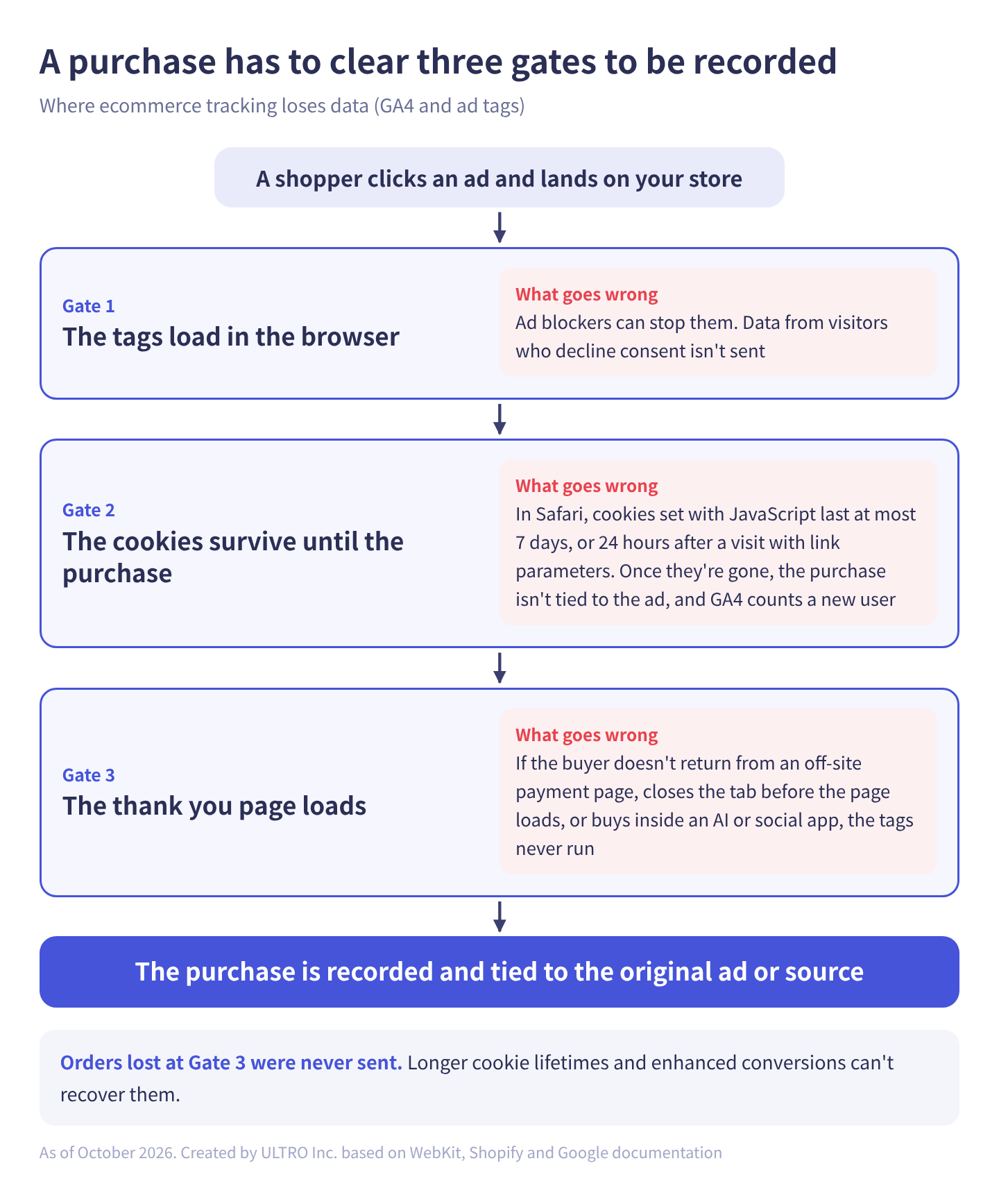
What the sources say and don’t say:
| Cause | What the sources say | What they don’t, and our estimate |
|---|---|---|
| Thank you page never loads | Per Shopify’s docs, checkout_completed usually fires once on the thank you page (or the first upsell page, if there is one) and doesn’t fire if that page doesn’t load | We found no industry statistic for how often this happens. When we matched order IDs for one of our client stores, about 20% of orders were missing from GA4 (the mix of payment methods behind it differs by store) |
| Ad blockers | Backlinko, citing GWI data (a secondary source), says 29.5% of internet users worldwide and 32.5% of Americans use an ad blocker at least sometimes (Q2 2025). Edge’s default tracking prevention also blocks storage access for known advertising domains | Not confirmed in a primary source. Usage rates aren’t loss rates, and there’s no public figure for how often GA4 tags specifically are blocked |
| Safari’s cookie lifetimes | Cookies set with JavaScript last at most 7 days, or 24 hours after visits with link parameters (WebKit). GA4’s cookies are capped at 7 days in Safari (Google) | How much you lose depends on your Safari share and how long people take to buy |
| Declined consent | Data from people who decline isn’t sent. Advanced consent mode sends cookieless pings and, when conditions are met, models the gap (Google) | Decline rates vary by region and banner design. A store that sells only where no banner is required is barely affected |
The first one, orders whose thank you page never loads, has nothing to do with cookies: the tag never gets a chance to run. If the buyer closes the tab after an off-site payment page without coming back, loses connection before the thank you page loads, or completes the purchase inside an AI assistant or social app, the browser tag never fires. Longer cookie lifetimes and enhanced conversions can’t recover something that was never sent.
To fill that gap in GA4, you have to start from the order data and send it from a server, bypassing the browser. GA4’s mechanism for that is the Measurement Protocol; the GA4 Measurement Protocol guide covers how it works and its timing rules. We built this into a Shopify app, GapFill. It’s our own product, so keep that in mind. It recovers missing GA4 purchase events server-side and works alongside your existing tags. The free missing purchases report shows where and how much you’re missing.
Our Shopify appGapFill: Recover missing GA4 purchase events server-sideWorks alongside your existing tags. Free missing purchases report.See GapFill →The full list of causes, and the steps for matching orders one by one, are in the “how to check your own store” section of GA4 Not Tracking All Shopify Purchases?
Where an online store should start
Here’s the order we’d work in. Steps 1 and 2 find and fix what’s missing in your store, steps 3 and 4 add the missing paths, and step 5 keeps your comparisons honest.
- Match orders against GA4: compare Shopify order IDs with GA4 transaction IDs (the order ID sent to GA4) one by one, and see whether the missing orders cluster around certain payment methods or sales channels.
- Check your tag setup: make sure the purchase event is sent exactly once, not twice. Setup on Shopify is in how to set up GA4 on Shopify, fixing duplicates in GA4 duplicate purchases, and checking that tags fire in Google Tag Assistant. If you use a Shopify custom pixel, see Shopify custom pixels.
- Give your ads a path that doesn’t depend on cookies: set up enhanced conversions for Google Ads and the Conversions API for Meta, including event ID deduplication.
- Recover orders the tags never saw: if step 1 shows gaps concentrated in certain payment methods or channels, consider sending those orders with the Measurement Protocol. If matching by hand is too much work, GapFill’s free missing purchases report shows the same thing.
- Write down the dates you change things: record when you added a consent banner or changed your tracking setup, and don’t compare numbers before and after directly.
On step 5: adding enhanced conversions or server-side sending raises the numbers in your ad platforms and GA4. That isn’t more revenue. It’s more of the revenue you already had becoming visible.
Sources
- Building a more private web: A path towards making third party cookies obsolete (Chromium Blog, January 14, 2020)
- An updated timeline for Privacy Sandbox milestones (Google, June 24, 2021)
- Expanding testing for the Privacy Sandbox for the Web (Google, July 2022)
- The next step toward phasing out third-party cookies in Chrome (Google, December 14, 2023)
- Update on the plan for phase-out of third-party cookies on Chrome (Privacy Sandbox, April 23, 2024)
- A new path for Privacy Sandbox on the web (Privacy Sandbox, July 22, 2024)
- Next steps for Privacy Sandbox and tracking protections in Chrome (Privacy Sandbox, April 22, 2025)
- Update on Plans for Privacy Sandbox Technologies (Privacy Sandbox, October 17, 2025)
- Privacy Sandbox feature status (Privacy Sandbox, updated August 14, 2026)
- Investigation into Google’s ‘Privacy Sandbox’ browser changes (UK Competition and Markets Authority)
- Intelligent Tracking Prevention 2.1 (WebKit, February 21, 2019)
- Intelligent Tracking Prevention 2.2 (WebKit, April 24, 2019)
- Full Third-Party Cookie Blocking and More (WebKit, March 24, 2020)
- CNAME Cloaking and Bounce Tracking Defense (WebKit, November 12, 2020)
- Bug 246477: Cap cookie lifetimes to 7 days for responses from third party IP addresses (WebKit Bugzilla, fixed October 21, 2022)
- Private Browsing 2.0 (WebKit, July 16, 2024)
- Apple announces powerful new privacy and security features (Apple Newsroom, June 5, 2023)
- Apple elevates the iPhone experience with iOS 26 (Apple Newsroom, June 9, 2025)
- Firefox 69.0 release notes (Mozilla, September 3, 2019)
- Firefox rolls out Total Cookie Protection by default to more users worldwide (Mozilla, June 14, 2022)
- Tracking prevention in Microsoft Edge (Microsoft Learn)
- [GA4] Cookie usage on websites (Google Analytics Help)
- Conversion linker (Tag Manager Help)
- About enhanced conversions (Google Ads Help)
- About consent mode (Google Ads Help)
- Enhance your conversion measurement and ad performance with Google tag gateway for advertisers (Google, May 2, 2025)
- Conversions API (Meta for Developers)
- ClickID and the fbp and fbc Parameters (Meta for Developers)
- Handling Duplicate Pixel and Conversions API Events (Meta for Developers)
- checkout_completed (Shopify.dev)
- California Consumer Privacy Act (CCPA) (State of California Department of Justice)
- EU user consent policy (Google)
- Ad Blocker Usage and Demographic Statistics (Backlinko, updated March 19, 2026, citing GWI data)
FAQ
What are third-party cookies?
Cookies set by a domain other than the site you're on, typically by ad and tracking tags, embedded videos or social buttons. Because the same domain's cookie can be read on many sites, they've been used to recognize the same person across sites. Cookies set by the site you're on are first-party cookies.
Are third-party cookies going away?
Not in Chrome. Google paused its deprecation plan in July 2024 and announced in April 2025 that it would keep the current approach and not roll out a new standalone prompt. Safari has blocked them by default since 2020 and Firefox has restricted them by default since 2019, and Chrome's Incognito mode blocks them by default.
What happened to the Privacy Sandbox?
On October 17, 2025, Google announced it would retire most of its ad-related technologies, including Topics, Protected Audience and Attribution Reporting, citing low adoption. CHIPS, FedCM and Private State Tokens continue. As of its August 2026 update, the official status page gives no removal dates for the retired features.
Will GA4 stop working without third-party cookies?
No. Google's help center says GA4 tags use first-party cookies to distinguish users and sessions. The impact is in Safari, where those cookies last at most 7 days if the person doesn't return. Someone who comes back after 7 days is counted as a new user.
What is Safari's ITP?
Intelligent Tracking Prevention, the tracking protection built into Safari. It blocks all third-party cookies, caps cookies set with JavaScript at 7 days, and cuts that to 24 hours when the visitor arrives from a domain classified as able to track across sites with a URL that has a query string or fragment. All of this is documented on the WebKit blog.
Do I still need cookie consent if third-party cookies are staying?
Chrome's decision doesn't change privacy law. If you advertise to people in the EEA, UK or Switzerland, Google requires consent signals, which in practice means consent mode. In California, the CCPA gives consumers the right to opt out of the sale or sharing of their personal information, including for cross-context behavioral advertising. Check your own obligations with a lawyer.
- Third-party cookies are set by a domain other than the site you're on. GA4's _ga is a first-party cookie.
- Chrome dropped its phase-out (April 2025), and most Privacy Sandbox ad technologies are being retired (October 2025). CHIPS and FedCM stay.
- Safari has blocked third-party cookies fully since 2020. Cookies set with JavaScript last at most 7 days, or 24 hours after certain visits with link parameters.
- For ads, add paths that don't depend on cookies: enhanced conversions for Google Ads, and the Conversions API with event ID deduplication for Meta.
- What actually causes missing ecommerce data: orders whose thank you page never loads, ad blockers, Safari's cookie caps and declined consent. Check those separately from the cookie phase-out story.
Written byRyushi Nagata
CEO, ULTRO Inc. (Tokyo)Shopify Partner. Ryushi handles Shopify store builds, maintenance, advertising and CRM end to end, and has managed more than ¥4 billion in ad spend over his career. He holds Google Ads certifications (Search, Display, Video, Shopping, Apps, Performance Max, Measurement) and the Google Analytics certification.
How many purchases is GA4 missing in your store?
GapFill matches your Shopify orders against GA4 purchases, shows what GA4 missed, and recovers those purchase events server-side. It works alongside your existing tags, and the missing purchases report is free.