(not set) in Google Analytics 4: What It Means and How to Fix It

What (not set) means in GA4, how it differs from Unassigned and Direct, the cause behind each dimension, five cases common on Shopify stores, what you can fix, and how to dig into (not set) rows in Explore.
You open Traffic acquisition in GA4, switch to Session source / medium, and (not set) is near the top of the list. The Landing page report has a (not set) row too, and it has purchase revenue attached. If you handle tracking for Shopify stores, you’ve probably seen this.
Not all (not set) has the same cause. Some disappears when you fix a tag, some is by design and won’t go away, and some is created by sending purchases from a server. Here’s what to do first:
- If (not set) is a small share and isn’t growing, there’s no need to rush.
- If it jumped on a particular day, look at theme, app, tag, and consent banner changes made that day.
- The cause depends on the dimension, so find the matching row in the tables below.
This article follows Google’s help center as of October 2026.
What does (not set) mean in Google Analytics 4?
(not set) is a placeholder GA4 shows when it hasn’t received a value for a dimension (the field a report row is labeled with, such as source, page, or country). The cause differs by dimension, and Google’s help center says you can often reduce it.
A few similar values mean different things:
| Value | Meaning | Where you see it |
|---|---|---|
| (not set) | No value was received for the dimension | Source, landing page, campaign, custom dimensions, and others |
| (data not available) | The data can’t be used | A separate value from (not set). Google’s help center says that, unlike (not set), you typically can’t reduce it |
| (other) | Rows grouped together because there are too many distinct values | High-cardinality dimensions |
| (direct) / (none) | A visit with no information about where it came from | Session or first user source / medium |
| Unassigned | No channel rule matched | Default channel group |
(not set) vs. Unassigned vs. Direct
Unassigned is the result of channel classification, (direct) / (none) is a visit with no source information, and (not set) means the value itself never arrived. Three different things.
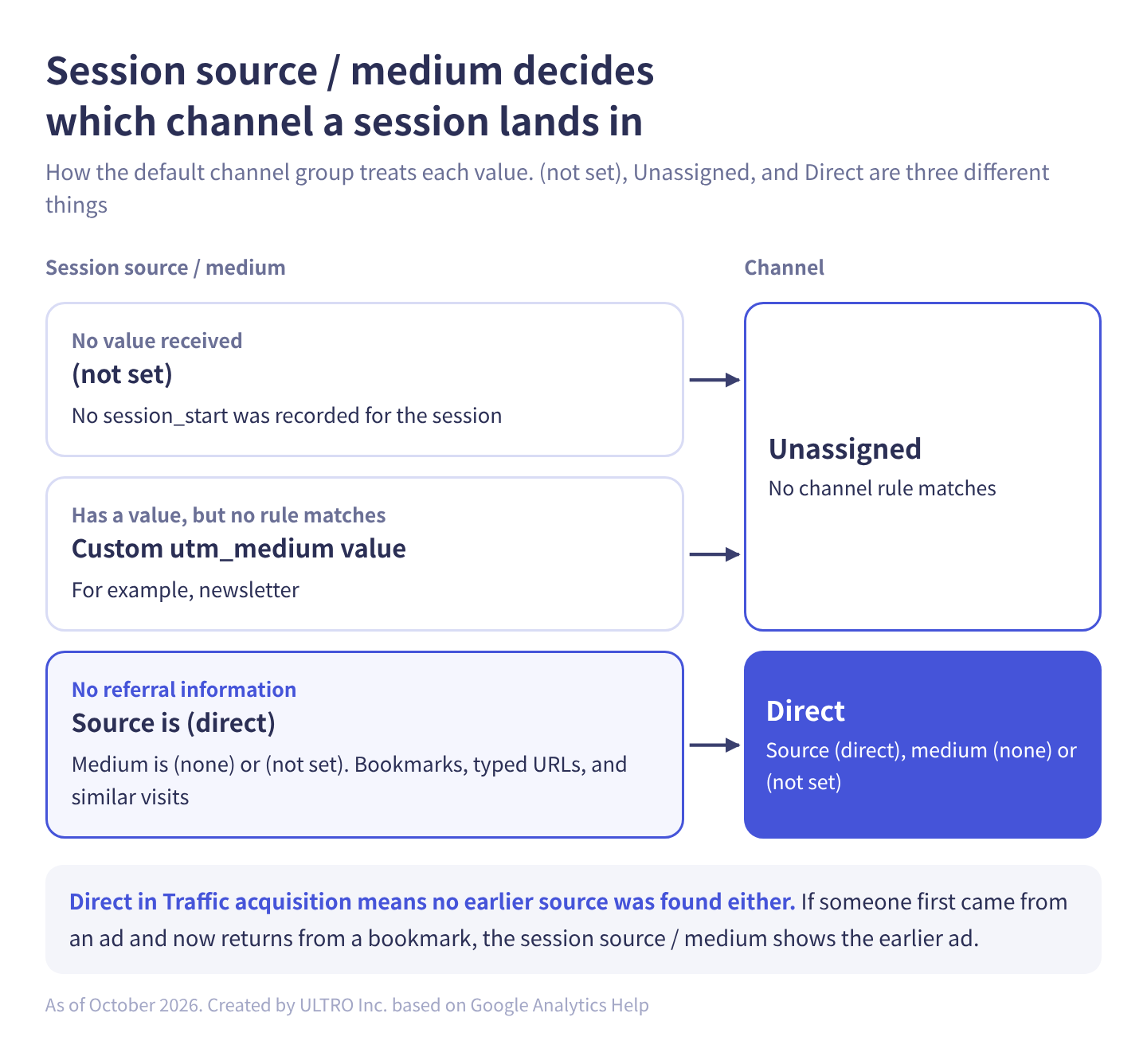
Side by side:
| Value | Where it appears | Meaning | Common causes |
|---|---|---|---|
| (not set) | Dimensions such as source / medium | No value received | Sessions without session_start, events that aren’t key events |
| Unassigned | Default channel group | No channel rule matches | Sessions with a (not set) source, custom utm_medium values |
| Direct | Default channel group | Source is (direct) and medium is (none) or (not set) | Bookmarks, typed URLs, links that don’t pass a referrer |
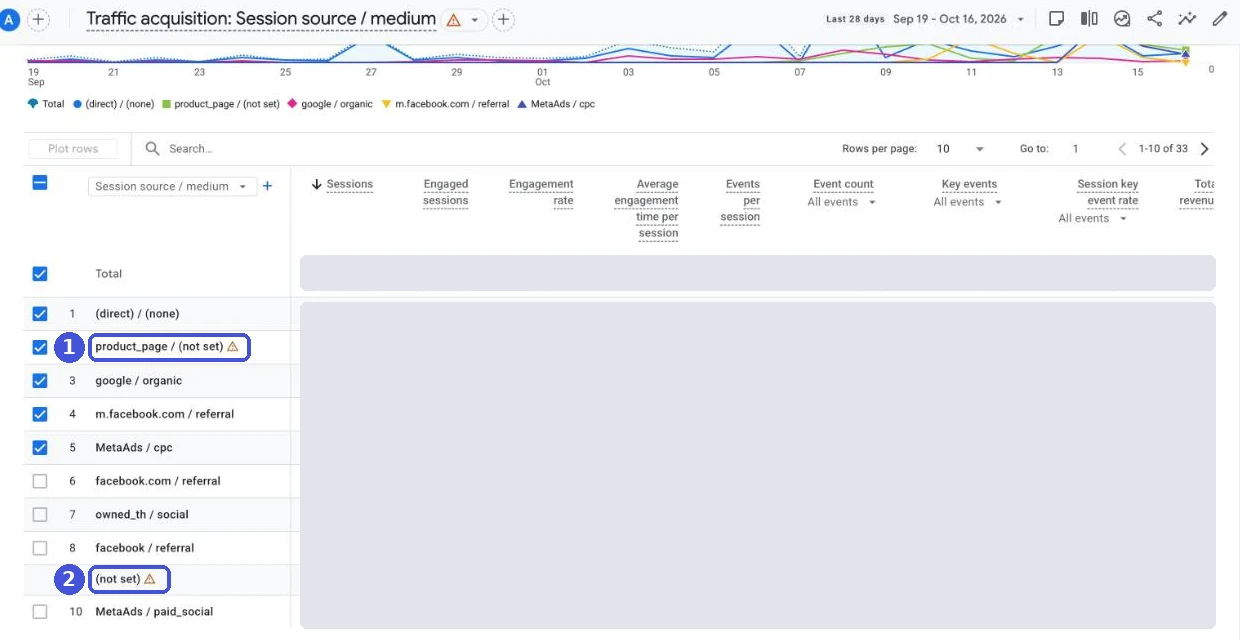
In Google’s default channel group definitions, Direct is a session whose source exactly matches (direct) and whose medium is (none) or (not set). Unassigned is “the value Analytics uses when there are no other channel rules that match the event data.” A session whose source / medium is (not set) matches no rule, so it lands in Unassigned. A session with a custom utm_medium such as newsletter lands in Unassigned too, even though it has a value. To check the (not set) rows yourself, open the Traffic acquisition report and switch the primary dimension in the top-left of the table to Session source / medium.
One thing to watch: Direct in Traffic acquisition means no earlier source was found for that user either. Google’s help center says sessions that start with a direct entrance are attributed to the UTM values for that user (session- and user-scoped dimensions use the “paid and organic channels last click” model). So if someone came from an ad last time and from a bookmark this time, Session source / medium shows the earlier ad.
What causes (not set) in each dimension
(not set) appears when the event that carries a dimension’s value is missing: session_start (the event GA4 sends automatically when a session begins) for session source, page_view for landing page, and so on. Which event carries the value depends on the dimension’s scope (whether the value belongs to a user, a session, or an event). Starting from Google’s help article “What the value (not set) means in your reports,” here are the four you’ll see most:
| Dimension | Scope | When it shows (not set) | Can you fix it? |
|---|---|---|---|
| Session source / medium, session campaign, and similar | Session | The session has no session_start. The channel becomes Unassigned | Yes, if tag order or consent mode is the cause |
| Landing page | Session | The session has no page_view | A longer session timeout can reduce it |
| Google Ads dimensions (campaign name and others) | Session and others | Google Ads isn’t linked, auto-tagging is off, or the traffic comes from an unlinked Ads account | Yes |
| Source / medium (no prefix, event scope) | Event | Any event that isn’t a key event (an event you’ve marked as a conversion, such as purchase) | By design. Nothing to fix |
These can also show up, depending on your setup:
| Dimension | When it shows (not set) | Can you fix it? |
|---|---|---|
| Session source / medium (visits with srsltid in the URL) | The URL has srsltid (added by Merchant Center auto-tagging) but the referrer isn’t google.com, and similar cases. These sessions aren’t classified as organic | Google calls this normal behavior for Google organic results |
| Manual campaign name and other UTM-based values | URL parameters are missing or wrong | Yes |
| Content group | Combined with automatically collected events such as session_start, or content_group was sent empty | Change the combination |
| Custom dimensions | Within 24 hours of registering. For session_start and first_visit, only the first event’s parameters are kept | Wait, or fix how values are sent |
| Consent mode | default and update are misused and session_start is lost | Yes |
If Unassigned is high and landing page URLs carry srsltid, that’s (not set) from Merchant Center auto-tagging. Google treats it as normal, so read organic as slightly understated rather than trying to fix it.
Page title and country aren’t on Google’s (not set) list. Page title is an event-scoped value attached to events sent from a page view, so events that arrive with no page, such as server-sent events, don’t get one, and we expect (not set) there. For country, Measurement Protocol events let you send location (user_location or ip_override). If you don’t, the reference only describes deriving location from tagging events, so a server event with no tag activity behind it has nothing to derive from. We think it can end up (not set).
Google says data processing can take 24 to 48 hours, and report values may change during that time. Judge today’s and yesterday’s (not set) only after processing is done.
Why is direct traffic high in GA4?
Direct is high either because many visits carry no source information, or because many visits can’t inherit an earlier source.
| Cause | What happens | How to check or fix |
|---|---|---|
| Untagged links | Links in emails, texts, QR codes, PDFs, and apps often don’t pass a referrer | Always add UTM parameters to links you distribute |
| In-app browsers | Pages opened inside social or messaging apps may not pass a referrer | Add UTMs to links you post on social media too |
| Redirects, link shorteners | Parameters get dropped along the way | Open your ad’s destination and check that the final URL still has the UTMs |
| Cleared cookies | The earlier source can’t be carried over, so the visit becomes a new user’s Direct visit | Compare the Direct share by browser |
| Device or browser switches | Someone sees an ad on their phone and types the URL on a laptop, so they look like a different person arriving direct | Sending a login ID to GA4 can sometimes connect them |
| Returns from off-site payment | Credit tends to go to the payment provider as a referral rather than Direct | Add the provider’s domain to the unwanted referrals list |
One reason cookies disappear is Safari’s Intelligent Tracking Prevention (ITP), which caps cookies set by script at 7 days. If Safari has a noticeably higher Direct share than other browsers, suspect this. In our view, this isn’t something your tag setup can fix. Read part of Direct as “returning customers.”
Five cases where (not set) shows up on Shopify
On Shopify, (not set) mostly comes from five things: tag order, purchases after a session timeout, returns from off-site payment, server-sent purchases, and consent mode.
1. Events sent before session_start
If you set up GA4 only through the Google & YouTube app, without GTM, you only need to check the “duplicate setup” part below.
If an event tag fires before the Google tag (formerly the GA4 configuration tag), that event arrives with no session_start, and Session source / medium becomes (not set). Google’s help center also names a Google tag trigger that isn’t the Initialization type as a cause. If you use Google Tag Manager, set the Google tag’s trigger to “Initialization - All Pages.”
Duplicate setups also break tag order on Shopify: a tag hard-coded in the theme plus the Google & YouTube app, or a custom pixel plus the app both sending to GA4. First, make sure only one route sends to GA4. Duplicate setups also double-count purchases, so check GA4 duplicate purchases as well. How to connect Shopify to GA4 compares the routes.
If GA4 runs in a custom pixel, there’s one more catch. Shopify’s help center says that when GA4 runs inside the sandbox (an environment isolated from the store’s pages), page URLs include information about the sandbox. If your landing pages show long, unfamiliar URLs, this is usually why. Shopify’s fix is to turn off GA4’s automatic page tracking and send the real page URL with the page_viewed event. See Shopify custom pixels for how it works.
2. Activity and purchases after a session times out
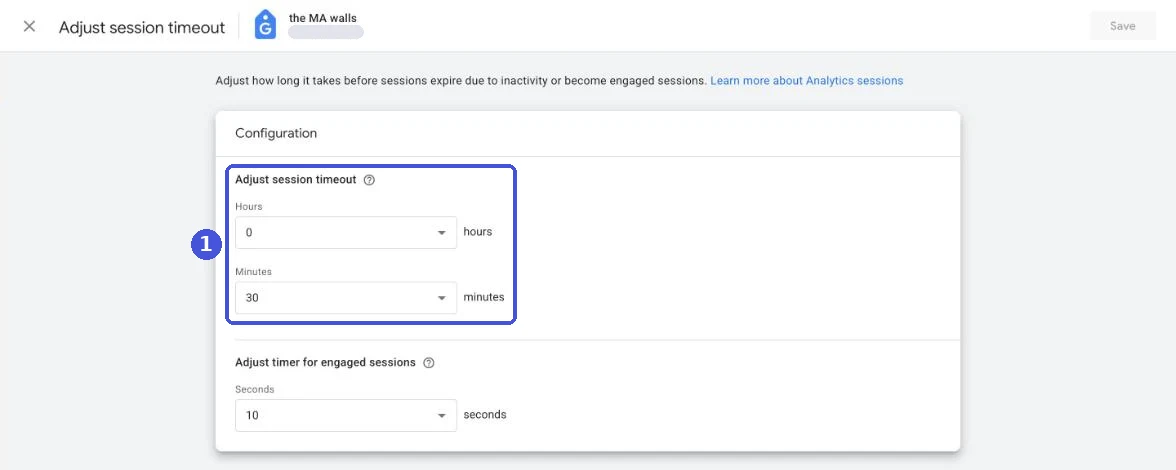
A GA4 session ends after 30 minutes of inactivity. Later activity goes into a new session, and if that session has no page_view, its landing page is (not set). This is what happens when someone returns to a tab left open and scrolls or clicks without reloading. In our experience this happens constantly, not just at checkout.
When it happens at checkout, the purchase lands in a new session with a different source from the original visit. Think of a buyer who takes a while to find their card, or gets held up authenticating with an off-site payment provider such as PayPal.
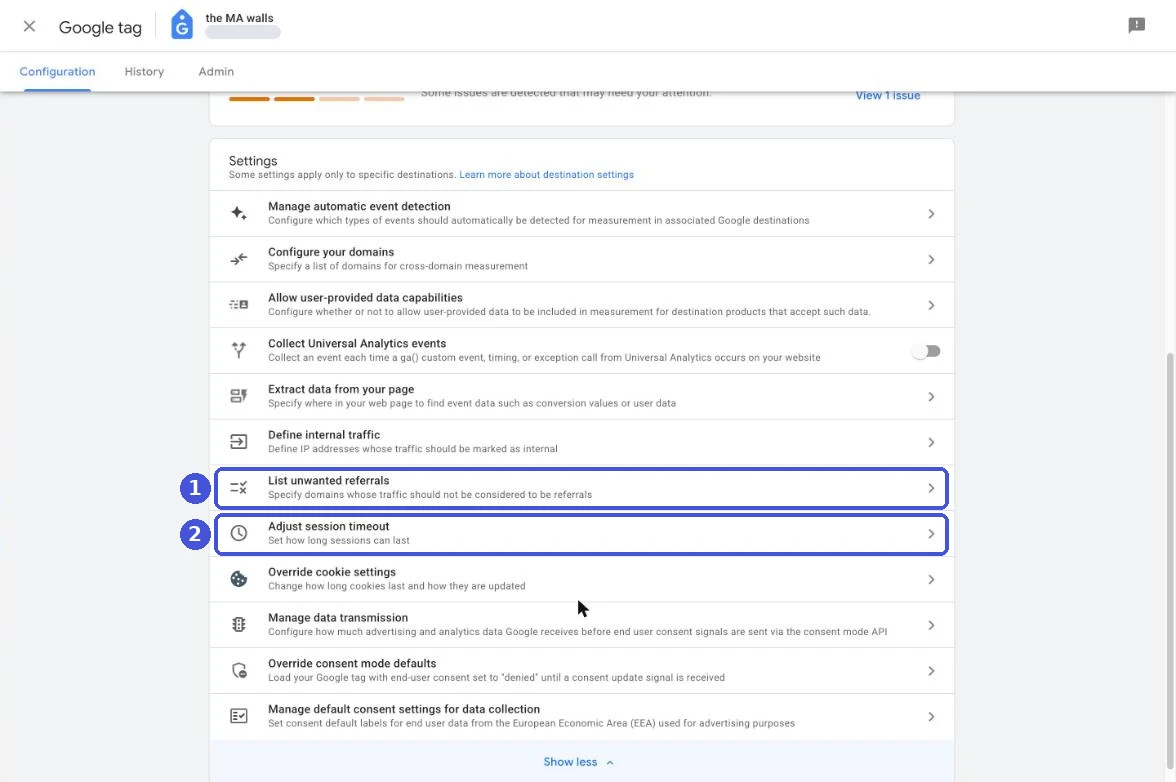
You can change the timeout under Admin > Data collection and modification > Data streams > your web stream > Configure tag settings > Show all > Adjust session timeout. The default is 30 minutes and the maximum is 7 hours and 55 minutes. A longer timeout means fewer sessions, which also changes session-based ratios such as engagement rate and conversion rate. Write down the date you change it, and don’t compare before and after directly.
3. Returns from off-site payment
After paying with an off-site payment provider, a buyer who comes back to the thank you page can start a new session with the provider’s domain as the referrer. If that domain isn’t on your unwanted referrals list, the purchase is credited to the provider as a referral. Once you add it, GA4 appends ignore_referrer with a value of true to matching events, and the domain stops counting as a referral.
Purchases where the buyer never comes back don’t reach GA4 at all. That’s a missing purchase problem rather than (not set). GA4 Not Tracking All Shopify Purchases? covers causes and how to check.
4. Purchases sent from a server
If you don’t use an app or system that sends purchases from a server, this case doesn’t apply.
What you see depends on whether a session ID is attached.
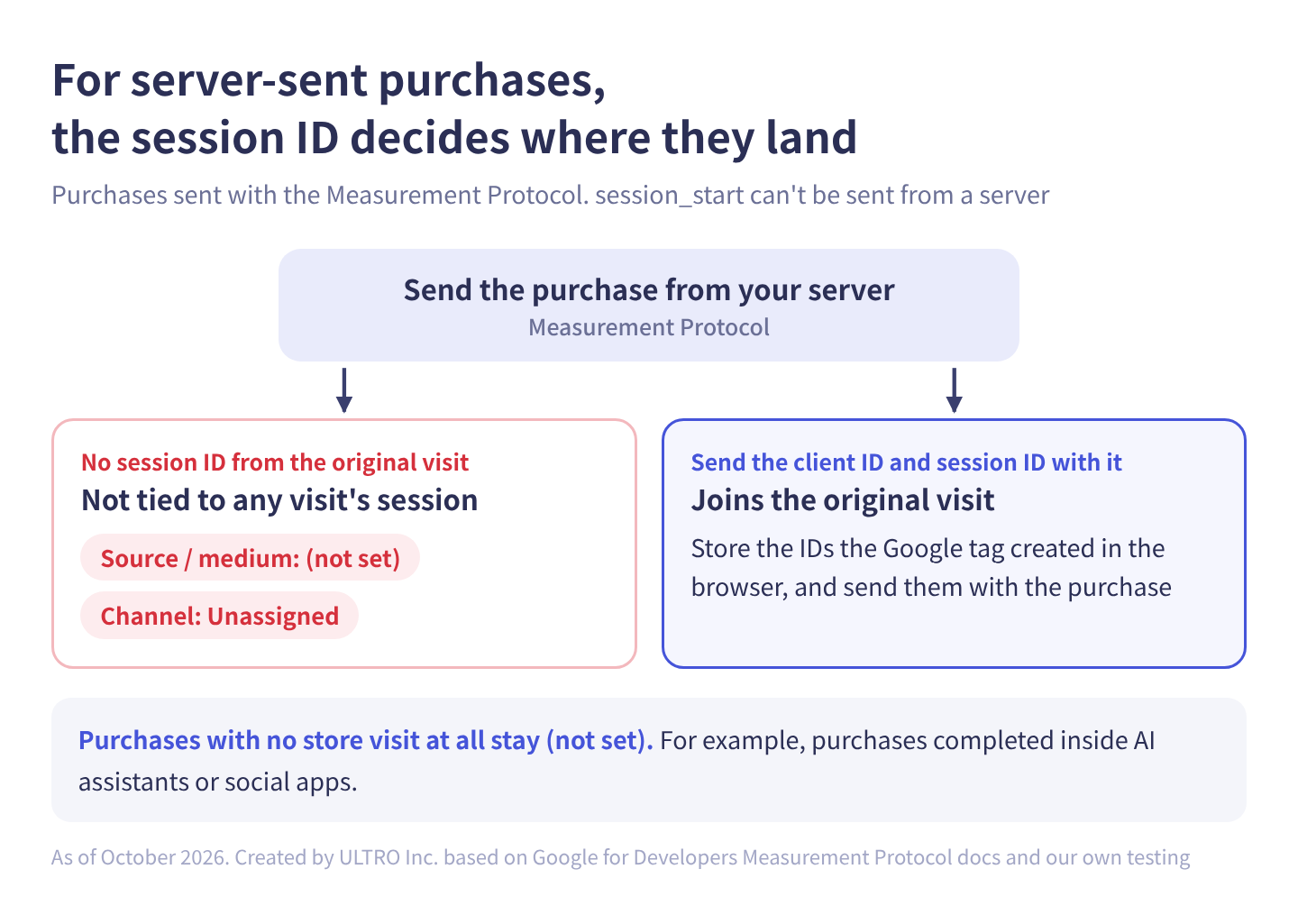
A purchase sent with the Measurement Protocol (Google’s way to send events to GA4 from a server) without the original visit’s session ID isn’t tied to any visit’s session. In our testing, its Session source / medium was (not set) and its channel Unassigned. session_start is a reserved event name and can’t be sent through the Measurement Protocol, which we believe is why. To join the original visit, store the client ID and session ID created by the Google tag in the browser, and send them with the purchase.
Google’s help center also says to avoid including manual campaign details (utm_source, utm_medium, utm_campaign) on Measurement Protocol purchase events unless they reflect a new campaign interaction, and that mixing them with an existing GCLID can lead to misattribution. See the GA4 Measurement Protocol guide for payload details, and server-side GTM for a different way to route browser events through a server.
Our Shopify app GapFill works this way. It’s our own product, so read with that in mind. GapFill recovers missing GA4 purchase events server-side and works alongside your existing tags. It sends each purchase with the client ID and session ID its app pixel captured at checkout, so a purchase that had a visit joins that visit’s session. If the browser session was already (not set), the purchase inherits that.
Our Shopify appGapFill: Recover missing GA4 purchase events server-sideWorks alongside your existing tags. Free missing purchases report.See GapFill →What stays (not set) is purchases with no store visit at all, such as checkouts completed inside AI assistants or social apps. A sender can still attach a source and medium (GapFill bases them on the sales channel), but the session-scoped dimensions show (not set) and the channel shows Unassigned, because there was never a session. We cover these orders in more depth in how AI assistant orders show up in GA4.
5. Consent mode setup
A consent mode mistake can drop session_start and create (not set). Google’s help center names two. The first is calling the default command for every consent value, including the state after the visitor makes a choice in the banner, instead of using update. The second is sending events with denied consent after the visitor has granted it, which creates a separate session with no session_start.
How to fix (not set), and what to do with the rest
The practical split: fix only the (not set) caused by tag setup, and handle the (not set) that’s by design or comes from purchases with no visit by choosing the right report.
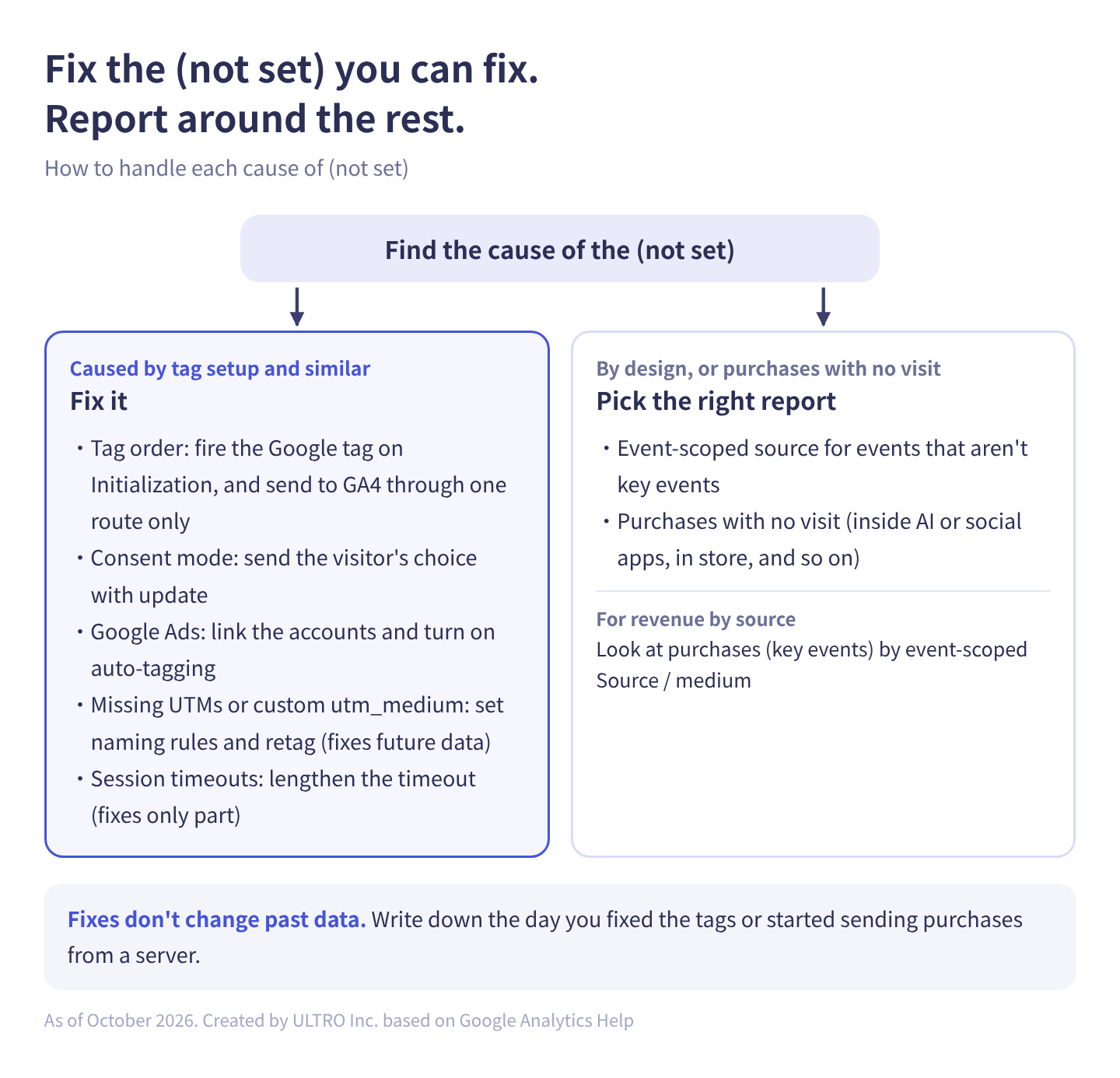
In table form:
| Cause | Fix | Fixable? |
|---|---|---|
| Event tags fire before the Google tag | Set the Google tag to fire on Initialization. Send to GA4 through one route | Yes |
| default and update misused in consent mode | Send the visitor’s choice with update | Yes |
| Google Ads linking, auto-tagging | Link the accounts and turn on auto-tagging | Yes |
| Missing UTMs, custom utm_medium values | Set naming rules and retag | Yes, for future data |
| Activity and purchases after a session timeout | Lengthen the timeout | Partly |
| Event-scoped source for events that aren’t key events | Nothing to fix | By design |
| Purchases with no visit (inside AI or social apps, in store, and so on) | Pick the right report | By design |
Which report answers which question:
| Report | Dimension | Best for | How (not set) shows up |
|---|---|---|---|
| Traffic acquisition | Session source / medium | Which sources brought visits | Purchases with no visit are (not set) |
| User acquisition | First user source / medium | Which sources brought new customers | Users with no first-visit information are (not set), among others |
| Explore, advertising attribution | Source / medium (event scope) | Which source a purchase (key event) is credited to | Events that aren’t key events are (not set) |
For revenue by source, look at purchases (key events) by the event-scoped Source / medium. Treat revenue on Traffic acquisition’s (not set) row as “purchases not tied to a visit,” and break it down in Explore.
Fixes don’t change past data. Write down the day you fixed your tags or started sending purchases from a server, and don’t compare periods with different tracking conditions directly. That way you can tell later whether a change in the (not set) share was a real traffic shift or a tracking change.
How to dig into (not set) rows in Explore
You can usually tell the cause of (not set) from which events happen in those sessions.
- In GA4, go to Explore and start a Blank exploration (free form).
- Click ”+” next to Dimensions, check “Session source / medium” and “Event name,” and click Confirm.
- Click ”+” next to Metrics, check “Event count” and “Sessions,” and click Confirm.
- Drag “Event name” to Rows and “Event count” to Values.
- Drag “Session source / medium” to Filters, choose “exactly matches,” and enter
(not set). - Read the event names against the table below. To narrow it down, add “Date” and “Device category” as dimensions and rows to see when it started and which devices it’s concentrated on.
| Events in the (not set) sessions | Likely cause |
|---|---|
| page_view, scrolls, and the usual events are all there | session_start is missing. Suspect tag order, a duplicate setup, or consent mode |
| Scrolls or clicks but no page_view | Activity on a tab left open (landing page is (not set) too) |
| Only purchase, or purchase and a few other events | A purchase after a session timeout, or a server-sent purchase |
| Concentrated in certain browsers or devices | The consent banner or browser tracking prevention |
| Jumped on a certain day | That day’s theme, app, tag, or consent banner change |
To separate server-sent purchases, check whether your sender adds a marker parameter. If it does, register it as an event-scoped custom dimension under Admin > Custom definitions and add it to the exploration. Values can take 24 to 48 hours to appear after registering.
If you export to BigQuery, check whether each session ID (the ga_session_id event parameter) has a session_start event. That tells you exactly how many sessions are missing session_start. If you’re comparing several stores, this is faster than Explore.
Sources
- What the value (not set) means in your reports (Google Analytics Help)
- [GA4] Scopes of traffic-source dimensions (Google Analytics Help)
- [GA4] Default channel group (Google Analytics Help)
- [GA4] Identify unwanted referrals (Google Analytics Help)
- [GA4] Sessions (Google Analytics Help)
- [GA4] Configure your Google tag settings (Google Analytics Help)
- [GA4] Data freshness (Google Analytics Help)
- Send Measurement Protocol events to Google Analytics (Google for Developers)
- Measurement Protocol reference (Google for Developers)
- Create a Google Tag Manager custom pixel (Shopify Help Center)
- Intelligent Tracking Prevention 2.1 (WebKit)
FAQ
What does (not set) mean in Google Analytics 4?
It's a placeholder Google Analytics uses when it hasn't received a value for a dimension. The reason depends on the dimension. For example, (not set) in Session source / medium means no session_start event was recorded for that session.
What is Unassigned in GA4?
Unassigned is the value Analytics uses when no default channel group rule matches. (not set) means a dimension has no value; Unassigned is the result of channel classification. Sessions whose source / medium is (not set) land in Unassigned, and so do sessions with a custom utm_medium value, even though they do have a value.
Why is my direct traffic so high in GA4?
Usually because many visits arrive without anything that identifies the source: untagged links in emails, texts, QR codes, or PDFs, apps that don't pass a referrer, and redirects that strip UTM parameters. Direct in Traffic acquisition also means no earlier source was found for that user, so visitors whose cookies were cleared and who are counted as new users add to it too.
How do I exclude (not set) from reports?
Use a filter in standard reports, or a 'does not exactly match' filter in Explore. Find the cause first, though. (not set) caused by tag order or similar problems is a tracking bug, and filtering it out hides the bug. (not set) in the event-scoped source for events that aren't key events, or on purchases with no visit, is expected, so it's fine to filter those out.
Why is my landing page (not set) in GA4?
Because the session has no page_view event. It happens when someone returns to a tab left open for more than 30 minutes and interacts without reloading the page, or when a session times out mid-checkout and the purchase event starts a new session on its own.
Why hasn't (not set) gone down after I fixed my setup?
Fixes don't change past data, so compare data from the day after the fix onward. GA4 can also take 24 to 48 hours to process data, and report values can change during that time. Don't judge a fix by today's or yesterday's numbers.
- (not set) means no value reached GA4. The cause is specific to each dimension.
- Session source / medium is (not set) without session_start, Landing page without page_view, and the event-scoped Source / medium for events that aren't key events.
- Unassigned is where sessions go when no channel rule matches. Direct is a visit with no current or earlier source. Neither is the same as (not set).
- On Shopify, (not set) usually comes from tag order, purchases after a session timeout, returns from off-site payment, server-sent purchases, or consent mode.
- Handle (not set) you can't fix by choosing between Traffic acquisition, User acquisition, and the event-scoped source, and diagnose the rest by listing event names in Explore.
Written byRyushi Nagata
CEO, ULTRO Inc. (Tokyo)Shopify Partner. Ryushi handles Shopify store builds, maintenance, advertising and CRM end to end, and has managed more than ¥4 billion in ad spend over his career. He holds Google Ads certifications (Search, Display, Video, Shopping, Apps, Performance Max, Measurement) and the Google Analytics certification.
How many purchases is GA4 missing in your store?
GapFill matches your Shopify orders against GA4 purchases, shows what GA4 missed, and recovers those purchase events server-side. It works alongside your existing tags, and the missing purchases report is free.