What Is GCLID? How Google's Click ID Works and Why It Goes Missing

How the Google Ads click ID works, how conversion tracking, GA4 and offline conversion imports use it, what gbraid and wbraid are, where it's stored, how to find where it breaks, and what to watch for on Shopify.
What is that ?gclid= string on your Google Ads landing page URLs? Is it safe to strip it? And when someone says the gclid isn’t being added, or disappears along the way, what should you check? Anyone running Google Ads gets these questions sooner or later.
This guide is for anyone running Google Ads or owning site tracking. It covers what a gclid is, what it’s used for, how it differs from gbraid and wbraid on iOS, the cookies that store it, why it goes missing and how to check, and how it behaves on Shopify. Specs follow Google’s help center and developer documentation as of October 2026. Screen and setting names come from the help center and may differ slightly from what you see.
What is GCLID (Google Click Identifier)?
A gclid is an ID that Google Ads appends to your landing page URL when someone clicks an ad and auto-tagging is on. It stands for Google Click Identifier. Google Ads Help gives the example of an ad pointing to www.example.com: after a click, the URL looks like www.example.com/?gclid=123xyz.
Auto-tagging is on by default in new Google Ads accounts. Here’s what Google’s help center documents about auto-tagging and the gclid:
| Item | Detail |
|---|---|
| Where it’s added | At the end of the final URL, before any fragment (the part after #). If there’s already a query string, it’s joined with & |
| Length | Up to 100 characters |
| When it’s created | Sometimes at the time of an impression rather than a click. If the same user clicks the same ad again, the same gclid is used |
| Exceptions | App campaigns don’t respect auto-tagging. Auto-tagging isn’t compatible with third-party ad serving (3PAS) ads |
The gclid itself isn’t a readable string. The Google tag on your site picks it up, and Google matches it on its side to the specific campaign and click.
GCLID vs UTM parameters and similar parameters
A gclid is added by Google Ads automatically; UTM parameters are strings you write yourself. When both are present, GA4 uses the auto-tagged (gclid) values for source, medium and other traffic-source dimensions. Google’s ad products have a few similar parameters:
| Parameter | When it appears | Source |
|---|---|---|
| gclid | Google Ads clicks (auto-tagging on) | Google Ads Help |
| wbraid | Clicking an ad in an iOS app that leads to a web page. iOS traffic from a handful of Google apps gets this instead of gclid | Google Ads API docs, Google Ads Help |
| gbraid | Clicking a web ad that leads to an iOS app. Google Ads Help also says it’s added to landing page URLs for iOS 14.5+ clicks. It can appear alongside gclid | Google Ads API docs, Google Ads Help |
| dclid | Clicks from Campaign Manager, Display & Video 360 and similar | Google tag docs, Google advertising cookies list |
| srsltid | Product results in Google Search (Merchant Center auto-tagging) | Merchant Center Help |
Other platforms have click IDs too, such as Meta’s fbclid.
What is GCLID used for?
A gclid has three jobs: Google Ads conversion tracking, Google Ads campaign data in GA4, and offline conversion imports. Google Ads Help says auto-tagging is required for all three.
| Use | What the gclid does | Requirement |
|---|---|---|
| Google Ads conversion tracking | The tag reads the click information stored in a site cookie at purchase time and passes it to Google Ads | The Google tag (or the Conversion Linker) runs on every page |
| Google Ads dimensions in GA4 | GA4 gets the Google Ads campaign, ad group name, keyword text and so on from URLs with a gclid | GA4 is linked to Google Ads |
| Offline conversion imports | You store the gclid with the lead’s details at inquiry time, and later send in-store or phone sales back to Google Ads | GCLIDs are retained for 90 days. New API integrations use the Data Manager API |
How conversion tracking passes the gclid along
In conversion tracking, the gclid moves from the URL to a cookie, and from the cookie to the purchase tag. Based on Google Ads Help, it happens in three steps:
- Someone clicks the ad, and a gclid is added to the landing page URL.
- The Google tag on your site reads the gclid and stores it in a cookie on your domain.
- When the conversion tag fires on the thank you page, the purchase is sent to Google along with the click information from the cookie.
If the cookie disappears along the way, or the person buys on another device, the purchase isn’t tied to the ad click. Enhanced conversions fill part of that gap with hashed data such as the email address used at purchase. How that fits into conversion setup is in Google Ads conversion tracking.
How GA4 uses it
GA4 gets the Google Ads campaign, ad group, keyword and more from URLs with a gclid. When a URL has both a gclid and UTMs, the auto-tagged values win for source, medium and the other traffic-source dimensions; only manual ad content and manual term take the UTM values. When you link GA4 and Google Ads, the linking flow lets you enable auto-tagging.
According to GA4’s help center, if the gclid or dclid can’t be used as intended and the URL has even one UTM parameter, GA4 takes all the cross-channel source values from the UTMs. To tell why Google Ads dimensions show (not set), see why GA4 shows (not set).
What are gbraid and wbraid?
wbraid is the parameter iOS traffic from a handful of Google apps gets instead of a gclid. gbraid is added to landing page URLs for iOS 14.5+ clicks, and can appear alongside a gclid. Google added both in response to Apple’s App Tracking Transparency (ATT, which asks permission for cross-app tracking). If you see them in your URLs, auto-tagging isn’t broken.
Here’s what Google Ads Help’s “Updates to iOS 14 campaign measurement” says:
- Since ATT took effect on April 26, 2021, Google no longer sends the gclid for iOS 14 traffic from ads on a handful of Google apps. Other Google traffic still gets a gclid.
- For web conversions, the new wbraid parameter helps attribute conversions to ad campaigns, and works with conversion modeling (Google’s statistical estimate of conversions it couldn’t observe).
- gbraid helps measure app conversions driven by ad campaigns on iOS. It’s added to landing page URLs for all iOS 14.5+ clicks when auto-tagging is on, and currently applies only to Search, Shopping, Display and Performance Max campaigns.
- Most advertisers don’t need to change their site, but a small percentage may need to allow arbitrary URL parameters.
The Google Ads API docs define gbraid as a URL parameter present when a user clicks an ad on the web and is directed to your iOS app, and wbraid as one present when a user clicks an ad in an iOS app and is directed to your web page. The help center and API docs describe them from different angles, so if either shows up in your URLs, treat it as Google Ads click information and don’t strip it.
There are limits on conversions measured through wbraid and gbraid. The Google Ads API docs say Google Ads doesn’t support custom conversion variables in combination with wbraid or gbraid.
Where is the GCLID stored? _gcl_aw cookies and the Conversion Linker
The gclid is stored by the Google tag or the Conversion Linker in a first-party cookie on your domain, such as _gcl_aw. On the purchase page, the tag reads that cookie to tie the purchase to the click.
Tag Manager Help says the Conversion Linker automatically detects ad click information in your landing page URLs and stores it in first-party cookies named _gcl_*, such as _gcl_aw, _gcl_gs and _gcl_dc, and in the browser’s local storage (_gcl_ls). The main entries in Google’s advertising cookies list:
| Cookie | Products listed | Lifespan |
|---|---|---|
| _gcl_aw | Google Ads | 90 days |
| _gcl_au | Campaign Manager, Display & Video 360, Google Ads, Search Ads 360 | 90 days |
| _gcl_gb, _gcl_gs, _gcl_ag | Google Ads | 90 days |
| _gcl_dc | Campaign Manager, Display & Video 360, Search Ads 360 | 90 days |
| FPGCLAW, FPGCLGB | Google Ads | 90 days |
The list doesn’t describe what each cookie does, and we couldn’t confirm from official sources which parameter goes into which cookie. Cookies starting with “FP,” such as FPGCLAW, are names used with server-side tagging (see server-side GTM).
Do you need the Conversion Linker?
To track Google Ads conversions through GTM, you need either the Conversion Linker or a Google tag that runs on every page. Tag Manager Help says you don’t need the Conversion Linker if your container loads the Google tag on all pages. It recommends placing it on any page visitors may land on after an ad click, usually with the All Pages trigger.
When the gclid isn’t stored, or disappears early
Consent settings and browser protections can keep the gclid from being saved, or make it expire early.
- Ad storage consent is denied: Google’s consent mode docs say that when
ad_storageis denied, no new advertising cookies are set. Even then, turning on URL passthrough (url_passthrough) passes the gclid and similar values between pages on the same domain as URL parameters. What gets sent on denial also differs between basic and advanced consent mode. - Safari: cookies set with JavaScript last 7 days at most, and 24 hours on a page you land on from a domain classified as a tracker with parameters in the URL. The Google tag writes
_gcl_awin the browser, so these caps apply. In our view, landing pages from ad clicks often hit the 24-hour condition. More on this in third-party cookies.
Why the GCLID goes missing or isn’t added
Between the ad click and the purchase, the gclid can break at any of four points: being added to the URL, surviving to the landing page, being stored in a cookie, and carrying over to the purchase page.
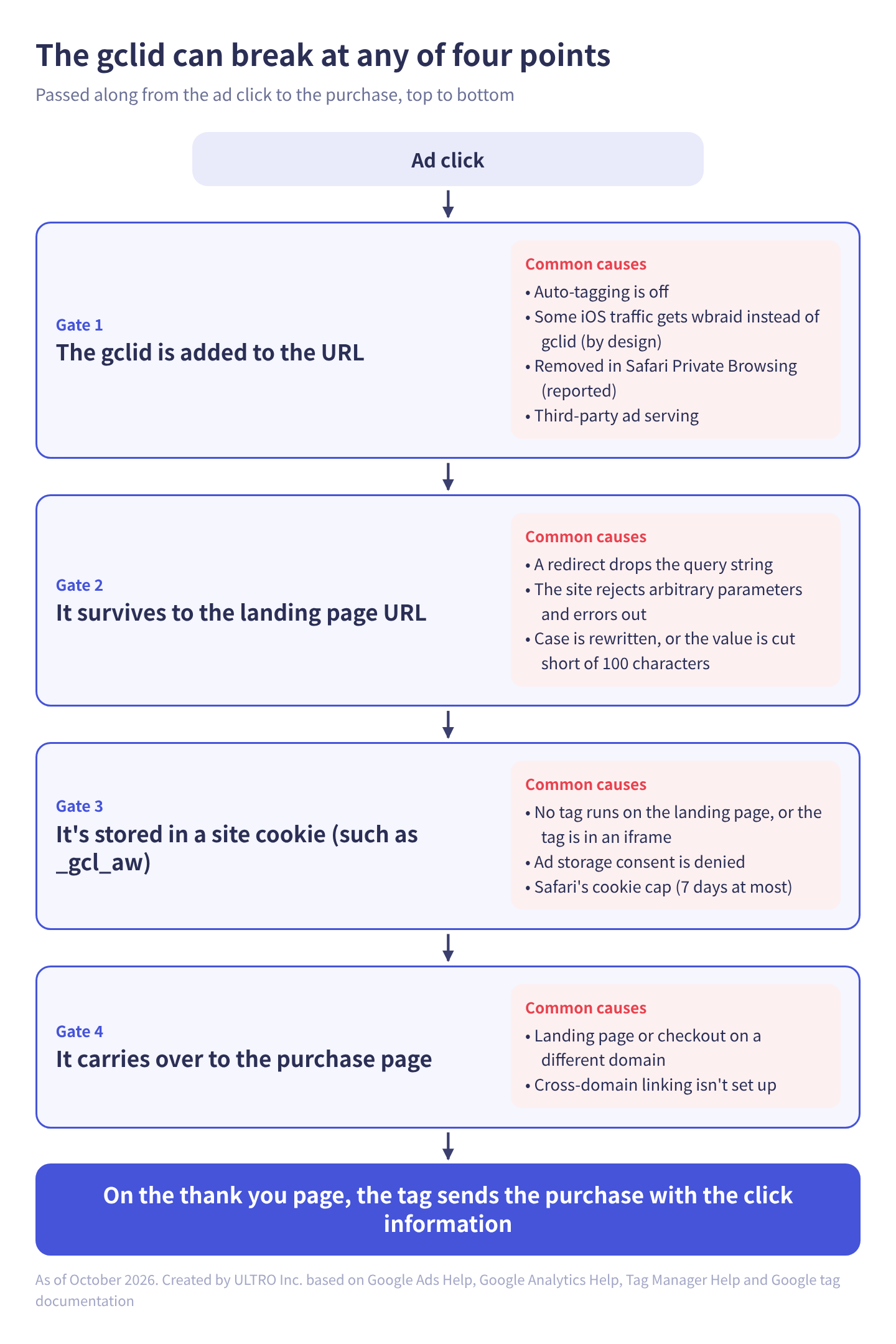
In table form:
| Where it breaks | Cause | What happens | Fix |
|---|---|---|---|
| Not added to the URL | Auto-tagging is off | No gclid; GA4 shows (not set) unless there are UTMs | Turn on auto-tagging under Account settings > Auto-tagging |
| Not added to the URL | iOS traffic from a handful of Google apps | wbraid instead of gclid. iOS 14.5+ clicks also get gbraid (sometimes with gclid) | By design. Nothing to fix |
| Not added to the URL | Safari Private Browsing | Tracking parameters are removed from the URL before navigation. gclid is reported to be among them | By design. Use enhanced conversions to fill the gap |
| Dropped before landing | A redirect (an automatic move from one URL to another; 301 and 302 are the response types) doesn’t carry the query string (the part after ?) | The final page’s URL has no gclid | Point the ad at the final URL, or configure the server so redirects carry query parameters forward |
| Dropped before landing | The site doesn’t accept arbitrary URL parameters | Turning on auto-tagging can produce error pages | Turn auto-tagging off temporarily, have your developer make the site accept parameters, then turn it back on |
| Dropped before landing | The server rewrites the URL and changes case | Analytics can’t match the click to the session, and GA4 shows (not set) | Don’t rewrite the gclid value |
| Dropped before landing | Logs, storage or redirect systems truncate long values | The gclid gets cut off | Make sure 100 characters fit |
| Not stored in a cookie | No tag runs on the landing page, or the tag is in an iframe | The gclid can’t be read. A child frame can’t read the parent page’s address | Put the tag on every landing page, in the parent page |
| Not stored in a cookie | Ad storage consent is denied | No cookie is set | By design. Consider URL passthrough |
| Lost on another domain | The landing page and the purchase page are on different domains | The new domain has no gclid cookie | Set up cross-domain linking |
On Safari Private Browsing, WebKit’s blog (July 2024) says Safari 17.0 and later remove a subset of query parameters identified as being used for cross-site tracking before navigation. WebKit hasn’t published the list, though. That gclid is on it has only been reported by third-party testing; we couldn’t confirm it from Apple’s own sources.
Most auto-tagging problems happen on the site side. When tracking suddenly breaks, the first thing we ask is whether the site’s redirects or URL structure changed around that time. Site redesigns and platform migrations are the usual culprits, and they break this kind of plumbing without raising any errors.
Manual UTMs and tracking templates
Adding UTM parameters doesn’t remove the gclid. GA4 gives priority to the gclid values, and only manual ad content and manual term use the values you tagged by hand.
What to watch is a tracking template (the Google Ads setting that adds tracking information to the click URL) that routes clicks through a third-party tracking service. If that service’s redirect doesn’t carry the query string, the gclid never reaches the final page. Both Google Ads and Merchant Center help say that when there’s a redirect, the gclid has to be passed through to the final page.
Landing pages on a different domain
If your ad points to a landing page on a different domain from your store, such as an advertorial page, the gclid cookie only exists on the landing page’s domain. Google tag docs say cross-domain measurement adds a _gl parameter to destination URLs to carry first-party cookie values from the original domain. The parameter is added at the time of the click and expires after two minutes.
In Tag Manager, turn on “Enable linking across domains” in the Conversion Linker and enter the destination domains under “Auto Link Domains.” The destination domain’s container needs linking across domains enabled too, so it can accept incoming linker parameters. For the GA4 side of the domain setup, see GA4 cross-domain tracking and unwanted referrals.
How to check whether the GCLID is getting through
Check in this order: the auto-tagging setting, the landing page URL, the tag request, then the GA4 reports. If it breaks at an early step, you can stop there.
- Check auto-tagging: in Google Ads, click the Admin icon, open Account settings, and in the Auto-tagging section, see whether “Tag the URL that people click through from my ad” is checked. If you have several accounts, check each one that runs ads.
- Check the gclid survives in the URL: following Analytics Help, append a test value such as
gclid=TeSter-123to your final URL (for example,https://your-store.com/?gclid=TeSter-123; if the URL already has a ?, join it with &) and open it, then see whether it’s still in the URL after the page loads. Open Chrome DevTools first (F12 on Windows, Option+Command+I on Mac) and select the Network tab before entering the URL, so the requests are recorded. If there’s a redirect, look for 301 or 302 responses in the Network tab and check that the gclid survives each leg. To test the 100-character case, use the long test value Google’s help article provides. - Check the tag request includes it: in the same Network tab, filter for
collectto find requests sent to GA4, and check that the page URL field (dl) includes the gclid. If there’s no request at all, the tag isn’t installed. - Check the GA4 reports: look at Google Ads sessions and see whether Google Ads campaign and other dimensions show (not set).
A test value isn’t a real ad click. To check all the way to the conversion on the Google Ads side, connect Tag Assistant and place a test order. Google Ads Help also suggests clicking your own ad to check the site opens correctly, but those clicks cost money.
Using GCLID for offline conversion imports
For offline conversion imports, which send in-store or phone sales back to Google Ads, you capture the gclid at inquiry time and store it with the lead’s details. The usual approach is a hidden form field filled with the URL’s gclid value by JavaScript or GTM. When the deal closes, you send that gclid with the conversion action and time to Google Ads.
Here’s what Google’s help center and docs confirm:
| Item | Detail |
|---|---|
| GCLID age | Google retains GCLIDs for only 90 days, so upload conversions within that window |
| How to upload | By file or API. Since June 15, 2026, offline conversion imports are being moved to the Data Manager API and blocked in the Google Ads API. In the Google Ads API, developer tokens with no offline conversion uploads between December 17, 2025 and June 15, 2026 are restricted |
| Identifiers | The Data Manager API’s offline docs send ad click identifiers along with other data. The Google Ads API docs say to send the gclid, if you have one, along with user identifiers |
| Using user-provided data too | Google Ads Help says advertisers who used first-party data such as email addresses and phone numbers with GCLIDs saw a median 10% increase in conversions compared with standard offline conversion imports |
For an online store, this applies to phone orders and B2B orders that close after a quote. Ways to get web purchases the tags missed into Google Ads are compared in Google Ads conversion tracking.
How Shopify handles GCLID
On Shopify, connecting Google Ads through the Google & YouTube app installs the Google tag for you, so there’s no tag to paste into your theme to store the gclid. Beyond that, there are four Shopify-specific things to watch:
| Watch out for | What happens | What to check |
|---|---|---|
| Shopify’s UTM reports don’t read gclid | Google Ads traffic doesn’t show up in Shopify’s UTM-based reports | If you want it in Shopify, add UTMs in the tracking template or final URL too |
| URL redirects only work from broken URLs | Shopify Help says you can redirect only from URLs that no longer load, and that URLs containing query strings might not work as expected | Point ads at current URLs that don’t go through a redirect. Check no ads still point to old URLs |
| Custom pixels run in an iframe | If you install the GA4 tag in a custom pixel, the page URL it collects automatically isn’t the storefront page’s. GA4 uses the gclid in the URL to decide the source | Pass the storefront page’s page_location with your page view tag |
| Landing pages on another domain | If you build an advertorial landing page on a separate domain, the gclid cookie doesn’t carry over to the store’s domain | Set up cross-domain linking, or build the landing page on the store’s domain |
The behavior of Shopify’s UTM reports is what we saw in the Shopify admin; Shopify’s help center doesn’t describe how it determines the referrer. How to pass page_location from a custom pixel is in Shopify custom pixels. For the Google & YouTube app connection itself, see how to set up GA4 on Shopify.
If you load GTM in a custom pixel to track Google Ads conversions, also check that the Conversion Linker or the Google tag runs on every page. Installing a Google Ads purchase tag both through the Google & YouTube app and through another route causes double counting.
When Google Ads shows fewer purchases than Shopify
When Google Ads reports fewer purchases than Shopify has orders, first decide whether it’s a gclid problem or whether purchases aren’t reaching GA4 and your tags at all. No amount of gclid fixing adds purchases whose tag never ran.
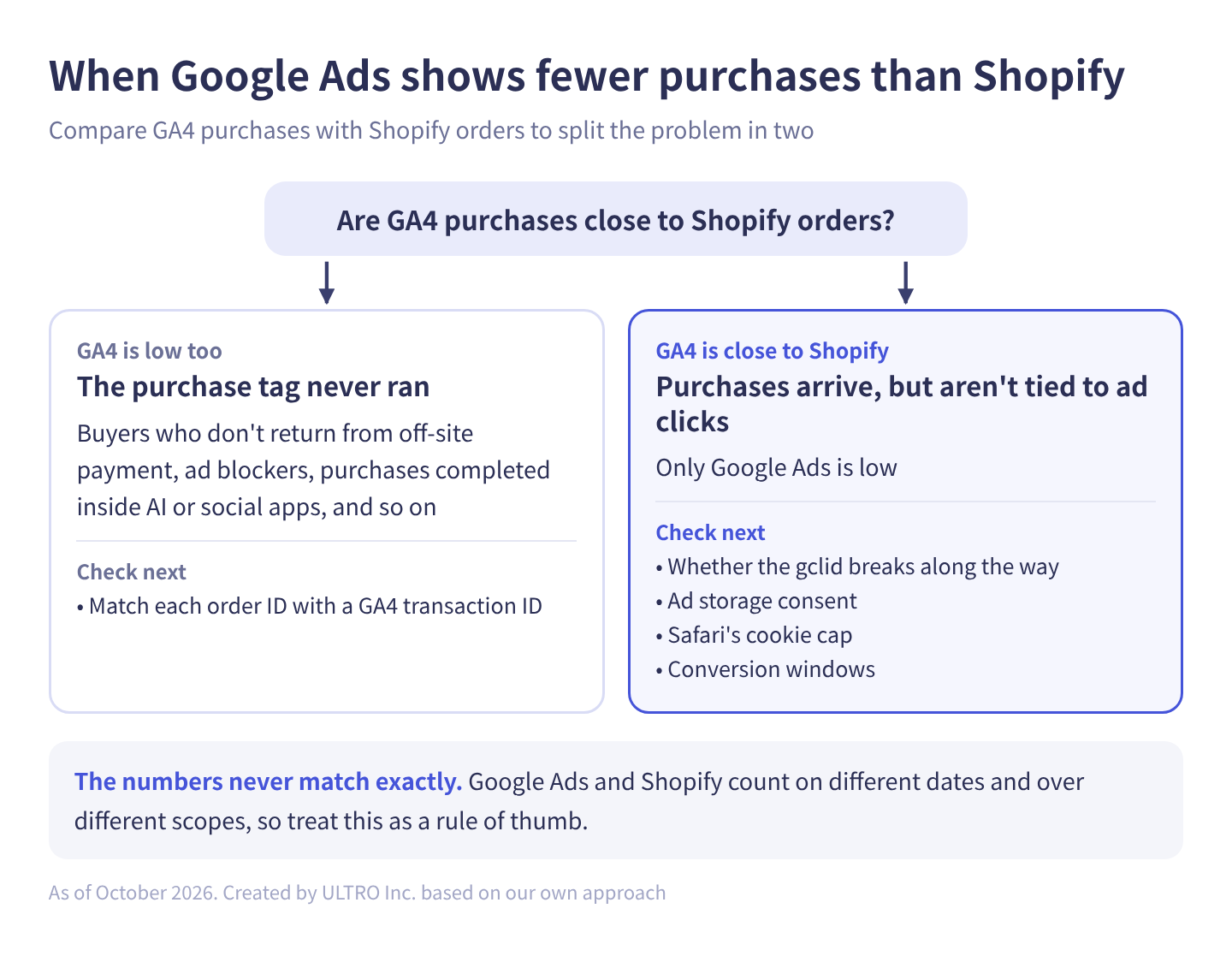
Our dividing line is whether GA4 purchases are close to Shopify orders:
| Situation | Likely cause | Check next |
|---|---|---|
| GA4 purchases are also lower than Shopify orders | The purchase tag never ran: buyers who don’t return from off-site payment, ad blockers, purchases completed inside AI or social apps, and so on | Match order IDs with GA4 transaction IDs one by one |
| GA4 purchases are close to Shopify orders, but Google Ads is low | Purchases arrive, but aren’t tied to ad clicks | Whether the gclid breaks along the way, ad storage consent, Safari’s cookie cap, conversion windows |
Google Ads and Shopify count on different dates and over different scopes, so their numbers never match exactly. Treat this split as a rule of thumb. The order of checks on the Google Ads side is in Google Ads conversion tracking.
If purchases aren’t reaching GA4 either, GA4 Not Tracking All Shopify Purchases? explains which purchases go missing and how to check. The mechanism for sending missing purchases to GA4 from a server is the Measurement Protocol.
One way to fill the GA4 side is our Shopify app, GapFill. It’s our own product, so read with that in mind. It recovers missing GA4 purchase events server-side and works alongside your existing tags. If your split lands in the first row (GA4 is low too), it matches Shopify orders against GA4 purchases by transaction ID and shows how many orders, and how much revenue, GA4 is missing. The missing purchases report is free. It adds purchases to GA4; it doesn’t send them to Google Ads directly.
Our Shopify appGapFill: Recover missing GA4 purchase events server-sideWorks alongside your existing tags. Free missing purchases report.See GapFill →Sources
- About auto-tagging (Google Ads Help)
- Auto-tagging (Google Ads Help)
- Enable auto-tagging (Google Ads Help)
- Updates to iOS 14 campaign measurement (Google Ads Help)
- About conversion measurement (Google Ads Help)
- About offline conversion imports (Google Ads Help)
- Offline conversion imports FAQs (Google Ads Help)
- Set up offline conversions using Google Click ID (GCLID) (Google Ads Help)
- Check if Google Ads auto-tagging works (Google Analytics Help)
- Traffic-source dimensions, manual tagging, and auto-tagging (Google Analytics Help)
- Link Google Ads to Analytics (Google Analytics Help)
- Conversion linker (Tag Manager Help)
- About auto-tagging (Merchant Center Help)
- Cookies used by Google’s advertising and measurement products (Google Business Data Responsibility)
- Set up consent mode on websites (Google tag, Google for Developers)
- Set up cross-domain measurement (Google tag, Google for Developers)
- Upload click conversions (Google Ads API, Google for Developers)
- Offline conversions (Data Manager API, Google for Developers)
- Private Browsing 2.0 (WebKit, July 16, 2024)
- Creating and managing URL redirects (Shopify Help Center)
FAQ
What is a GCLID?
It's an ID Google Ads appends to your landing page URL when someone clicks an ad and auto-tagging is on. Short for Google Click Identifier, it looks like www.example.com/?gclid=123xyz. The Google tag on your site stores it in a cookie and uses it for conversion tracking and GA4 campaign data.
Can I stop Google Ads from adding gclid?
Yes. In Google Ads, go to Admin > Account settings > Auto-tagging and uncheck "Tag the URL that people click through from my ad." But conversion tracking, GA4 data and offline conversion imports depend on it, so you'd normally leave it on. It's on by default in new accounts.
Should I use gclid or UTM parameters?
Use auto-tagging (gclid) as the base for Google Ads. When both are present, GA4 uses the auto-tagged values for source, medium and other traffic-source dimensions. In our checks in the Shopify admin, though, Shopify's UTM-based reports don't read gclid, so if you want Google Ads sales in Shopify's reports, add UTMs too.
What are gbraid and wbraid, and how do they differ from gclid?
Both are Google Ads click parameters added in response to Apple's App Tracking Transparency. Google's help center says iOS traffic from a handful of Google apps doesn't get a gclid, and web conversions from it are measured with wbraid instead. gbraid is added to landing page URLs for iOS 14.5+ clicks when auto-tagging is on; it isn't a replacement for gclid, and the two can appear together.
Does a GCLID expire?
Google's list of advertising cookies gives _gcl_aw and related cookies a 90-day lifespan, and Google retains GCLIDs for offline conversion imports for only 90 days. In Safari, though, cookies set with JavaScript last 7 days at most, or 24 hours under some conditions, such as landing from an ad click.
My URL has a gclid, but GA4 shows (not set) for the Google Ads campaign. Why?
Common causes are GA4 and Google Ads not being linked, traffic from an unlinked Google Ads account, or a server rewriting the URL so the gclid's case changes. Google's help center says that if the case changes, Analytics can't match the click to the session, and campaign, ad group and keyword show (not set).
- GCLID is the click ID Google Ads auto-tagging adds to your landing page URL. It's stored in a first-party cookie (such as _gcl_aw) and ties purchases back to ad clicks.
- It's used for three things: Google Ads conversion tracking, Google Ads campaign, ad group and keyword data in GA4, and offline conversion imports.
- iOS traffic from a handful of Google apps gets wbraid instead of gclid. gbraid is added to iOS 14.5+ clicks, sometimes alongside gclid. Both are by design.
- The gclid can break at four points: it isn't added to the URL, it's dropped before landing, it isn't stored in a cookie, or it doesn't carry over to another domain. Opening your URL with gclid=TeSter-123 appended lets you check.
- When Google Ads shows fewer purchases than Shopify, first decide whether it's a gclid problem or whether purchases aren't reaching GA4 and your tags at all.
Written byRyushi Nagata
CEO, ULTRO Inc. (Tokyo)Shopify Partner. Ryushi handles Shopify store builds, maintenance, advertising and CRM end to end, and has managed more than ¥4 billion in ad spend over his career. He holds Google Ads certifications (Search, Display, Video, Shopping, Apps, Performance Max, Measurement) and the Google Analytics certification.
How many purchases is GA4 missing in your store?
GapFill matches your Shopify orders against GA4 purchases, shows what GA4 missed, and recovers those purchase events server-side. It works alongside your existing tags, and the missing purchases report is free.