Google Ads Enhanced Conversions: How It Works, Shopify Setup

How Google Ads recovers purchases the gclid couldn't tie to a click: the three setup methods, turning it on in Shopify, what the 2026 settings merge changes, and what enhanced conversions can't fix.
Maybe you’ve seen the “Set up enhanced conversions” prompt in Google Ads and left it because you weren’t sure what it does. Or you switched it on in a Shopify app and couldn’t tell what changed. Enhanced conversions get treated that way a lot.
Below, we start with the gclid, the ID that ties an ad click to a purchase, and explain how enhanced conversions build on it. Then we cover the setup methods, turning them on in Shopify, the settings merge that started in 2026, and what enhanced conversions can’t recover. Help center content is as of October 2026.
What are enhanced conversions?
Enhanced conversions are a Google Ads feature that makes conversion tracking more accurate.
When someone buys, the conversion tag picks up the email address, phone number, name or address they entered, hashes it with SHA256 and sends it to Google. Hashing turns the text into a value that can’t be turned back into the original. Before hashing, the data is normalized: whitespace trimmed, text lowercased, phone numbers formatted to E.164. Google matches the hashed values against the Google accounts that were signed in when people saw or clicked your ads, and ties the purchase to the ad.
Google’s help center lists these benefits:
- Recovers conversions that otherwise wouldn’t be measured
- Improves bidding optimization with better data
- Protects privacy by hashing first-party data
There are two kinds: enhanced conversions for web and enhanced conversions for leads. Ecommerce purchases use the web version. Enhanced conversions for leads are for businesses that take inquiries on the site and close the sale offline.
How enhanced conversions relate to the gclid
Start with the big picture.
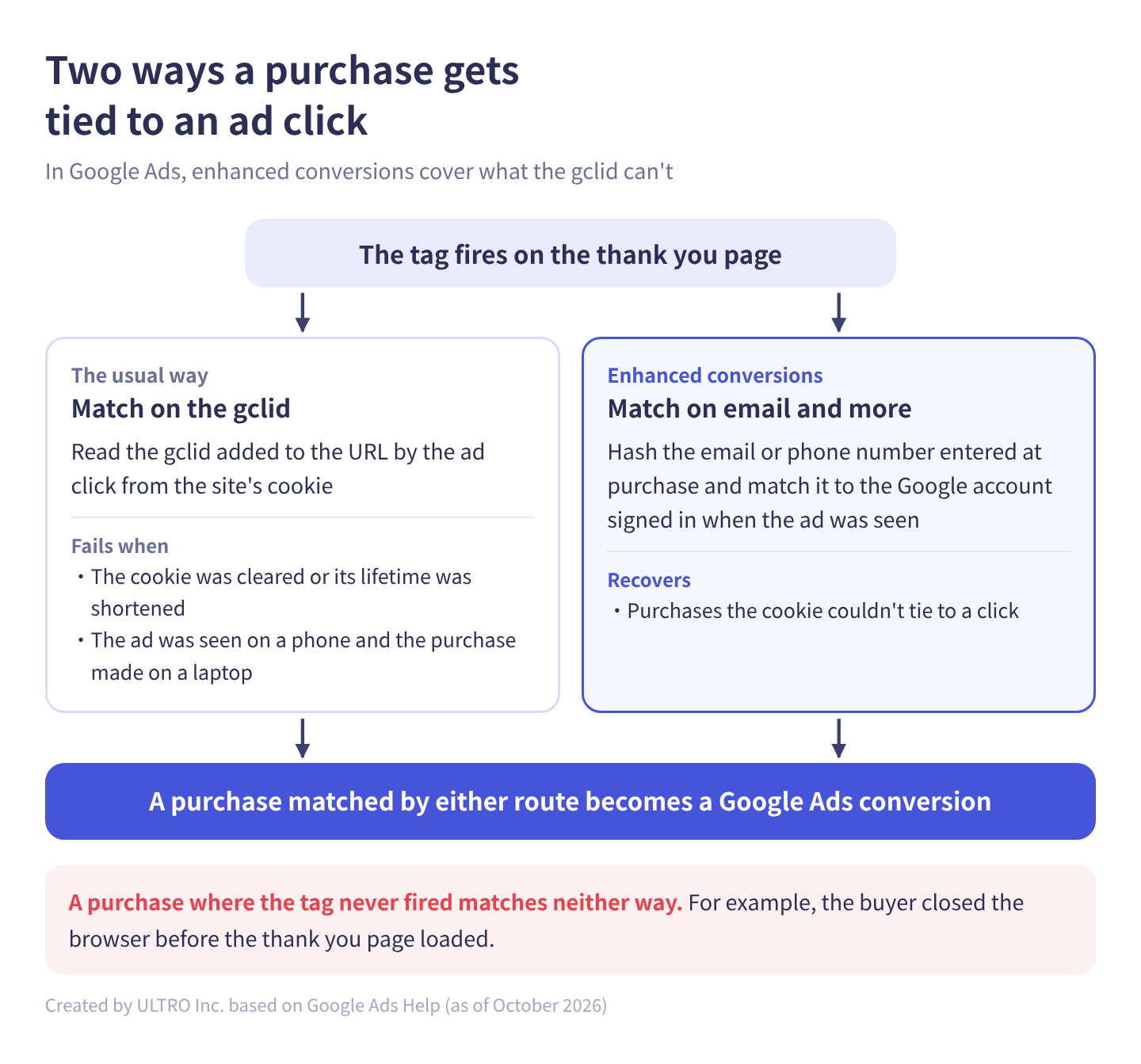
Normally, Google Ads ties an ad click to a purchase like this:
- When someone clicks an ad, an ID called the gclid is added to the landing page URL
- The Google tag on your site stores the gclid in a first-party cookie
- When the tag fires on the thank you page, the purchase is sent to Google along with the gclid from the cookie
This only works if the cookie is still there. If browser tracking prevention shortens the cookie’s lifetime, the shopper clears cookies, or they see the ad on a phone and buy on a laptop, the purchase and the click don’t connect. Those purchases aren’t counted as conversions in Google Ads, and Smart Bidding doesn’t learn from them. For more on the gclid itself, see What is a gclid?, and for why cookies keep getting shorter, third-party cookies.
Enhanced conversions fill that gap by matching on hashed customer data and Google account information instead of the cookie. You don’t choose between the gclid and enhanced conversions: both are used at the same time.
Three ways to set up enhanced conversions
Enhanced conversions for web can be set up in one of three ways:
| Method | Best for |
|---|---|
| Google tag | Conversion tracking placed directly on your site with the Google tag |
| Google Tag Manager (GTM) | Google Ads conversion tags managed in GTM |
| Google Ads API | Sending purchase data straight from your own systems, with more control |
With the Google tag and GTM, you choose how the tag collects the customer data:
- Automatically detect user-provided data: the tag scans the page for text that looks like an email address or phone number. The least work, and Google says it suits most advertisers
- Specify CSS selectors or JavaScript variables: you tell the tag where on the page the data is
- Add a code snippet: you pass the data in code (
gtag('set', 'user_data', {...})) when the conversion happens. Google says this is the most accurate, and its data takes priority
You can combine methods. Whichever you use, the data has to be available when the conversion tag fires, which is why the code snippet is the most reliable.
Turning it on in Google Ads
To use enhanced conversions, turn them on in Google Ads and agree to the customer data terms. Per Google’s help center:
- In Google Ads, click the Goals icon and open Settings
- Expand the Enhanced conversions section and check Turn on enhanced conversions
- Agree to the customer data terms
- Choose how you’ll send user-provided data from the dropdown (Google tag, Google Tag Manager or Google Ads API)
- Click Save
Google’s help center warns that data sent a different way from the method you selected may not be processed. For example, if you select Google tag but send data through the API, the API data won’t be used. (This is the pre-2026 behavior; see the 2026 changes below.)
With GTM, you then open the Google tag, select Manage, select Allow user-provided data capabilities, and choose how the data is collected.
Setting up enhanced conversions on Shopify
On Shopify, if you track Google Ads conversions with the Google & YouTube app, you can turn enhanced conversions on inside the app:
- Open the Settings tab of the Google & YouTube app
- Under Data sharing and tag management, expand Additional conversion measurement settings
- Open Enhanced conversions, turn it on, and agree to the customer data terms
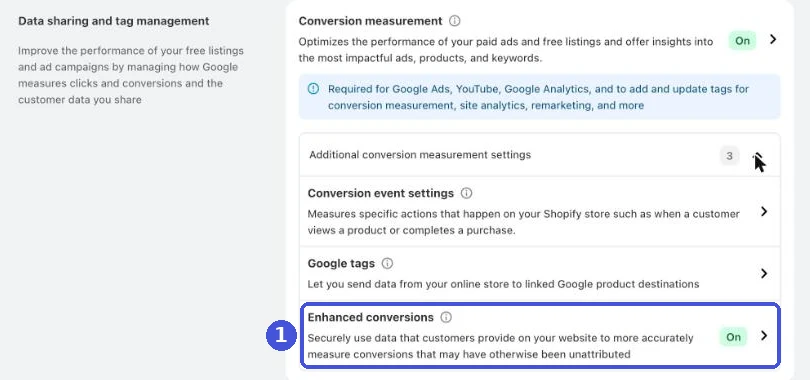
You can also turn it on when you first connect your Google Ads account to the app. Creating the conversion action itself, and primary versus secondary conversion actions, are covered in Google Ads conversion tracking.
First, check that you don’t have Google Ads tags installed another way. If GTM or a custom pixel also fires a Google Ads purchase tag, every purchase is counted twice alongside the app’s tag. Google’s help center also says to set the app’s conversion as primary, remove legacy tags, and check that your campaigns bid to the new conversion action.
The 2026 changes: one setting for enhanced conversions
Google has been consolidating enhanced conversions settings through 2026. Here’s the timeline.
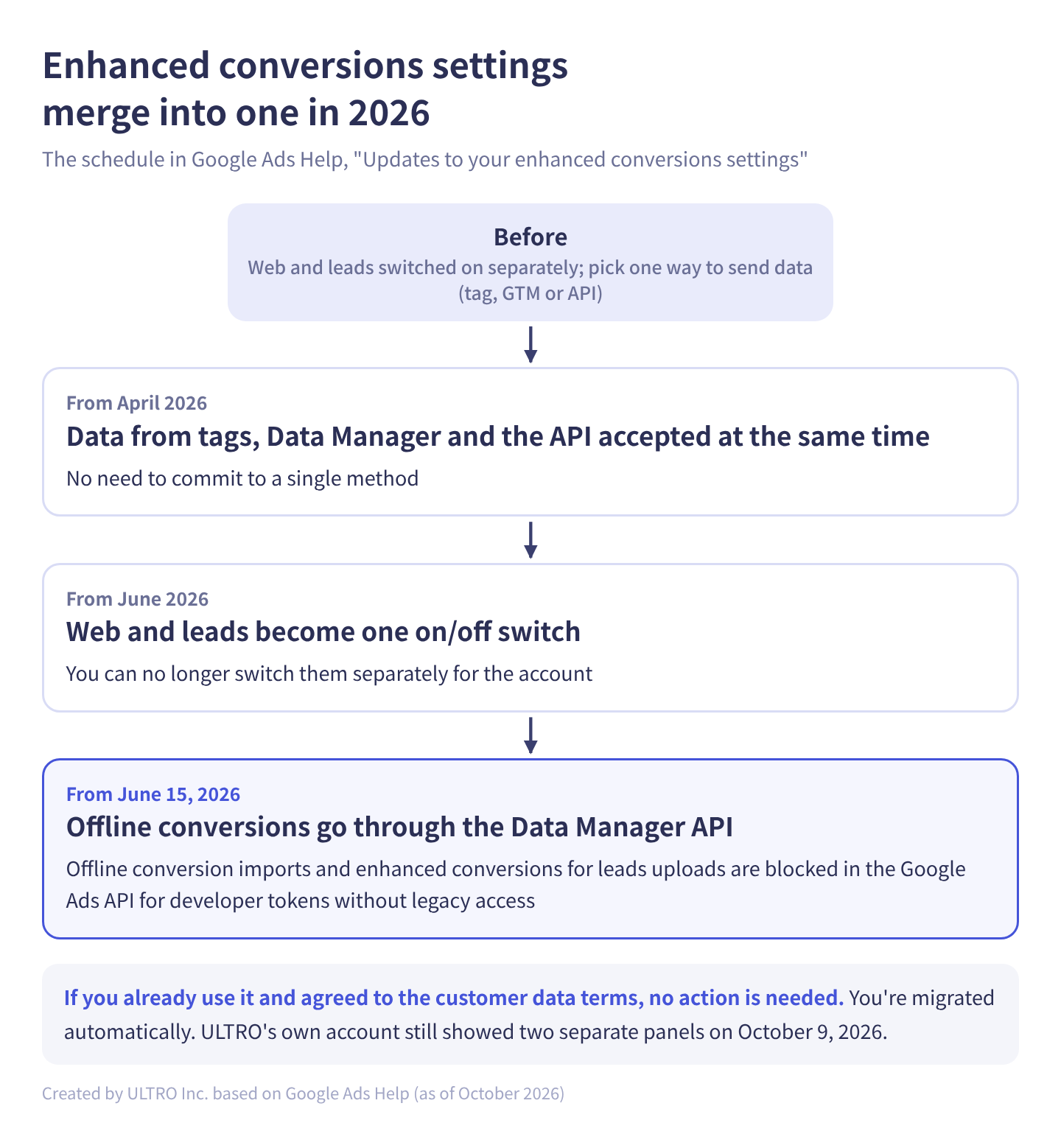
According to Google’s help center:
- From April 2026: Google Ads will simultaneously accept user-provided data from website tags, Data Manager and API connections. You no longer have to commit to one method
- From June 2026: enhanced conversions for web and for leads are combined into a single feature with one on/off switch. You can’t switch them separately for the account
- From June 15, 2026: offline conversion imports and enhanced conversions for leads uploads move to the Data Manager API and are blocked in the Google Ads API for developer tokens without legacy access
If you already use enhanced conversions and have agreed to the customer data terms, you don’t need to do anything: you’re migrated to the new setting automatically. You can still opt out at the conversion action level.
That said, ULTRO’s own Google Ads account still showed two separate panels, Enhanced conversions and Enhanced conversions for leads, on October 9, 2026. The switch seems to roll out to accounts at different times, so don’t worry if your screen doesn’t match the help center yet.
What enhanced conversions can’t recover
The rest of this section is our own take.
Enhanced conversions recover purchases where the conversion tag fired but couldn’t be tied to an ad click. They can’t recover purchases where the tag never fired at all.
For example:
- The buyer paid, then closed the browser before the thank you page loaded
- The buyer went to an off-site payment gateway and never came back to the store
- An ad blocker stopped the Google tag from loading
In these cases Google never received the purchase, so there’s nothing to match. As long as you rely on browser tags alone, enhanced conversions won’t count these.
To cover them, add server-side sending from your store’s order data: the API (and from 2026, Data Manager) for Google Ads, or the Conversions API for Meta. See the Meta Conversions API for how that works. For GA4, the Measurement Protocol (or, for new integrations, the Data Manager API Google recommends) lets you send purchases from the server. But unless you store the client ID captured in the browser with the order, the purchase can’t be credited to a traffic source or ad. We compare the approaches in GA4 not tracking all Shopify purchases.
We built a Shopify app, GapFill, that sends only the missing purchases from the server. It’s our own product, so read with that in mind. It recovers missing GA4 purchase events server-side, works alongside your existing tags, and its missing purchases report is free.
Our Shopify appGapFill: Recover missing GA4 purchase events server-sideWorks alongside your existing tags. Free missing purchases report.See GapFill →Consent. You have to agree to Google’s customer data terms and comply with its customer data policies. If you use automatic detection or CSS selectors and JavaScript variables, Google uses an ads cookie, and with consent mode implemented that cookie follows the ad_storage consent status, and the customer data is only used when ad_user_data is granted. For how consent fits together, see cookie consent for ecommerce.
How to check that it’s working
Right after setup: place a test purchase, open Chrome DevTools, and on the Network tab find the request to googleadservices.com/pagead/conversion/ (or google.com/pagead/1p-conversion/). In its payload, an em parameter starting with tv.1~em followed by a long string means hashed data is being sent. If it’s only tv.1~em, the data was empty, usually because it wasn’t available when the tag fired. Google’s Enhanced Conversions Assist tool, a Chrome extension, walks you through the same check.
After about 72 hours: open Summary under Goals, select the conversion action, and check Diagnostics to see that enhanced conversions data is arriving.
After about 30 days: the conversion actions table shows how many conversions enhanced conversions recovered.
The extra conversions are purchases you couldn’t see before, not a sudden improvement in your ads. When you compare CPA across periods, check whether the comparison crosses the date you turned it on.
Common misconceptions
“Enhanced conversions mean we don’t miss any conversions.” They recover purchases where the tag fired but the cookie didn’t connect. Purchases where the tag never fired need server-side sending.
“We’re sending email addresses to Google as is.” The data is hashed before it’s sent, so the original address can’t be recovered. You still need to agree to the terms and disclose it to customers.
“We turned it on in the Shopify app, so our other tags can stay.” If GTM or something else also fires a Google Ads purchase tag, you’re double counting. Make the app’s tag the main one and remove the old ones.
Sources
- About enhanced conversions (Google Ads Help)
- About enhanced conversions for web (Google Ads Help)
- Updates to your enhanced conversions settings (Google Ads Help)
- Set up enhanced conversions for web using the Google tag (Google Ads Help)
- Set up enhanced conversions for web using Google Tag Manager (Google Ads Help)
- Set up conversion tracking with the Google & YouTube app on Shopify (Google Ads Help)
FAQ
What are enhanced conversions in Google Ads?
A Google Ads feature that makes conversion tracking more accurate. It hashes the email address, phone number, name or address a buyer enters and sends it to Google, which matches it to the Google account that was signed in when the ad was seen or clicked. That recovers conversions cookies couldn't tie to an ad, improving both reporting and Smart Bidding.
How are enhanced conversions different from the gclid?
The gclid is an ID added to the URL when someone clicks an ad. Your site stores it in a cookie and sends it with the purchase later. If the cookie is cleared or the buyer purchases on another device or browser, the match fails. Enhanced conversions match from the Google account side using hashed customer data, so they recover what the gclid misses. You don't choose one: both are used at the same time.
How do I set up enhanced conversions on Shopify?
If you use Shopify's Google & YouTube app, open the app's Settings, expand Additional conversion measurement settings under Data sharing and tag management, open Enhanced conversions, turn it on and agree to the customer data terms. You can also turn it on when you first connect your Google Ads account. If you also have Google Ads tags in GTM or a custom pixel, check for duplicate tracking first.
How many more conversions will enhanced conversions add?
There's no fixed number. It depends on how many purchases cookies were failing to match. About 30 days after a successful setup, Google Ads shows the impact of enhanced conversions in the conversion actions table.
Is it safe to send customer data to Google?
The data is normalized and hashed with SHA256 before it's sent, so the original email address can't be recovered from it. You still have to agree to Google's customer data terms and comply with its customer data policies, and your privacy policy should say you use this data for ad conversion tracking.
Do I need to do anything about the 2026 enhanced conversions changes?
If you already use enhanced conversions and agreed to the customer data terms, no: you're migrated automatically. From April 2026, Google Ads accepts data from tags, Data Manager and the API at the same time, and from June 2026 web and leads become one on/off switch. If you upload offline conversions or leads data through the Google Ads API, Google recommends the Data Manager API; from June 15, 2026, only developer tokens active in the first half of 2026 keep legacy access.
- Enhanced conversions hash customer data entered at purchase, such as email, and match it to Google accounts to recover conversions.
- The gclid ties purchases to clicks through a cookie. Enhanced conversions cover purchases where the cookie was gone or the buyer switched devices.
- Set up with the Google tag, GTM or the Google Ads API. On Shopify, turn it on in the Google & YouTube app.
- From April 2026, Google Ads accepts tag, Data Manager and API data at the same time. Web and leads are merging into one setting.
- Purchases where the conversion tag never fired can't be recovered. Those need server-side sending.
- Impact shows in the conversion actions table about 30 days after setup.
Written byRyushi Nagata
CEO, ULTRO Inc. (Tokyo)Shopify Partner. Ryushi handles Shopify store builds, maintenance, advertising and CRM end to end, and has managed more than ¥4 billion in ad spend over his career. He holds Google Ads certifications (Search, Display, Video, Shopping, Apps, Performance Max, Measurement) and the Google Analytics certification.
How many purchases is GA4 missing in your store?
GapFill matches your Shopify orders against GA4 purchases, shows what GA4 missed, and recovers those purchase events server-side. It works alongside your existing tags, and the missing purchases report is free.