Meta Conversions API: How It Works With the Pixel and on Shopify

How the Conversions API differs from the Meta pixel, the conditions for deduplication when you run both, the setup options compared, how to turn it on in Shopify, and what to check so purchases aren't counted twice.
If you run Meta ads, someone will tell you to “set up the Conversions API.” But most guides lead with building a server integration or setting up a server-side GTM container, say you need a developer, and barely mention what to do on Shopify.
On Shopify, it’s a single setting. The hard part isn’t turning it on. It’s making sure it doesn’t overlap with tags and apps you already have and count the same purchase twice.
Below: how the Conversions API works, how it differs from the Meta pixel, the deduplication rules, your setup options, and how to set it up and check it on Shopify. Shopify screen names follow Shopify’s help center. Everything is as of October 2026.
What is the Meta Conversions API?
The Conversions API sends events such as purchases and add to carts directly from an advertiser’s server or ecommerce platform to Meta. It’s often shortened to CAPI.
The other way to send data to Meta is the Meta pixel: code on your site that sends events from the customer’s browser. The difference is where the data is sent from.
| Meta pixel | Conversions API | |
|---|---|---|
| Sent from | The customer’s browser | A server (including platforms like Shopify) |
| Affected by ad blockers | Yes | Much less |
| Affected by browser cookie limits | Yes | Much less |
| Affected by pages that fail to load | Yes | Much less |
| What it can send | What the browser knows | What the server knows, such as order and customer account details |
The pixel only reports when its code runs in the customer’s browser. If they close the page before the code runs, or an ad blocker stops the request, Meta never hears about the purchase. The Conversions API sends the fact that an order was placed from the server, so it arrives even when the browser code didn’t run (except where consent is required and the customer hasn’t given it).
Why you need it
Browser events go missing for several reasons:
- Ad blockers stop requests to Meta entirely.
- Safari’s limits: Safari deletes cookies set by JavaScript after at most 7 days, even first-party ones, and after 24 hours when the visitor arrived from a tracker-classified site via a link carrying an ad click ID. Someone who clicks an ad and buys a week later is hard to tie back to the ad.
- Purchases that never reach the thank you page: with some off-site payment methods, the checkout can finish without the thank you page loading. The pixel fires on that page, so those orders aren’t sent.
- Network failures, such as closing the page on a flaky connection.
Many articles say you need the Conversions API “because third-party cookies are going away.” That’s out of date: Google dropped its plan to remove them in Chrome. The reasons above haven’t gone away, though, so the case for the Conversions API still holds. For the history and what it actually means for ecommerce tracking, see What Are Third-Party Cookies?
It doesn’t get around consent or iOS restrictions
The Conversions API isn’t a way to bypass customer consent or iOS’s App Tracking Transparency. The same rules apply to data sent from a server.
Shopify’s help says server pixels remain subject to your store’s customer privacy and consent settings, and that events might be restricted if a customer hasn’t consented. Being technically able to send data doesn’t mean you can send it without consent for customers in regions that require it.
Run it alongside the pixel and deduplicate
Alongside, not instead
The Conversions API doesn’t replace the pixel. You send the same event from both, and Meta merges them into one.
With only the pixel, you lose what the browser drops. With only the Conversions API, you lose browser-side behavior such as product page views and the identifiers the browser holds. Sending both means that if one route fails, the other still gets through.
Deduplication rules
Here are the two routes and how deduplication works.
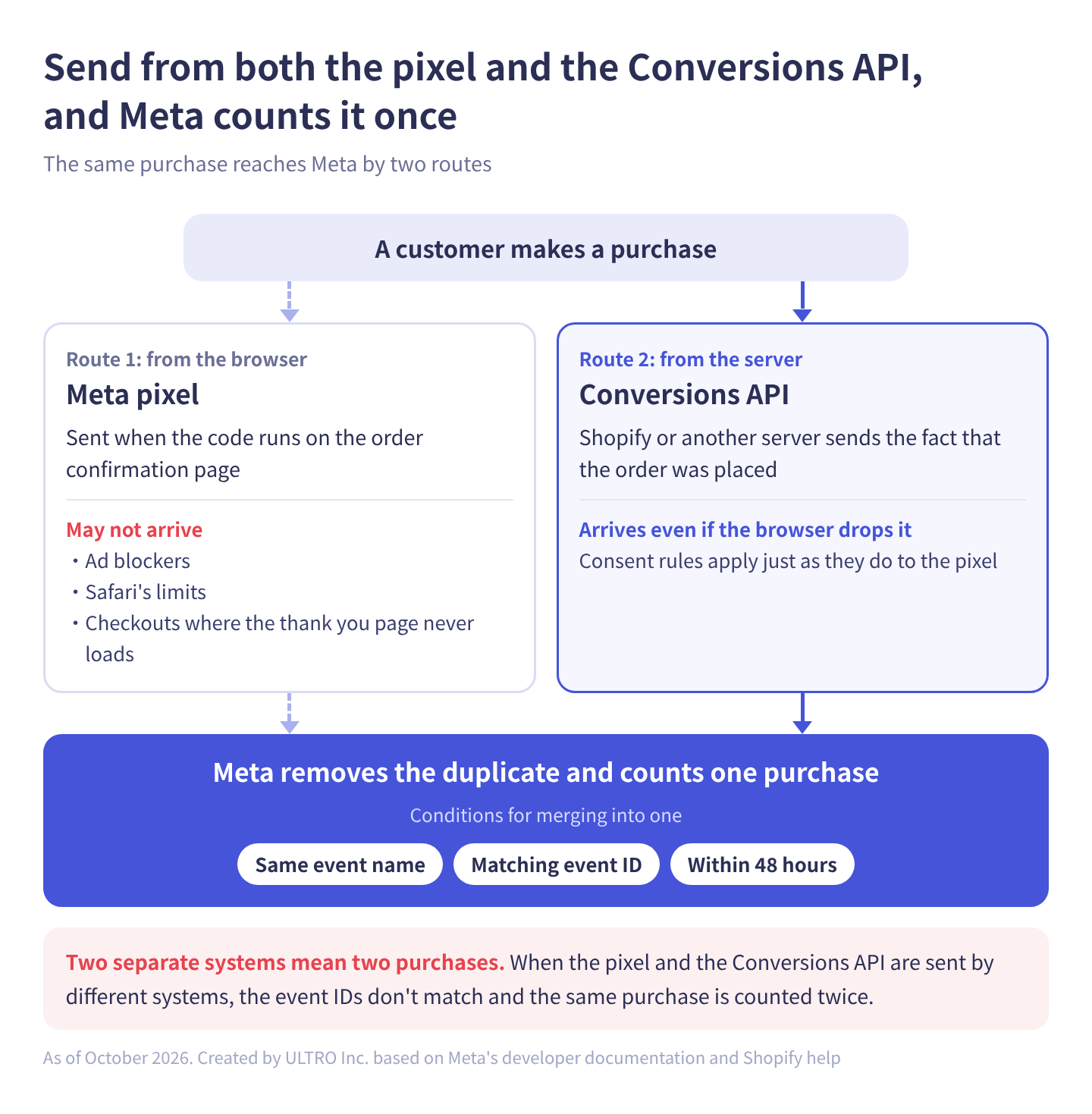
Sending from both means Meta receives the same purchase twice. It merges them into one when these conditions in its developer documentation are met:
- The event name matches (for example, both are Purchase).
- The event ID matches:
eventIDon the pixel andevent_idin the Conversions API. - It arrives within 48 hours of the first event Meta received with that event ID.
When the conditions are met, Meta generally keeps the event it received first and discards the later one.
You can also deduplicate on the browser ID (fbp) or external ID (external_id) instead of the event ID, but that only works when the browser event arrives first and the server event second. Matching event IDs is the reliable method.
This is where the double counting covered below comes from. When one system sends both the pixel and Conversions API events, the IDs match automatically. When separate systems send them, the IDs don’t match and the same purchase is counted twice.
Ways to set up the Conversions API
There are several ways to use the Conversions API.
| Method | What it is | What you need | Best for |
|---|---|---|---|
| Ecommerce platform integration | An official app, such as Shopify’s, sends both pixel and Conversions API events | A settings change | Stores on Shopify or another supported platform |
| Meta-enabled Conversions API | Turn it on in Events Manager and Meta mirrors your pixel’s events through a server-side connection | An installed Meta pixel | Sites without an official platform integration |
| Conversions API Gateway | Run a relay in your own cloud account | A cloud account and initial setup | Managing several sites in one place |
| Server-side GTM | Send from a Google Tag Manager server container | Running a server container | Teams already tracking with GTM |
| Direct integration | Call Meta’s API from your own server | A developer | Custom systems that need fine control over what’s sent |
The Meta-enabled Conversions API is new: industry press reported it went live in April 2026. You turn it on from Events Manager, and it’s reported to be free. Because it mirrors what the pixel sends, we couldn’t confirm from Meta’s descriptions whether it can cover cases where the pixel never ran, such as purchases that never reached the thank you page.
If you’re on Shopify, choose the first option. Shopify’s help says that raising the data sharing level sends the purchase event between Shopify and Meta’s servers, and that this server-to-server data can’t be blocked by ad blockers. Even so, turn it on and then compare your order count with Meta’s purchase count. We compare the three routes on Shopify in Shopify CAPI: 3 Ways to Set Up Meta’s Conversions API.
“You need a developer to set up the Conversions API” assumes a direct integration. It doesn’t apply when your platform has an official integration.
How to set up the Conversions API on Shopify
Choose a data sharing level
The setting is in the Facebook & Instagram sales channel. Go to Settings > Data sharing settings, turn on customer data sharing, and choose one of three levels.
| Level | What it uses | What’s shared |
|---|---|---|
| Standard | Meta pixel only | Browsing behavior collected in the browser |
| Enhanced | Meta pixel + Conversions API | The above, plus name, location, email address and phone number |
| Maximum | Meta pixel + Conversions API | Same as Enhanced, and updated with Facebook’s latest advertising technology |
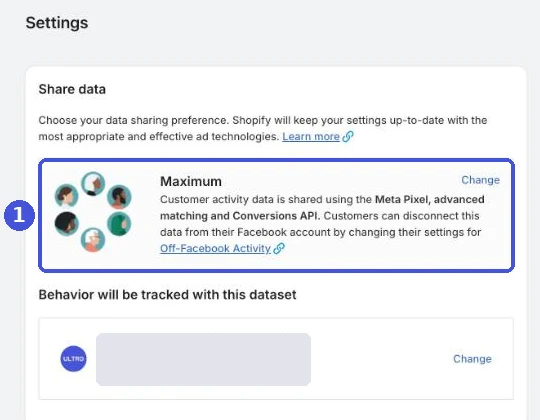
The Conversions API is used on Enhanced and Maximum. On Standard, you’re tracking with the pixel alone. If you run Meta ads and your store is on Standard, check this first.
Meta’s documentation requires customer information such as email addresses and phone numbers to be hashed (converted into a form that can’t be reversed) before it reaches Meta. Shopify’s help also asks you to keep your privacy policy up to date so customers know you share their data with Meta for advertising.
Data access settings
Each pixel also has a data access setting. Go to Settings > Customer events and click the pixel’s name. The options are Always on and Optimized; new app pixels default to Optimized.
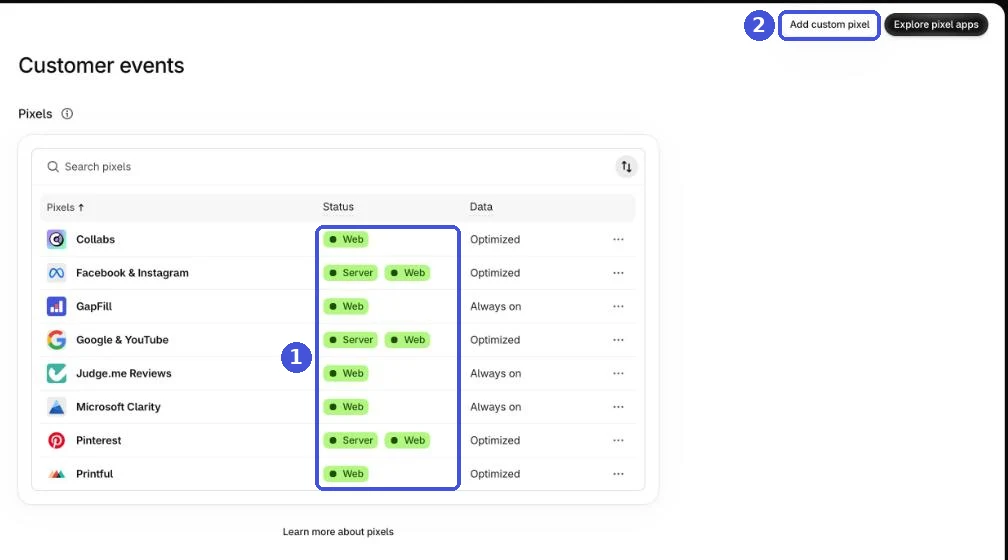
Shopify’s help says that with Optimized, Shopify can pause some or all data a marketing pixel shares until relevant activity, such as referred traffic, resumes. If you’re running Meta ads continuously and the event count in Events Manager suddenly drops, check this setting too.
How consent settings interact
If your store sells to markets that require consent, such as the EU and UK, and you’ve turned on Shopify’s cookie banner, visitors there see the banner and their data is only sent after they consent. That applies to server-side sending too. Where no banner is shown, data is sent by default. For how the banner and consent mode work on Shopify, see our cookie consent guide.
Beyond Meta: official Shopify apps and server-side sending
Sending purchase data from a server isn’t unique to Meta. The major ad platforms offer similar APIs, and on Shopify, some platforms’ free official apps set them up alongside the pixel.
Here’s what we could verify in each platform’s official documentation as of October 2026.
| Platform | Official Shopify app | Server-side sending | What turns it on |
|---|---|---|---|
| Meta (Facebook, Instagram) | Facebook & Instagram | Yes (Conversions API) | Set data sharing to Enhanced or Maximum |
| Google Ads | Google & YouTube | Yes, for purchases | Connect Google Ads in the app; server-to-server purchase sending is part of the integration, so check it’s active |
| TikTok | TikTok | Yes (Events API) | Set data sharing to Enhanced or Maximum |
| Yes (Conversions API) | Nothing extra. Installed with the tag when you link your account | ||
| Snapchat | Snapchat Ads | Yes (Conversions API) | Nothing extra. Installed when you add the pixel through the app |
| Microsoft Advertising | Microsoft Channel | Not mentioned in the app’s docs. The platform has a Conversions API | The UET tag (browser-side) is added automatically |
| X Ads | X | Not mentioned in the app’s docs. The platform has a Conversions API | The X pixel (browser-side) can be installed from the app |
All of these official apps are free to install. Three things stand out.
On some platforms, installing the app doesn’t turn on server-side sending. Meta and TikTok track with the pixel alone while the data sharing level is low. Don’t stop at installing the app; check the level. Pinterest and Snapchat say their apps set up server-side sending automatically.
Google has two separate mechanisms. Enhanced conversions hash customer information at purchase and send it from the tag (the browser). Separately, Google Ads help describes an integration where Shopify’s server sends purchase data directly to Google Ads, deduplicated against the tag’s conversions. It only covers purchases. Check in your Google Ads account that it’s actually active. For the browser side, see Enhanced Conversions and Google Ads conversion tracking.
Microsoft and X apps install browser-side tags. Both platforms have a Conversions API, but neither the apps’ descriptions nor the platforms’ help say the Shopify apps send from the server. The partners each platform lists for its Conversions API are server-side tag managers and data integration vendors, not Shopify (as of October 2026). Assume the official apps cover browser-side tracking only. To add server-side sending, use server-side GTM or a third-party app that supports it.
Which events are sent (only purchases, or add to carts too) and how sending ties into consent settings vary by app, and the official docs don’t always say. If you advertise on several platforms, check each platform’s dashboard for events arriving from the server.
GA4 also has a way to send purchases and other events from a server: the Measurement Protocol. It’s meant to add to the data your tags collect, not to replace them, and Google recommends the Data Manager API for new server-to-server integrations. See GA4 Measurement Protocol Guide for how it works, and GA4 Not Tracking All Shopify Purchases? for how to check whether GA4 is missing purchases.
We built a Shopify app, GapFill, that sends only the purchases GA4 missed from the server. It’s our own product, so read with that in mind. It recovers missing GA4 purchase events server-side, works alongside your existing tags, and the missing purchases report is free.
Our Shopify appGapFill: Recover missing GA4 purchase events server-sideWorks alongside your existing tags. Free missing purchases report.See GapFill →How to avoid double counting
The most common problem on Shopify is the same purchase being counted twice. The cause is almost always that something else sends to Meta in addition to the official app.
Common combinations:
| What’s overlapping | What happens |
|---|---|
| Official app + pixel code pasted into the theme | Page views and add to carts are doubled. Purchases may not be, if the old code doesn’t run at checkout |
| Official app + Meta pixel in a custom pixel | Everything is doubled, including purchases |
| Official app + a third-party tracking app | The app sends with its own event IDs, so nothing is deduplicated |
| Official app + server-side GTM container | Same as above |
Events sent by separate systems don’t share event IDs. Meta treats them as separate purchases, and the count comes out close to double. CPA looks halved, so it’s easy to conclude “ads are doing great” without noticing.
If you use a tracking app or a server-side GTM container, the vendor’s docs often tell you to turn off data sharing in Shopify’s official app. The rule is to pick one.
Plenty of stores had an agency paste pixel code into the theme years ago and later installed the official app. If you use the official app, remove leftover Meta code from the theme and from custom pixels.
What to check after you turn it on
After switching the setting, check how events arrive in Meta Events Manager.
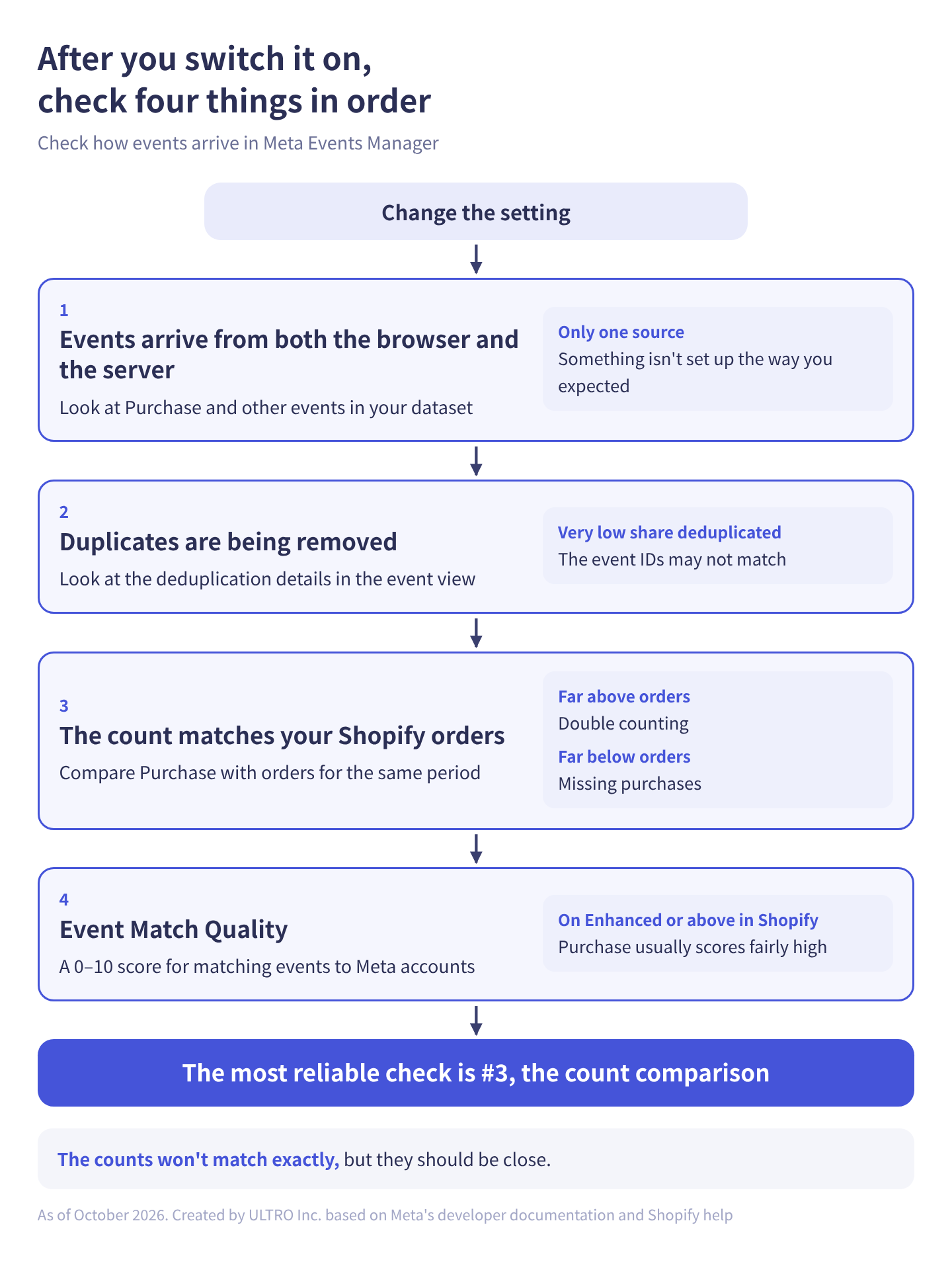
1. Events arrive from both the browser and the server Open your dataset (what used to be called a pixel) and check that Purchase and other events arrive from both the browser and the server. If they arrive from only one, something isn’t set up the way you expected.
2. Duplicates are being removed The event details show deduplication information. If very few of the events arriving from both the browser and the server are being deduplicated, the event IDs probably don’t match.
3. The count matches your Shopify orders This is the most reliable check. For the same period, compare the Purchase count in Events Manager with your Shopify order count. If Meta’s count is far above your orders, you’re double counting; if it’s far below, purchases are missing. They won’t match exactly, but they should be close.
4. Event Match Quality This 0 to 10 score shows how well the events you send can be matched to people on Meta. The more matching signals you send, such as email addresses, phone numbers and ad click IDs, the higher it goes. On Enhanced or above in Shopify, order details are sent, so Purchase usually scores fairly high.
Why CPA before and after can’t be compared directly
Turning on the Conversions API changes the numbers in Ads Manager, and that’s easy to misread.
What goes up is the number of purchases Meta can see. Purchases the browser used to drop now arrive, so conversions in Ads Manager go up and CPA looks lower. Your actual sales didn’t jump that day.
So comparing CPA in Ads Manager before and after and calling it an improvement is a mistake. Judge it on your store’s orders and revenue instead.
There is a longer-term effect, though. Meta’s delivery learns from the people who buy and shows ads to similar people. More purchase data means more for it to learn from. How much that improves delivery depends on your account’s size and how much was missing, so there’s no single answer.
For how ad platform numbers relate to your store’s numbers, see What Is ROAS? For the parameters that let GA4 tell your ad traffic apart, see UTM Parameters.
Watch out for outdated advice
The Conversions API and everything around it changes often, and advice from a few years ago may no longer apply.
- “You need to prioritize 8 events.” To deal with iOS restrictions, you used to pick and rank up to 8 events per domain. Meta’s current guidance says this configuration is no longer needed.
- “Domain verification is required.” Likewise, Meta says it’s no longer needed for event configuration. You may still need it for other purposes.
- “Chrome is removing third-party cookies.” That plan was dropped.
- Ad reporting attribution: on January 12, 2026, Meta removed the 7-day view and 28-day view attribution windows from the API used to pull ad results. If numbers don’t match a report built on the old settings, this may be why.
Settings screen labels change often, too. When you follow a step-by-step guide, check when it was last updated.
Sources
- Conversions API (Meta for Developers)
- Handling Duplicate Pixel and Conversions API Events (Meta for Developers)
- Customer Information Parameters (Meta for Developers)
- Ads Insights API Metric Availability Updates (Meta for Developers, October 2025)
- Facebook data sharing (Shopify Help Center)
- App pixels (Shopify Help Center)
- Custom pixels (Shopify Help Center)
- Tracking Prevention in WebKit (WebKit)
- Meta’s free one-click Conversions API is now live (PPC Land, April 2026)
- Shopify (Google Ads Help)
- About data sharing for the TikTok app on Shopify (TikTok Business Help Center)
- Link your Shopify store to your account (Pinterest Help)
- Snap Pixel (Snapchat for Business)
- Microsoft Advertising on Shopify: The Microsoft Channel app (Microsoft Advertising Help)
- Conversions API (CAPI) (Microsoft Advertising API)
- X (Shopify App Store)
- Conversion tracking for websites (X Business Help)
FAQ
What is the Meta Conversions API?
It's Meta's way of sending events such as purchases directly from an advertiser's server or ecommerce platform to Meta. It's often shortened to CAPI. Unlike the Meta pixel, which runs in the browser, it's much less affected by ad blockers and browser restrictions.
Do I need both the Meta pixel and the Conversions API?
Yes, running both is the standard setup. The pixel sends from the browser, the Conversions API sends the same event from the server, and Meta deduplicates them into one. With only one, you lose either the events the browser drops or the browsing behavior a server can't see.
Won't running both count purchases twice?
Not if Meta can tell they're the same event. The event name has to match and the event ID (eventID on the pixel, event_id on the server) has to match, and the second event has to arrive within 48 hours of the first. When one system sends both, as Shopify's official app does, this is handled for you. When separate systems send them, the IDs usually don't match and the purchase can be counted twice.
Where do I turn on the Conversions API in Shopify?
In the Facebook & Instagram sales channel, under Settings > Data sharing settings. Of the three data sharing levels, Standard uses only the Meta pixel; Enhanced and Maximum also use the Conversions API. No development is needed.
Will the Conversions API increase my sales?
It increases the number of purchases Meta can see, not your actual sales. More data does give Meta's delivery optimization more to learn from. When you compare CPA in Ads Manager before and after, remember that what's being counted has changed.
Google backed off removing third-party cookies. Do I still need the Conversions API?
Yes. Chrome's plan was dropped, but Safari's limits, ad blockers and purchases where the thank you page never loads still cause browser events to go missing. Running both is worth it regardless of what Chrome does.
- The Conversions API sends purchases and other events to Meta from a server. You run it alongside the Meta pixel.
- When you run both, events with the same event name and matching event ID that arrive within 48 hours are merged into one.
- On Shopify, the official app's data sharing setting turns it on. No development needed.
- Adding another app or tag that sends to Meta on top of the official app can cause double counting because the IDs don't match.
- What goes up is the number of purchases Meta can see, not sales. Don't compare CPA before and after at face value.
- It doesn't get around consent or iOS restrictions. Without consent, server-side sending is restricted too.
Written byRyushi Nagata
CEO, ULTRO Inc. (Tokyo)Shopify Partner. Ryushi handles Shopify store builds, maintenance, advertising and CRM end to end, and has managed more than ¥4 billion in ad spend over his career. He holds Google Ads certifications (Search, Display, Video, Shopping, Apps, Performance Max, Measurement) and the Google Analytics certification.
How many purchases is GA4 missing in your store?
GapFill matches your Shopify orders against GA4 purchases, shows what GA4 missed, and recovers those purchase events server-side. It works alongside your existing tags, and the missing purchases report is free.