First-Party Data: What It Is and How Online Stores Use It

How it differs from zero-, second- and third-party data, where it already lives in your store, four ways to use it in ads and measurement, and what to check on consent before you upload customer lists.
“Use your first-party data” comes up constantly, from ad platform reps and in software sales decks. But most explanations are written for large B2B companies with membership sites, and an ecommerce manager is left asking what that actually means for their store.
For an online store, first-party data isn’t something you need to start collecting. It piles up in your platform’s admin every time an order comes in. The real questions are where it lives, what you can use it for, and what to check before you use it.
Below, we sort out the terms, then cover where the data lives in an online store, how to use it in ads and tracking, and how to think about consent. Product details are as of October 2026. Anything touching law here is a general overview; check your own situation with a lawyer.
What is first-party data?
First-party data is data a business collects directly from its own customers. Data is usually named by who collected it:
| Type | Who collected it | Ecommerce examples |
|---|---|---|
| Zero-party data | You. Customers told you on purpose | Survey answers, skin type or style preferences, birthdays |
| First-party data | You. Collected through purchases and behavior | Order history, email addresses, on-site browsing |
| Second-party data | Another company, shared with you directly | A partner’s member data, buyer details a marketplace passes to you |
| Third-party data | A third party, collected across many sites | Interest and demographic segments sold for ad targeting |
Zero-party data is a term coined by Forrester Research. What sets it apart is that it’s what the person said, not something inferred from behavior. It’s a kind of first-party data.
In practice, you don’t need to separate all four precisely. If it’s in your own admin, as information about your own customers, it’s first-party data.
First-party vs third-party data
The difference that matters is control. With first-party data, you know where it came from, how accurate it is, and what you told customers when you collected it. Third-party data is assembled by someone else from activity across many sites, and you rarely know how it was collected or whether the people in it agreed to this use.
Why first-party data matters now
The usual answer is “because third-party cookies are going away.” That explanation is out of date.
Chrome kept third-party cookies
Google had planned to remove third-party cookies from Chrome, but it paused the plan in July 2024 and announced in April 2025 that it would keep the current approach. In October of that year, it announced it would retire most of the technologies it had been building as replacements. Articles written on the assumption that Chrome will drop third-party cookies no longer match reality. The full timeline is in third-party cookies.
Data is still going missing
- Safari’s limits: Safari has blocked third-party cookies completely for years. Cookies that tracking scripts set with JavaScript expire after at most 7 days, or 24 hours when the visitor arrives from a domain classified as a tracker with a URL that has a query string or fragment, such as an ad click ID.
- Consent banners: more sites ask for consent to use cookies, and the behavior of people who decline isn’t tracked. When a store actually needs a banner is covered in cookie consent.
- Ad blockers: browser features and extensions can stop tracking tags from running at all.
iPhone users browse with Safari by default, so these limits alone have a real effect. For products where people take days between seeing an ad and buying, more purchases go uncredited to the ad that drove them.
Automated advertising runs on your data
The other reason is that ad buying has moved to automated bidding. Google and Meta now let the platform’s AI decide who sees your ads, and what it learns from is the purchase data you send back.
When purchase data is missing, those decisions get worse. When the platform can’t tell new customers from existing ones, ad spend goes to people who already buy from you. Getting your own data to the platforms correctly now affects ad results directly.
Where first-party data lives in an online store
Here’s where it sits, using Shopify as the example.
| Data | Where in Shopify | When it’s collected |
|---|---|---|
| Name, email, phone number, address | Customer profiles | Orders, account signups |
| Order history (products, amounts, order count, dates) | Orders, customer profiles | Orders |
| Email and SMS marketing consent | Subscription status on customer profiles | Checkout, signup forms |
| Tags and notes | Customer profiles | Entered by staff or automations |
| Survey answers and preferences | Metafields, apps | Post-purchase surveys, quizzes |
| On-site behavior (views, add to cart) | Shopify analytics, GA4, ad pixels | Site visits |
You can pull these out with customer segments, combining filters such as number of orders, amount spent, last order date, email subscription status and RFM group. A segment can be exported as a CSV or used as the audience for a marketing email.
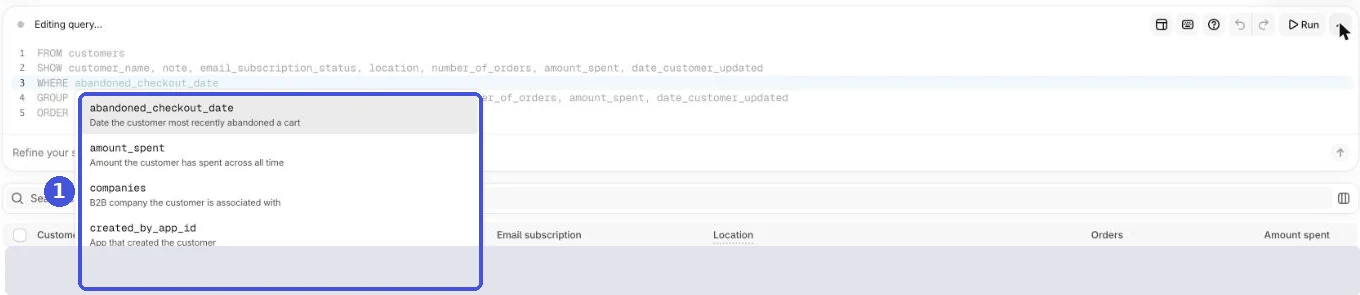
Data outside your store
There’s data outside your ecommerce platform, too.
| Where | What’s there | Can you use it elsewhere? |
|---|---|---|
| Email and SMS tools (such as Klaviyo) | Opens, clicks, signup source | Yes, it syncs with Shopify |
| Marketplaces such as Amazon | Buyer details | Limited by marketplace policy for your own marketing |
| In-store POS | Members’ purchase history | Depends on the system |
Marketplaces set the rules for how you can use buyer information. Your own site is where you have the most data you’re free to use, so the more of your sales go through marketplaces, the more valuable the data from your own store becomes.
Get consent when you collect it
What you can use data for depends on what you told customers when you collected it. If you later want to use it for advertising and that goes beyond what you originally said, you may need to ask for consent again. On Shopify, consent is collected in these places:
- The email and SMS marketing checkboxes at checkout
- When customers manage their email subscription from their customer account
- Newsletter signup forms (theme sections, Shopify Forms and so on)
You can choose in settings whether the checkboxes are preselected and whether to require double opt-in, which sends a confirmation email first.
How to use first-party data
There are four main uses for an online store.
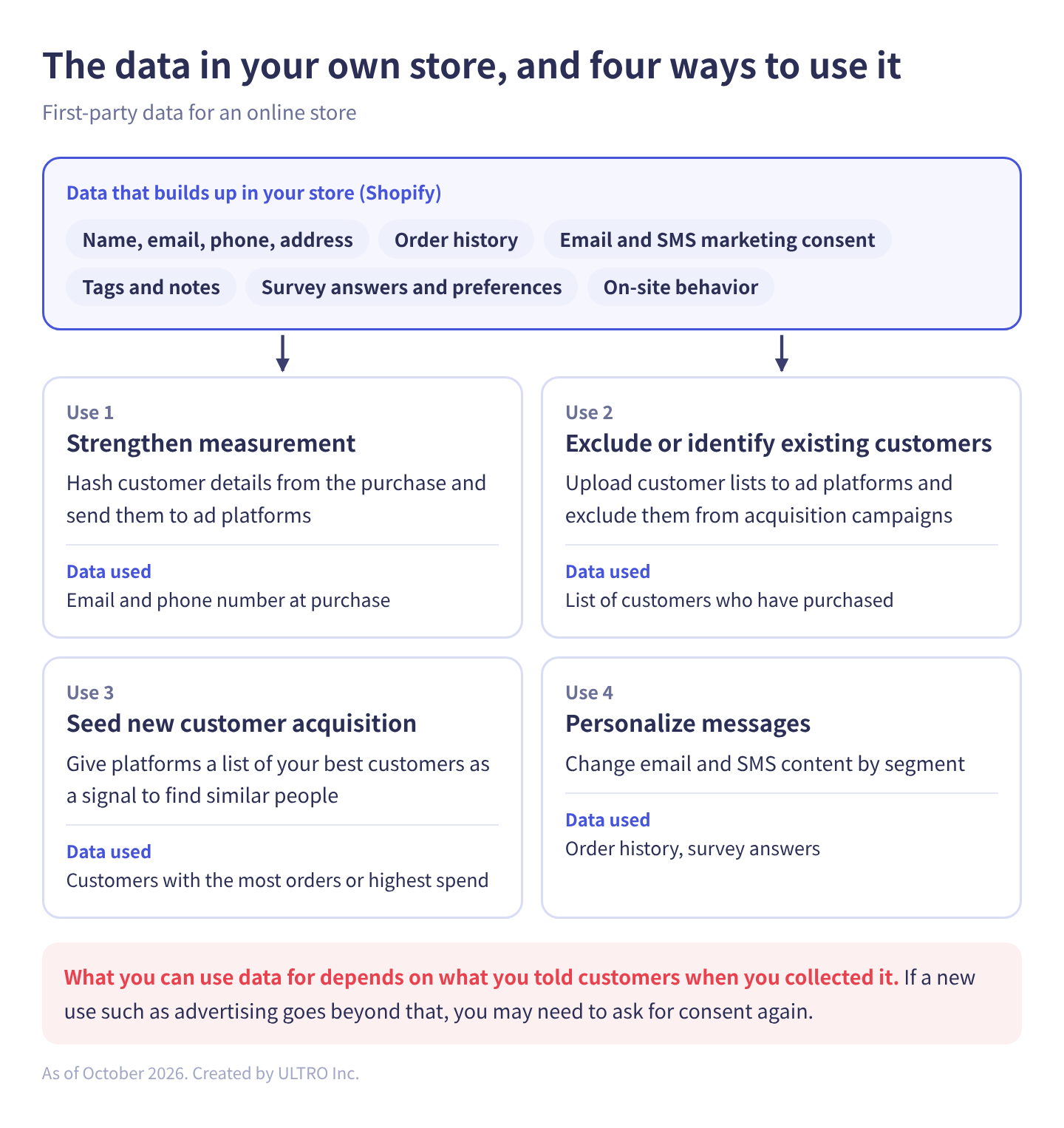
As a table:
| Use | What you do | Data used |
|---|---|---|
| Improve conversion tracking | Hash customer details from the purchase and send them to ad platforms | Email and phone number at purchase |
| Exclude or identify existing customers | Upload customer lists and exclude them from acquisition campaigns | List of customers who have purchased |
| Seed new customer acquisition | Give platforms your best customers as a signal to find similar people | Customers with the most orders or highest spend |
| Personalize messages | Change email and SMS content by segment | Order history, survey answers |
Improve conversion tracking
This recovers purchases that cookies couldn’t connect to an ad. You hash (convert into a string that can’t be turned back) customer details such as the email address from the purchase and send them to the ad platform, which matches them to the ad click.
| Platform | Feature | Setup on Shopify |
|---|---|---|
| Google Ads | Enhanced conversions | Turn it on in the Google & YouTube app settings |
| Meta ads | Conversions API | In the Facebook & Instagram app, go to Settings > Data sharing settings and choose Enhanced or Maximum, which add the Conversions API to the pixel |
Both are set up with Shopify’s standard apps, with no development. Of the four uses, start here. For the details, see enhanced conversions, Meta’s Conversions API and 3 ways to use Meta’s Conversions API on Shopify.
Both send data to ad platforms. Neither fills in purchases missing from GA4. How to send those from a server is covered in GA4 Not Tracking All Shopify Purchases?
We built that into a Shopify app, GapFill. It’s our own product, so read with that in mind. It recovers missing GA4 purchase events server-side, works alongside your existing tags, and the missing purchases report is free.
Our Shopify appGapFill: Recover missing GA4 purchase events server-sideWorks alongside your existing tags. Free missing purchases report.See GapFill →Exclude or identify existing customers
It’s common for acquisition campaigns to be shown to people who already buy from you. Give the platforms your customer list, and you can exclude existing customers or bid more for new ones.
In Google Ads, you upload customer lists with Customer Match. If you connect Shopify to Google Ads through Data Manager (which uses the Google & YouTube app), you can import Shopify customer segments as Customer Match lists, up to 25 at a time. Lists are also used to tell new customers from existing ones in the new customer acquisition goal.
Customer Match has eligibility requirements:
| Requirement | What you can do |
|---|---|
| Good history of policy compliance and good payment history | Upload lists, exclude them, and use the Observation setting (report on them without narrowing who sees ads) |
| The above, plus 90 days of Google Ads history and more than USD $50,000 total lifetime spend | Use the Targeting setting and manual bid adjustments |
So even a new account can use lists for exclusions. Customer Match memberships expire after 540 days, so lists need regular updates. Syncing through an integration works better than repeatedly uploading CSVs by hand.
In Meta ads, you create a Custom Audience from your customer list and exclude it from delivery.
Seed new customer acquisition
Give a platform a list of your best customers, and it looks for people with similar patterns. Meta’s Lookalike Audiences are the best-known example, and the source audience needs at least 100 people from a country.
With today’s automated delivery, though, the list you provide is treated as a hint (“find people like these”), not as an instruction (“show ads only to these people”). The platform uses the hint and expands delivery beyond it.
What separates good results from bad is list quality. A list narrowed to people who’ve bought two or more times, or whose total spend is in your top tier, sends a clearer signal than all purchasers.
Personalize messages
This one isn’t about ads. You send customers who’ve agreed to hear from you messages that fit where they are:
- A second-purchase offer some number of days after their first order
- A new product announcement to high-value customers who haven’t bought in a while
- Different product recommendations based on preferences they gave in a survey
Email and SMS go out from your own tools, so there’s no matching against an ad platform’s users.
Consent and privacy when you use it for ads
Uploading customer lists to ad platforms is where privacy rules matter most.
Does your privacy policy cover it?
Customers should be able to tell from your privacy policy that their information may be used for ad delivery and measurement, and shared with ad platforms for that purpose. In the EU and UK, the GDPR’s purpose limitation principle says data collected for one purpose shouldn’t be used for an incompatible one. Start by reading your own policy.
What the ad platforms require
Customer Match and Custom Audiences work by the platform matching your list against its own users. The platforms put conditions on that:
- Google’s Customer Match policy: your privacy policy should state that you share customer data with third parties that perform services for you, and you must obtain consent where the law or Google’s policies, such as the EU user consent policy, require it.
- EEA users: since March 2024, Customer Match lists used in the EEA need both
ad_user_dataandad_personalizationconsent set to granted.
US state privacy laws
Under California’s CCPA, “sharing” means sharing personal information for cross-context behavioral advertising, and covered businesses must let consumers opt out of selling and sharing. Whether uploading a customer list for ad matching counts as selling or sharing under the CCPA and other state laws is a question for your lawyer. Either way, if a customer has opted out, keep them off the lists you upload. On Shopify, opt-outs made through the data sharing opt-out page sync to Shopify Audiences; for other lists, you have to exclude those customers yourself.
In practice
Check three things:
- Does your privacy policy say you use customer data for ad delivery and measurement and share it with ad platforms?
- Do you collect consent for that from customers (at account signup or purchase) where it’s required?
- Do you meet the conditions in each ad platform’s policy?
If you’re unsure, build a segment of customers who’ve given consent and upload only that list. You can filter by email subscription status in Shopify segments. Keep in mind that agreeing to receive marketing email isn’t the same thing as agreeing to have your data used for advertising; what consent covers depends on how your policy is written.
The ad platforms also require disclosure and consent for conversion tracking (enhanced conversions and the Conversions API). If you’re unsure how they apply to you, ask a lawyer.
Do you need a CDP?
Articles about first-party data often end by recommending a customer data platform (CDP), a system that gathers all customer data in one place. That’s often because they’re written by companies that sell CDPs or data infrastructure.
If you sell mainly through your own site, with annual revenue in the low millions of dollars, you can usually cover all four uses above without one.
| What you want to do | How to do it without a CDP |
|---|---|
| Segment customers by conditions | Shopify customer segments |
| Improve conversion tracking | Google & YouTube app, Facebook & Instagram app |
| Sync customer lists to ad platforms | Google Ads Data Manager, Meta integration |
| Send email by segment | Shopify Messaging, Klaviyo |
| Tag customers who meet conditions | Shopify Flow |
You can wait to consider a CDP until you’re in a situation like these:
- Customer data is split across physical stores, an app or several online stores, and you need to treat the same customer as one person
- You want to analyze marketplace or phone orders together with your own store’s data
- You need to send data on custom conditions that standard integrations can’t pass to ad platforms
The common failure is making data integration the goal. Data that piled up without a purpose is thin and messy, so after it’s merged, nobody uses it, it scatters again, and someone proposes merging it again. Before buying a CDP, write down which of the four uses above is missing which data. That makes it much easier to judge whether you need one.
Where to start
We’d go in this order:
- Check your privacy policy and how you collect consent: can customers tell their data is used for advertising?
- Improve conversion tracking: enhanced conversions in Google Ads and the Conversions API for Meta ads
- Exclude existing customers: sync a list of past purchasers to the platforms and exclude it from acquisition campaigns
- Build a list of your best customers: narrow by order count or spend and give it to the platforms
- Add a way to ask about preferences: post-purchase surveys and the like, to learn what behavior can’t tell you
Steps 2 and 3 alone change where your ad budget goes. If you’re also setting up Google Ads purchase tracking from scratch, see Google Ads conversion tracking.
Sources
- About enhanced conversions (Google Ads Help)
- Set up conversion tracking with the Google & YouTube app on Shopify (Google Ads Help)
- About Customer Match (Google Ads Help)
- Customer Match policy (Google Advertising Policies Help)
- How to provide consent for Customer Match (Google Ads Help)
- Shopify (Google Ads Help)
- How customer lifecycle goals detect customer segments (Google Ads Help)
- Custom Audiences (Meta for Developers)
- Lookalike Audiences (Meta for Developers)
- Shopify segment filters (Shopify Help Center)
- Collecting customer contact information (Shopify Help Center)
- Facebook data sharing (Shopify Help Center)
- Privacy law compliance (Shopify Help Center)
- California Consumer Privacy Act (CCPA) (State of California Department of Justice)
- Next steps for Privacy Sandbox and tracking protections in Chrome (Privacy Sandbox)
- Update on plans for Privacy Sandbox technologies (Privacy Sandbox)
- Tracking Prevention in WebKit (WebKit)
FAQ
What is first-party data?
Data a business collects directly from its own customers. For an online store, that means order details, customer information such as names and email addresses, email and SMS signups, and on-site behavior such as which products someone viewed. The term distinguishes it from data bought from other companies or provided by ad platforms.
What's the difference between first-party and zero-party data?
Zero-party data is what customers tell you on purpose: survey answers, skin type or style preferences, birthdays. The term was coined by Forrester Research, and it's reasonable to treat it as a subset of first-party data. The difference is that it's what the person said, not something inferred from their behavior.
What's the difference between first-party and third-party data?
Who collected it. First-party data comes from your own customers through your own store. Third-party data is collected by someone else across many sites, such as interest and demographic segments sold for ad targeting. You know where first-party data came from and what you told people when you collected it; with third-party data, you usually don't.
Are third-party cookies still going away?
Not in Chrome. Google paused its deprecation plan in July 2024 and said in April 2025 that it would keep the current approach. Safari has blocked third-party cookies for years, though, and caps cookies set by tracking scripts at 7 days, so cookie-based tracking still loses data.
Do I need consent to upload customer emails to Google or Meta?
It depends on where your customers are and what your privacy policy says. Google's Customer Match policy requires your privacy policy to disclose that you share customer data with third parties that perform services for you, and consent where the law or Google's EU user consent policy requires it. For EEA users, Customer Match lists need both ad_user_data and ad_personalization consent set to granted. In US states with privacy laws, check with a lawyer whether ad matching counts as selling or sharing, and honor opt-outs.
Do I need a customer data platform (CDP) to use first-party data?
No. A store that sells mainly through its own site can cover most uses with Shopify customer segments and the built-in integrations with ad platforms. A CDP becomes worth considering when customer data is split across physical stores, apps or several sites and you need to treat the same customer as one person.
- First-party data is data you collect directly from your customers. An online store already has most of it in its platform's admin.
- Chrome dropped its third-party cookie phase-out, but Safari's limits still cut into cookie-based tracking.
- Four uses: improve conversion tracking, exclude or identify existing customers, seed new customer acquisition, and personalize email and SMS.
- Google Ads Customer Match: exclusions work for most accounts, but targeting needs 90 days of history and more than $50,000 lifetime spend.
- Before uploading customer lists, check your privacy policy, how you collect consent, and the ad platform's policy.
- A CDP isn't required. Consider one when your customer data is split across several places.
Written byRyushi Nagata
CEO, ULTRO Inc. (Tokyo)Shopify Partner. Ryushi handles Shopify store builds, maintenance, advertising and CRM end to end, and has managed more than ¥4 billion in ad spend over his career. He holds Google Ads certifications (Search, Display, Video, Shopping, Apps, Performance Max, Measurement) and the Google Analytics certification.
How many purchases is GA4 missing in your store?
GapFill matches your Shopify orders against GA4 purchases, shows what GA4 missed, and recovers those purchase events server-side. It works alongside your existing tags, and the missing purchases report is free.