Shopify Sends Purchases to GA4 Server-Side. We Checked What Happens to Attribution

The spec of the Google & YouTube app's server-side purchase tracking, what we found in a client store in Japan, how to check your own property, and your options.
In 2026, Shopify’s Google & YouTube app started sending purchases from Shopify’s server to GA4. Purchases the browser tag used to miss now reach GA4, which is a big deal for anyone measuring a Shopify store. But do those server-side purchases keep their attribution, meaning the ad or search that drove them? We checked in a client store.
This article is for Shopify merchants who use GA4 to evaluate ads and traffic sources. It covers how the feature works, what we found in a client store in Japan, how to check your own property, and what you can do. Details reflect Google’s help center as of October 2026. We ran the check in October 2026. The numbers are still small, so we don’t publish counts or amounts.
The short answer: purchases now reach GA4, but they arrive as Unassigned, with no source. For what Unassigned means and the other reasons it grows, see our Unassigned in GA4 article.
What the Google & YouTube app’s server-side purchase tracking is
Since July 2026, Shopify stores using GA4 through the Google & YouTube app have been getting a feature that sends purchases from Shopify’s server to GA4. The rollout was reportedly announced in an email Google sent to GA4 users in June 2026 (Google’s help center gives no start date). In the store we checked, it turned on in mid-October. Google hasn’t published a schedule, but it looks like a staged rollout by store or property. Here’s what Google’s help center says.
| Item | Google’s help center |
|---|---|
| Which stores | Stores that completed GA4 tagging in the Google & YouTube app. Turns on automatically |
| Event sent | Only Shopify’s “Checkout complete”. Arrives in GA4 as purchase |
| How | From Shopify’s server, without the browser |
| Browser tag | Purchases arriving from both the browser and Shopify’s server are deduplicated |
| How to turn off | Disconnect the GA4 property in the app’s settings. This turns off purchase measurement for both the tag and the server. Google says disconnecting isn’t recommended |
Ad blockers, and shoppers who never return from an off-site payment page, cause purchases the browser tag can’t record. Sending from the server gets those purchases into GA4. The upside: purchase counts and revenue get closer to what Shopify reports.
The help center says this also improves attribution (how credit is assigned to traffic sources). But it doesn’t say which visit a server-side purchase is tied to, or how its source is handled. So we checked in a client store.
What we found in our store
We checked one Shopify store where we run ads and measurement. It uses GA4 through the Google & YouTube app. Some purchases never reached GA4, so we had been backfilling them server-side with our own setup. We found four things.
1. Server-side purchases started on the annotation date
One day, GA4 report charts showed a “New Shopify integration” annotation, with a banner saying that more events were being imported because a new Shopify integration had been enabled for the account.
From that day, our backfill setup had no more orders to send. To give GA4 time to process data, it only sends orders that are still missing from GA4 26 hours after they’re placed. We take this to mean that purchases which used to be missing were now arriving from Shopify’s server. Our setup sends purchases with the original visit’s IDs, and it sent nothing after the annotation date, so the Unassigned purchases below didn’t come from us.
2. Those purchases all landed in Unassigned
After the annotation date, Unassigned’s share of revenue in the channel report rose noticeably. In the landing page report, all of the revenue on the (not set) landing page row belonged to Unassigned.
3. Just a purchase event, nothing else
Those Unassigned sessions had no page views (the landing page was (not set)), an average engagement time (time spent viewing pages) of 0 seconds, and no source. Nothing showed which page the shopper entered on, or which ad or search they came from. All that arrived was the fact that a purchase event happened.
4. Off-site payment orders, with ad UTMs still on the Shopify order
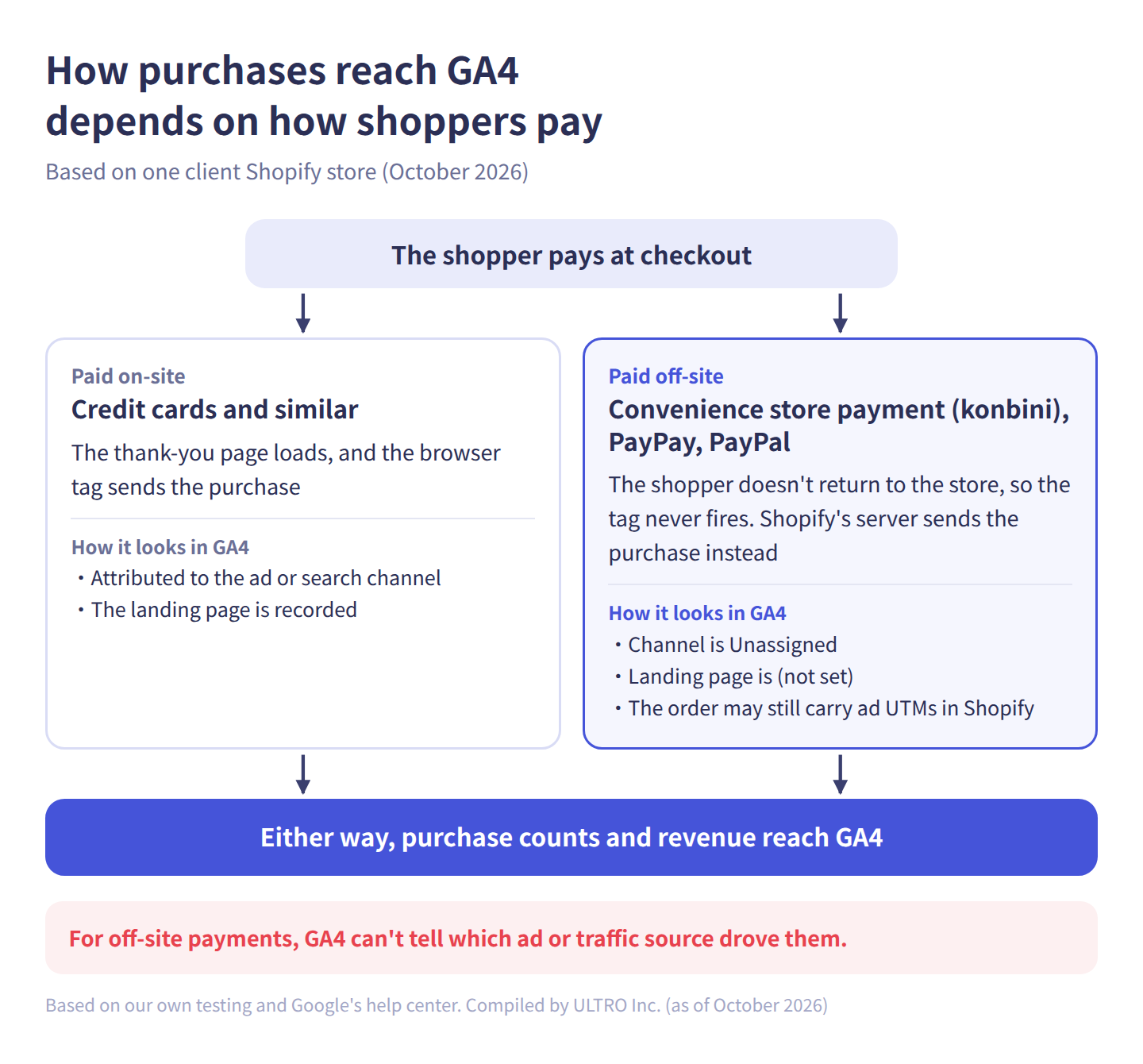
When we matched the Unassigned purchases to Shopify orders, all of them were paid through methods that send the shopper to an external payment page: convenience store payment, PayPay and PayPal. The shopper never came back to the store after paying, so the browser tag never fired. Orders paid inside the store, such as by credit card, still had their ad or search channel as before.
On the order side, some of the Unassigned orders had arrived with Meta ad UTMs or a click ID (fbclid), and one came from Google search. Purchases driven by ads aren’t being attributed to those ads in GA4.
In every case, the GA4 purchase timestamp also fell within the same hour as the order time. Our reading is that Shopify sends the order time as the event time.
That’s what we confirmed. Our reading is that server-side purchases are not being tied to the original visit recorded in the browser. Google’s help center doesn’t describe any marker that identifies server-side purchases, so this way of spotting them comes from our own experience. This is one store, about ten days after the annotation, so we’ll check again once there’s more data.
The total adds up, but the breakdown doesn’t
Getting purchases into GA4 that used to be missing is an improvement in itself. The catch is what it does to your channel reports. Server-side purchases bring GA4’s revenue total closer to Shopify. But what most teams want from GA4 is not the total. It’s which ads and traffic sources drove revenue. As purchases without a source increase:
- Only Unassigned revenue grows in your channel and source / medium tables
- Ad rows don’t get credit for that revenue, so ads keep looking weaker than they are
- From the integration date, only Unassigned revenue and conversion rate jump. Stores that were already backfilling purchases themselves may instead see ad rows lose revenue
- Purchase-only sessions add to Unassigned sessions and users
An accurate total doesn’t help much with budget or ad decisions if you can’t break it down. For channel decisions, read the numbers with Unassigned excluded. Before the integration, the problem was “purchases don’t reach GA4”. Now it’s “purchases reach GA4, but you can’t tell where they came from”.
How to check your own property
You can check whether this is happening in your store with GA4’s standard reports.
- Open Reports > Traffic acquisition and set the date range from July 1, 2026 to today. Click the icon under the chart to see annotation names, look for “New Shopify integration”, and note the date
- Compare equal-length periods before and after that date, and under Session primary channel group (Default channel group), divide Unassigned’s Total revenue by overall Total revenue for each period
- Open the Landing page report (under Engagement, or under the lead generation collection in some properties). Click Add comparison, choose Session primary channel group (Default channel group) as the dimension, Exactly matches, and Unassigned as the value, then apply
- Type “not set” in the table’s search box, and check whether revenue on the (not set) row sits under Unassigned and whether engagement time is close to 0 seconds
If the (not set) row has revenue and it belongs to Unassigned, purchases without page views are landing in Unassigned. If this grew from the annotation date, server-side purchases are the likely cause. Sessions without page views also happen when a purchase comes after a session times out from 30 minutes of inactivity, or when the shopper returns from an external payment page. If the same pattern existed before the annotation, follow the exploration steps in our (not set) article to tell the causes apart by event name.
What you can do
Your options depend on what you need to see in GA4. If in doubt, start with the first option. The second fits when you set ad budgets from GA4’s channel numbers and have someone who can rework your tagging.
| Option | When it fits | Watch out for |
|---|---|---|
| Accept it and check attribution on Shopify orders | You only need GA4’s total to match, and can analyze traffic elsewhere | Read GA4’s channel revenue with Unassigned excluded |
| Disconnect GA4 in the Google & YouTube app, re-tag another way, and backfill missing purchases with their source | You want to make ad decisions from GA4’s channel and source revenue | Disconnecting stops purchase measurement for both the app’s tag and the server. Re-tag first |
| Do nothing | You don’t use GA4 to check revenue. You only look at revenue in Shopify | Don’t compare GA4 numbers across the integration date |
Accept it and check attribution on Shopify orders
In the Shopify admin, open an order and you’ll find the Conversion summary on its details page, showing the first session’s source. Purchases that end up Unassigned in GA4 may still have a source on the order side. But Shopify’s help center says the summary is empty for orders where cookies were blocked and for draft orders, and can take up to 48 hours to appear. It also shows the first session’s source, which is a different basis from the source of GA4’s purchase session. It takes effort, but checking just high-value orders or ad-driven orders gives you a sense of what’s inside Unassigned. See “Per order: the Conversion summary” in our GA4 AI Assistant article.
Move your tag and backfill purchases with attribution
If you want to judge ads by channel revenue in GA4, purchases need to arrive tied to the original visit. While the Google & YouTube app connection is active, purchases without a source arrive from the server first. GA4 deduplicates purchases with the same transaction ID, so sending the same order again with its source won’t replace the one already there. If the transaction ID format or the user differs and GA4 doesn’t treat them as duplicates, you’ll count the order twice. See our duplicate purchases article for how to check.
So this option starts with disconnecting GA4 in the app. Do it in this order:
- Set up GA4 with Google Tag Manager or a custom pixel, and confirm that events through purchase are coming in
- In the Google & YouTube app settings, disconnect the GA4 property
- Backfill purchases the browser tag missed from the server, with the original visit’s client ID and session ID (the numbers GA4 uses to identify visitors and visits)
Step 3 is covered in our Measurement Protocol article. For setting up GA4 in a custom pixel, see our custom pixel article.
Our Shopify app GapFill handles step 3. Full disclosure: it’s our own product. GapFill sends only purchases missing from GA4, with the client ID and session ID captured by its pixel at checkout. Purchases it sends are generally stitched to the original session and keep their source / medium. In stores where the Google & YouTube app connection is active, server-side purchases already count as present in GA4, so GapFill doesn’t send them.
Our Shopify appGapFill: Recover missing GA4 purchase events server-sideWorks alongside your existing tags. Free missing purchases report.See GapFill →Summary
- Unassigned in GA4 is where sessions go when they match no channel rule. Sessions with no source land there
- Since July 2026, Shopify stores using GA4 through the Google & YouTube app have been getting server-side purchase tracking
- In a client store, from the “New Shopify integration” annotation date, purchases arrived in sessions with no page views and no source, and landed in Unassigned
- Revenue totals move closer to Shopify, but you can’t tell which ad or traffic source drove those purchases
- Either check sources on the order side, or move your tag and backfill with the source. Choose based on what you need GA4 to decide. Google doesn’t recommend disconnecting, so re-tag first if you do
Sources
- Google & YouTube App on Shopify in Google Analytics (Google Analytics Help)
- [GA4] Default channel group (Google Analytics Help)
- [GA4] What the value “(not set)” means in your reports (Google Analytics Help)
- [GA4] Traffic-source dimensions scope (Google Analytics Help)
- [GA4] Measure ecommerce (Google Analytics Help)
- Conversion summary (Shopify Help Center)
- Google silently routes Shopify purchases into GA4 - attribution gaps remain (PPC Land)
- Shopify GA4 tracking gains 4 events August 17, only purchase is server-side (PPC Land)
FAQ
Why did Unassigned traffic suddenly increase in GA4?
If your Shopify store uses the Google & YouTube app, the server-side purchase tracking that started in 2026 is a likely cause. Look for a "New Shopify integration" annotation on report charts. If Unassigned revenue grew from that date, this applies. Unassigned also grows when you start using links with a custom utm_medium, or start sending events from a server without a source.
What does Unassigned mean in GA4?
It's where sessions go when they don't match any rule in the default channel group. Sessions with no session source / medium (shown as (not set)) land there, and so do sessions with a custom utm_medium value that no rule recognizes. It's different from (not set), which means a value never arrived. Unassigned is the result of channel classification.
Which Shopify stores send purchases to GA4 server-side?
Google's help center says it turns on automatically for stores that have completed GA4 tagging in the Google & YouTube app. Only Shopify's "Checkout complete" event is sent, and it arrives in GA4 as purchase. Purchases arriving from both the browser and Shopify's server are deduplicated. The events the app added in August 2026, such as view_cart, are sent from the browser. Only purchases are sent from the server.
How do I know if this integration is active in my property?
GA4 adds a "New Shopify integration" annotation to report charts and shows a banner saying more events are being imported because a new Shopify integration was enabled for the account. The annotation date is a good marker for when server-side sending started.
Can I find the source of purchases that ended up in Unassigned?
Not inside GA4. Those purchases arrive with no page views and no source information. In Shopify, the Conversion summary on each order's details page shows the first session's source. But it can be empty for orders where cookies were blocked, and it shows the first session's source, which is a different basis from the source of GA4's purchase session.
Will disconnecting GA4 in the Google & YouTube app reduce Unassigned?
It stops the server-side purchase tracking. But according to Google's help center, disconnecting also turns off purchase measurement through the app's tag. Set up GA4 another way first, such as Google Tag Manager or a custom pixel, or purchases will stop reaching GA4. Google says it isn't recommended to disconnect.
Should I exclude Unassigned revenue when I analyze channels?
For channel comparisons, excluding it keeps it from skewing the comparison. But total revenue will then be lower than Shopify's. Include it for totals and exclude it for breakdowns. When comparing periods before and after the integration started, compare numbers with Unassigned excluded.
- Since July 2026, Shopify stores using GA4 through the Google & YouTube app have been getting server-side purchase tracking. Only purchases (Checkout complete) are sent
- In a client store, from the day of the "New Shopify integration" annotation, purchases arrived in sessions with no page views and no source, and were classified as Unassigned
- The Unassigned purchases were orders paid through external payment services, and some still carried ad UTMs on the order side. GA4's purchase time fell in the same hour as the order time
- To check: compare Unassigned revenue before and after the annotation date, and see whether revenue on the (not set) landing page row belongs to Unassigned
- Three options: accept it and check sources on the Shopify order side, move your GA4 tag elsewhere and backfill purchases with their source, or do nothing if you only look at revenue in Shopify. Choose based on what you need GA4 to decide
Written byRyushi Nagata
CEO, ULTRO Inc. (Tokyo)Shopify Partner. Ryushi handles Shopify store builds, maintenance, advertising and CRM end to end, and has managed more than ¥4 billion in ad spend over his career. He holds Google Ads certifications (Search, Display, Video, Shopping, Apps, Performance Max, Measurement) and the Google Analytics certification.
How many purchases is GA4 missing in your store?
GapFill matches your Shopify orders against GA4 purchases, shows what GA4 missed, and recovers those purchase events server-side. It works alongside your existing tags, and the missing purchases report is free.